Skip to content
  • Categories
  • Recent
  • Tags
  • Popular
  • Users
  • Groups
Skins
  • Light
  • Brite
  • Cerulean
  • Cosmo
  • Flatly
  • Journal
  • Litera
  • Lumen
  • Lux
  • Materia
  • Minty
  • Morph
  • Pulse
  • Sandstone
  • Simplex
  • Sketchy
  • Spacelab
  • United
  • Yeti
  • Zephyr
  • Dark
  • Cyborg
  • Darkly
  • Quartz
  • Slate
  • Solar
  • Superhero
  • Vapor

  • Default (Flatly)
  • No Skin
Collapse
Brand Logo

NetXMS Forum

  1. Home
  2. Support
  3. unresolved symbol compiling UBNT-UniFi-MIB.txt

unresolved symbol compiling UBNT-UniFi-MIB.txt

Scheduled Pinned Locked Moved Support
6 Posts 2 Posters 84.6k Views
  • Oldest to Newest
  • Newest to Oldest
  • Most Votes
Reply
  • Reply as topic
Log in to reply
This topic has been deleted. Only users with topic management privileges can see it.
  • Dani@M3TU
    Dani@M3TU
    Dani@M3T
    wrote on last edited by
    #1

    Hi

    I get the following error compiling UBNT-UniFi-MIB.txt:

    UBNT-UniFi-MIB: ERROR 001: Import symbol "ubntUniFiGroups" unresolved
    

    The MIB from where this should be imported (UBNT-MID.txt) is also in MIB directory. I attached both MIBs to this thread.

    In UBNT-MIB.txt I see this definition:

       ubntUniFi OBJECT IDENTIFIER ::= { ubntMIB 6 }
    

    Can someone help?

    thanks
    Dani

    edit: replaced UBNT-MIB.txt


    UBNT-UniFi-MIB.txt

    UBNT-MIB.txt

    1 Reply Last reply
    0
    • Dani@M3TU
      Dani@M3TU
      Dani@M3T
      wrote on last edited by
      #2

      I found a workaround. I defined the symbol in UBNT-UniFi-MIB.txt instead of importing. But I don't know what the problem in import is. Maybe someone found a proper solution. I attached the file with the workaround for others.

      Dani


      UBNT-UniFi-MIB.txt

      1 Reply Last reply
      0
      • N
        N
        normalcy
        wrote on last edited by
        #3

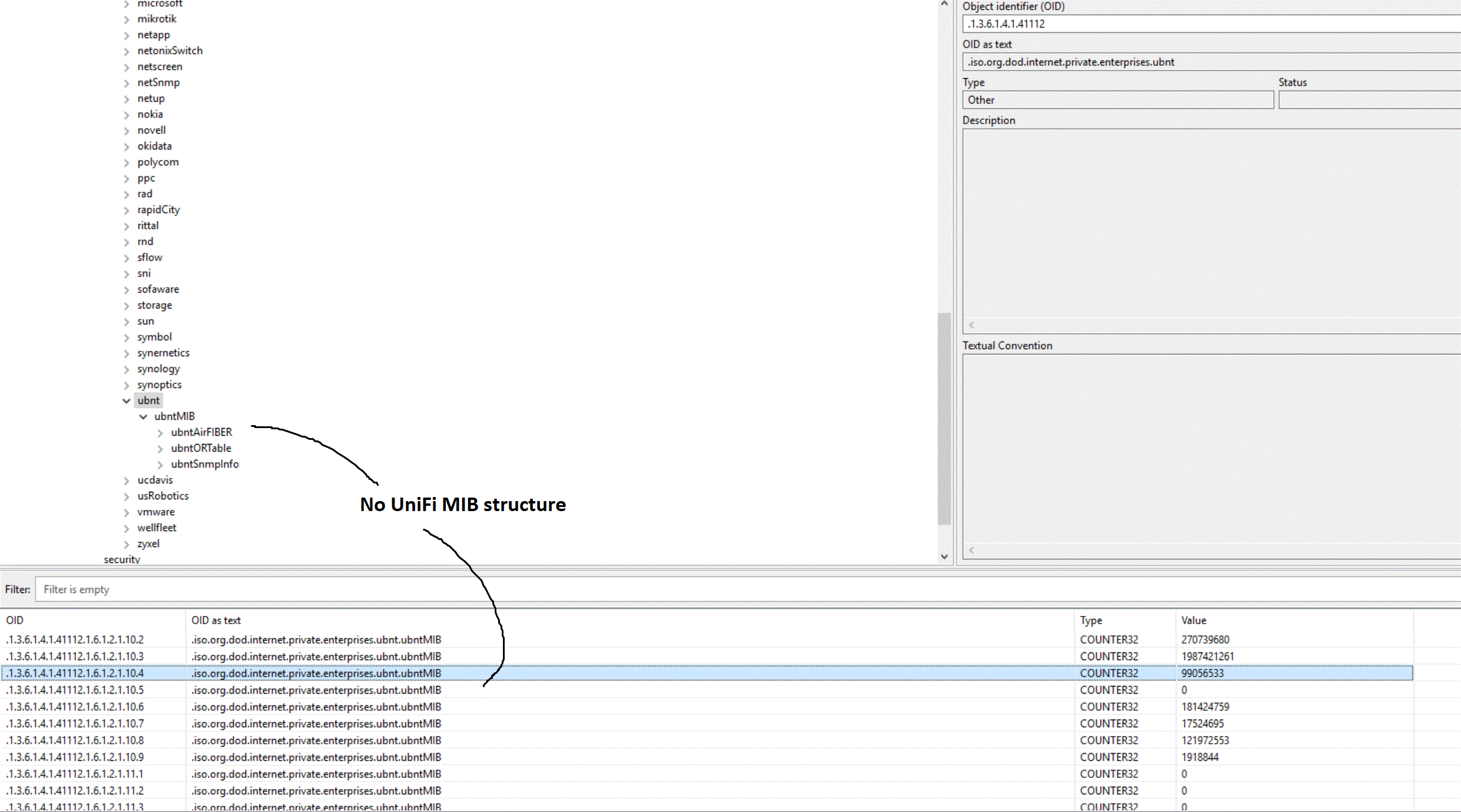
        Hi Dani, I've compiled the MIBs you provided here but it seems I don't get the UniFi MIB description info loading.

        Everything still shows up as the raw OID under ubntMIB instead of any of the structure from the UBNT-UniFi-MIB showing up.  Tried restarting console and server.

        Have you had anything like this with the unifi gear before?

        unifimibnxmc.gif

        1 Reply Last reply
        0
        • Dani@M3TU
          Dani@M3TU
          Dani@M3T
          wrote on last edited by
          #4

          Sorry I mixed up two different UBNT-MIB.txt. Please try this one and report back.


          UBNT-MIB.txt

          1 Reply Last reply
          0
          • N
            N
            normalcy
            wrote on last edited by
            #5

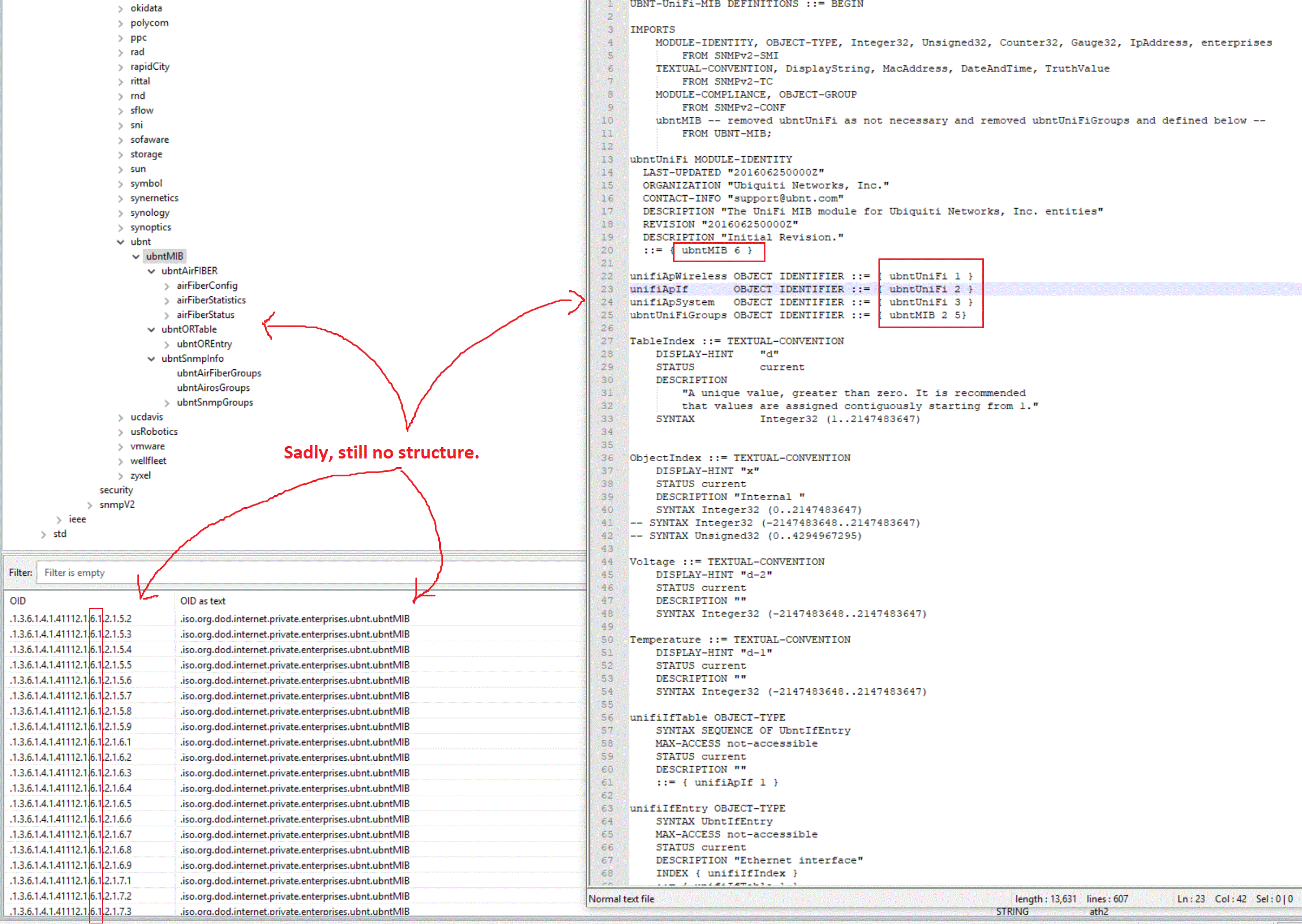
            Hi Dani, that shows up info for airmax/airfiber devices under the UBNT-MIB tree, but still not seeing any unifi structure from the Unifi MIB.

            Putting the MIB through an online checker it says all the description fields are missing, I wouldn't have thought that would stop the OID names from being added to the tree though?

            Do you see branches in your MIB tree for the unifi bits?

            ubntUniFi MODULE-IDENTITY
              LAST-UPDATED "201606250000Z"
              ORGANIZATION "Ubiquiti Networks, Inc."
              CONTACT-INFO "[email protected]"
              DESCRIPTION "The UniFi MIB module for Ubiquiti Networks, Inc. entities"
              REVISION "201606250000Z"
              DESCRIPTION "Initial Revision."
              ::= { ubntMIB 6 }
            
            unifiApWireless OBJECT IDENTIFIER ::= { ubntUniFi 1 }
            unifiApIf       OBJECT IDENTIFIER ::= { ubntUniFi 2 }
            unifiApSystem   OBJECT IDENTIFIER ::= { ubntUniFi 3 }
            ubntUniFiGroups OBJECT IDENTIFIER ::= { ubntMIB 2 5}
            

            Thanks for the help.

            unifimibnxmcretry.gif

            1 Reply Last reply
            0
            • N
              N
              normalcy
              wrote on last edited by
              #6

              Don't worry Dani, PEBKAC.

              I was not putting the compiled netxms.mib file in the right debian directory under /var/lib/netxms.  Left it in the /usr/share/netxms.

              It's all working fine with the latest MIB you had edited.

              Thanks again.

              1 Reply Last reply
              0

              Hello! It looks like you're interested in this conversation, but you don't have an account yet.

              Getting fed up of having to scroll through the same posts each visit? When you register for an account, you'll always come back to exactly where you were before, and choose to be notified of new replies (either via email, or push notification). You'll also be able to save bookmarks and upvote posts to show your appreciation to other community members.

              With your input, this post could be even better 💗

              Register Login
              Reply
              • Reply as topic
              Log in to reply
              • Oldest to Newest
              • Newest to Oldest
              • Most Votes


              • Login

              • Don't have an account? Register

              • Login or register to search.
              Powered by NodeBB Contributors
              • First post
                Last post
              0
              • Categories
              • Recent
              • Tags
              • Popular
              • Users
              • Groups