
Can't get management consoles to work
-
I'm new to NetXMS (coming from Opsview and Zabbix) so please excuse me if I've made a rookie mistake. A little background... I'm trying to run NetXMS 2.2.2 on Turnkey Core 14.2 (Debian Jessie). I have installed tomcat7, tomcat7-admin, default-jre (openjdk-7-jre), postgresql (postgresql-9.4), netxms-server, netxms-dbdrv-pgsql. I have set everything up according to NetXMS Administrator Guide, and as far as I can tell, the NetXMS server is up and running. However, I can't get the Windows or web management consoles to work.
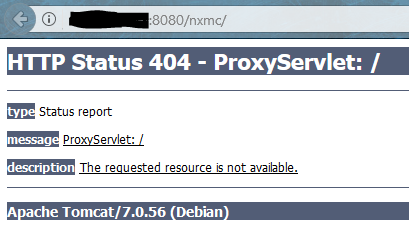
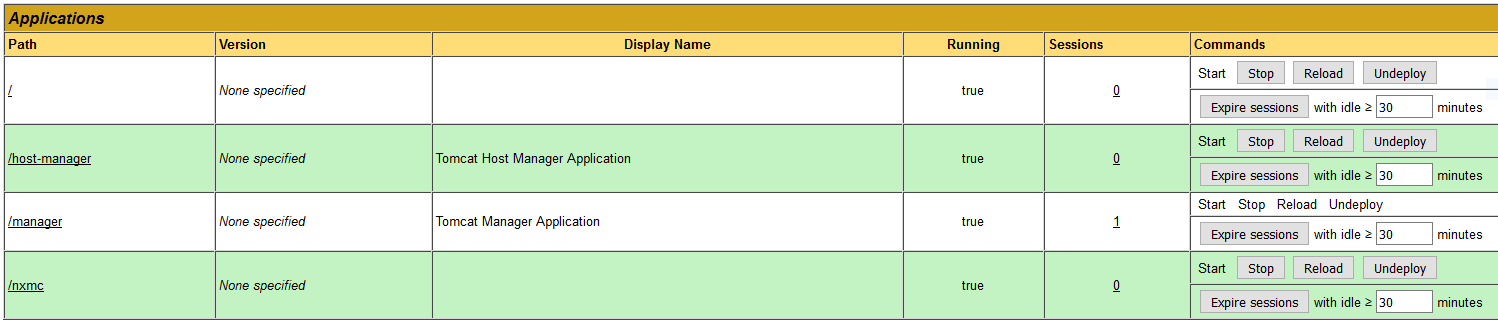
My preference is to use the web console, so I tried that first. I renamed nxmc-2.2.2.war to nxmc.war and put it in /var/lib/tomcat7/webapps. It seems to deploy, but I get a 404 error when I try to open ipaddress:8080/nxmc. Error attached below. I have also tried deploying it with the tomcat web manager and had the same result. The tomcat web manager says nxmc is deployed and running. I am using Firefox Quantum for this. I also tried it in Edge, but all it says is "Hmmm...can’t reach this page." Very helpful...
On this release, I can alternatively install openjdk-8-jre, postgresql-9.6, and tomcat8. I tried that briefly but still seemed to have the same problem. I did also try this briefly on Ubuntu Server LTS 16.04.3 but again had the same problem with the web console.
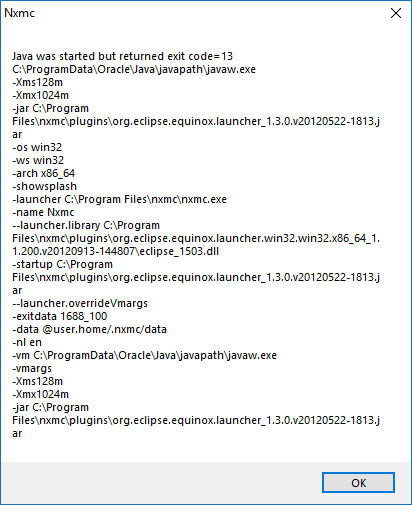
Now, I have also tried the Windows x64 management console on Windows 10. I extracted the nxmc folder to Program Files and ran nxmc.exe. It churns for a couple seconds and then gives me the below error. Not sure where to go with that either.
Any help is much appreciated...
-
Some related logs. Directory listing of tomcat7/webapps and dpkg --get-selections attached.
root@core:/var/log/tomcat7# grep nxmc localhost_access_log.2018-01-25.txt
10.31.248.11 - - [25/Jan/2018:14:52:06 +0000] "GET /nxmc/ HTTP/1.1" 404 997
10.31.248.11 - - [25/Jan/2018:14:53:29 +0000] "GET /nxmc/ HTTP/1.1" 404 997
root@core:/var/log/tomcat7# tail catalina.out Jan 25, 2018 2:42:55 PM org.apache.catalina.startup.HostConfig deployDirectory INFO: Deployment of web application directory /var/lib/tomcat7/webapps/ROOT has finished in 428 ms Jan 25, 2018 2:42:55 PM org.apache.coyote.AbstractProtocol start INFO: Starting ProtocolHandler ["http-bio-8080"] Jan 25, 2018 2:42:55 PM org.apache.catalina.startup.Catalina start INFO: Server startup in 1132 ms Jan 25, 2018 2:51:47 PM org.apache.catalina.startup.HostConfig deployWAR INFO: Deploying web application archive /var/lib/tomcat7/webapps/nxmc.war Jan 25, 2018 2:51:53 PM org.apache.catalina.startup.HostConfig deployWAR INFO: Deployment of web application archive /var/lib/tomcat7/webapps/nxmc.war has finished in 5,999 msroot@core:/var/log# cat netxmsd 2018.01.25 14:31:20.159 Log file opened (rotation policy 2, max size 16777216) 2018.01.25 14:31:20.163 *I* Platform subagent "/usr/lib/x86_64-linux-gnu/netxms/linux.nsm" successfully loaded 2018.01.25 14:31:20.163 *E* Unable to load database driver module "": /usr/lib/x86_64-linux-gnu/netxms/dbdrv/: cannot read file data: Is a directory 2018.01.25 14:33:44.404 Log file opened (rotation policy 2, max size 16777216) 2018.01.25 14:33:44.407 *I* Platform subagent "/usr/lib/x86_64-linux-gnu/netxms/linux.nsm" successfully loaded 2018.01.25 14:33:44.413 *I* Database driver "pgsql.ddr" loaded and initialized successfully 2018.01.25 14:33:44.618 *I* Server ID 2D34F56479DE1BDB 2018.01.25 14:33:44.687 *I* Server certificate not set 2018.01.25 14:33:45.240 *I* Network device driver "CATALYST-2900XL" loaded successfully 2018.01.25 14:33:45.241 *I* Network device driver "ERS8000" loaded successfully 2018.01.25 14:33:45.241 *I* Network device driver "JUNIPER" loaded successfully 2018.01.25 14:33:45.241 *I* Network device driver "QTECH-OLT" loaded successfully 2018.01.25 14:33:45.242 *I* Network device driver "BAYSTACK" loaded successfully 2018.01.25 14:33:45.242 *I* Network device driver "CISCO-SB" loaded successfully 2018.01.25 14:33:45.242 *I* Network device driver "NETONIX" loaded successfully 2018.01.25 14:33:45.243 *I* Network device driver "NET-SNMP" loaded successfully 2018.01.25 14:33:45.243 *I* Network device driver "AIRESPACE" loaded successfully 2018.01.25 14:33:45.244 *I* Network device driver "MIKROTIK" loaded successfully 2018.01.25 14:33:45.244 *I* Network device driver "DLINK" loaded successfully 2018.01.25 14:33:45.244 *I* Network device driver "PING3" loaded successfully 2018.01.25 14:33:45.245 *I* Network device driver "UBNT" loaded successfully 2018.01.25 14:33:45.245 *I* Network device driver "SYMBOL-WS" loaded successfully 2018.01.25 14:33:45.245 *I* Network device driver "AT" loaded successfully 2018.01.25 14:33:45.246 *I* Network device driver "PROCURVE" loaded successfully 2018.01.25 14:33:45.246 *I* Network device driver "H3C" loaded successfully 2018.01.25 14:33:45.246 *I* Network device driver "CISCO-ESW" loaded successfully 2018.01.25 14:33:45.247 *I* Network device driver "NETSCREEN" loaded successfully 2018.01.25 14:33:45.247 *I* Network device driver "CATALYST-GENERIC" loaded successfully 2018.01.25 14:33:45.247 *I* Network device driver "IGNITENET" loaded successfully 2018.01.25 14:33:45.248 *I* Network device driver "HPSW" loaded successfully 2018.01.25 14:33:45.248 *I* Network device driver "NTWS" loaded successfully 2018.01.25 14:33:45.249 *I* Network device driver "RITTAL" loaded successfully 2018.01.25 14:33:45.249 *I* Network device driver "TB" loaded successfully 2018.01.25 14:33:45.249 *I* Network device driver "DELL-PWC" loaded successfully 2018.01.25 14:33:45.250 *I* Network device driver "EXTREME" loaded successfully 2018.01.25 14:33:54.480 *I* Listening for SNMP traps on UDP socket 0.0.0.0:162 2018.01.25 14:33:54.480 *I* Listening for SNMP traps on UDP socket [::]:162 2018.01.25 14:33:54.495 *I* SocketListener/Clients: listening on 0.0.0.0:4701 2018.01.25 14:33:54.495 *I* SocketListener/MobileDevices: listening on 0.0.0.0:4747 2018.01.25 14:33:54.495 *I* SocketListener/MobileDevices: listening on [0.0.0.0]:4747 2018.01.25 14:33:54.495 *I* SocketListener/Clients: listening on [0.0.0.0]:4701 2018.01.25 14:33:54.496 *I* SocketListener/AgentTunnels: listening on 0.0.0.0:4703 2018.01.25 14:33:54.496 *I* SocketListener/AgentTunnels: listening on [0.0.0.0]:4703 2018.01.25 14:33:54.497 *I* NetXMS Server started
-
I fixed the issue with the Windows management console. I didn't realize it was going to be all Java. I downloaded the 64-bit version, but I only have 32-bit Java installed. I downloaded the 32-bit console and was able to log into NetXMS. Seems the server is up and ready to go.
I would really like to get the web management console working if we can figure that out.
Also, I mistakenly said I was using Firefox Quantum. I'm actually using Firefox ESR 52.6.0 32-bit which was why I had 32-bit Java.
-
Okay, I got it working, but it seems a bit strange. What I did was I switched to openjdk-8-jre (from jessie-backports) and tomcat8.
When I go to ipaddress:8080/nxmc, I get an odd error from Firefox about the page redirecting in a way that will never complete. I suspect it's redirecting to /nxmc. So just for kicks, I went to ipaddress:8080/nxmc/nxmc, and it actually works. I guess that'll do. I hope this info is useful to someone.
-
I renamed the war-file to 'ROOT.war'. So I can connect by 'netxms-servername.domain.com'
-
@karlmcs said in Can't get management consoles to work:
Okay, I got it working, but it seems a bit strange. What I did was I switched to openjdk-8-jre (from jessie-backports) and tomcat8.
Hello.
Yes, Java8 is a requirement for some time now. We'll mention it on the site.

Hello! It looks like you're interested in this conversation, but you don't have an account yet.
Getting fed up of having to scroll through the same posts each visit? When you register for an account, you'll always come back to exactly where you were before, and choose to be notified of new replies (either via email, or push notification). You'll also be able to save bookmarks and upvote posts to show your appreciation to other community members.
With your input, this post could be even better 💗
Register Login