
Lost Node
-
Greetings...
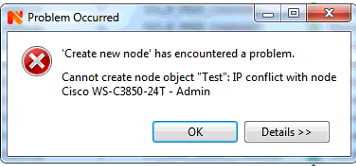
I recently replaced a Cisco switch and used the same IP address when configuring the new switch. The new switch is working as expected, but NetXMS will not recognize the new device. Before adding the new switch I deleted the old node and then I tried to create a new node with the same IP, but I get an IP conflict error (see attached screenshot).
The log file indicates an object as a "lost_node" which I'm sure is the new switch.
2018.02.02 06:19:36.024 *D* [obj.sync ] Object lost_node_6931 [6931] modified
2018.02.02 06:19:36.024 *D* [obj.sync ] Object lost_node_6931 [6931] modified
2018.02.02 06:19:36.509 *D* Subnet[193.193.0.0/20]::findMacAddress: reading ARP cache for node lost_node_6931 [6931]
2018.02.02 06:19:36.509 *D* Subnet[193.193.0.0/20]::findMacAddress: reading ARP cache for node lost_node_6931 [6931]
2018.02.02 06:20:01.421 *D* Node 6931 "lost_node_6931" queued for status poll
2018.02.02 06:20:01.421 *D* Node 6931 "lost_node_6931" queued for status poll
2018.02.02 06:20:01.422 *D* Starting status poll for node lost_node_6931 (ID: 6931)
2018.02.02 06:20:01.422 *D* Starting status poll for node lost_node_6931 (ID: 6931)
2018.02.02 06:20:01.422 *D* StatusPoll(lost_node_6931): check SNMP
2018.02.02 06:20:01.430 *D* StatusPoll(lost_node_6931): SNMP check finishedAny thoughts on how to resolve this would be greatly appreciated!
Thanks in advance!
-
Hi,
likely old node was not deleted completely. Try to login with user "system", find that node, and delete it.
Best regards,
Victor -
Hello! It looks like you're interested in this conversation, but you don't have an account yet.
Getting fed up of having to scroll through the same posts each visit? When you register for an account, you'll always come back to exactly where you were before, and choose to be notified of new replies (either via email, or push notification). You'll also be able to save bookmarks and upvote posts to show your appreciation to other community members.
With your input, this post could be even better 💗
Register Login