
Process - Instance discovery
-
-
Thanks
i am not able to handle these new list.
I added these to netxmsd.config:# Log File
LogFile=/var/log/nxagentd# IP white list, can contain multiple records separated by comma.
# CIDR notation supported for subnets.
MasterServers=10.10.__.__/32#ExternalList
ExternalList=Phonalisa.Processes:ps axco command | grep phonalisa- | sort -uThen I restartet the Agent.
I think that these will work fine, because a test of show agent suportet lists in info will result like this:Agent.ActionList
Agent.SubAgentList
...
Phonalisa.Processes
...
System.IO.Devices
System.ProcessListHow can I use this?
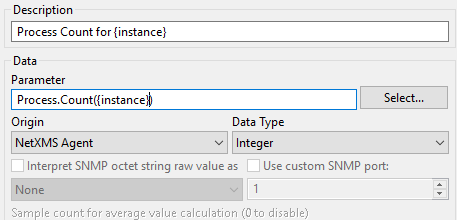
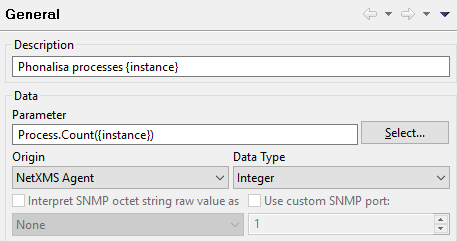
In "General" I set Process.Count({instance}) at Parameter
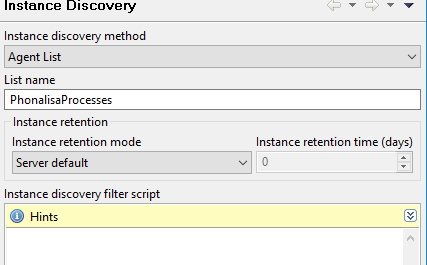
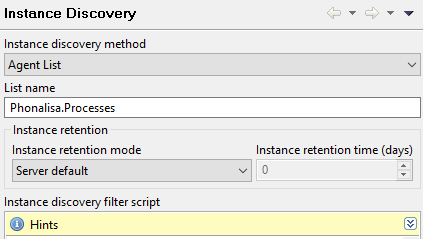
In Instance Discovery I select Agent List at discovery method
and Phonalisa.Processes in List nameWhat Have I to do in discovery filter script?
When I do nothin only 75 will be returned -I thin the total number of precesses
Thank you very much
Rainer -
There should be no need to use the instance discovery filter.
I'm assuming Instance Discovery did run against the Agent?Setup under General should look something like the attached screenshot.
Please confirm if the list contains the data you expect.
Right-click on your agent, select "Execute server script" and run the following:processes = AgentReadList($node,"Phonelisa.Processes"); if ( processes == null ) return "The list is empty!"; foreach ( process : processes ) { println(process); }This should list all the processes it knows about. If it does, then that's not your problem.
But if the above returns "The list is empty!", check that running the command that generates the list produces the expected output.
It worked on my system when I tested it against other processes (I don't have any phonalisa ones), so there is a possibility the command doesn't work as expected on your system.
As the user running the Agent, run the command that generates the list:ps axco command | grep phonalisa- | sort -uSee if that actually produces the list of process names you expect.
-
-
-
The description should include the process names as per your list and you should end up with one DCI per list entry.
Instead it appears the list returns "1" to your Instance Discovery DCI, hence your DCI returns 0, as there is no process called "1".
Not sure what exactly is happening, I'll have to set the whole thing up at my end (not just the script) for comparison/testing.
I'm assuming you're running the latest version of NetXMS? -
Hi,
you have wrong discovery method - it should be "Script", not "Agent List" if you are using script from script library for discovery.
Best regards,
Victor -
-
Yes, my mistake - method is correct. Still seems to be a typo in list name: it is "Phonelisa.Processes" in script and "Phonalisa.Processes" in DCI configuration.
Best regards,
Victor -
Yep, the script had a typo. Oops. Was only for testing though, so should not affect the actual DCI.
I just set something similar up on a Ubuntu system here and I think the ExternalList needs an update:
ExternalList=Phonalisa.Processes:/bin/bash -c "ps axco command | grep phonalisa- | sort -u"Using that (i.e. with /bin/bash), it worked for me when I grepped for "imap" processes (returned imap and imap-login). Created two DCIs, one for each and returned the correct values.
Let me know if that works for you.



Hello! It looks like you're interested in this conversation, but you don't have an account yet.
Getting fed up of having to scroll through the same posts each visit? When you register for an account, you'll always come back to exactly where you were before, and choose to be notified of new replies (either via email, or push notification). You'll also be able to save bookmarks and upvote posts to show your appreciation to other community members.
With your input, this post could be even better 💗
Register Login