Skip to content
  • Categories
  • Recent
  • Tags
  • Popular
  • Users
  • Groups
Skins
  • Light
  • Brite
  • Cerulean
  • Cosmo
  • Flatly
  • Journal
  • Litera
  • Lumen
  • Lux
  • Materia
  • Minty
  • Morph
  • Pulse
  • Sandstone
  • Simplex
  • Sketchy
  • Spacelab
  • United
  • Yeti
  • Zephyr
  • Dark
  • Cyborg
  • Darkly
  • Quartz
  • Slate
  • Solar
  • Superhero
  • Vapor

  • Default (Flatly)
  • No Skin
Collapse
Brand Logo

NetXMS Forum

  1. Home
  2. Support
  3. NetXMS 2.2.7- Network Maps

NetXMS 2.2.7- Network Maps
Scheduled Pinned Locked Moved Support
21 Posts 3 Posters 51.6k Views
  • Oldest to Newest
  • Newest to Oldest
  • Most Votes
Reply
  • Reply as topic
Log in to reply
This topic has been deleted. Only users with topic management privileges can see it.
  • V
    V
    Victor Kirhenshtein
    wrote on last edited by
    #10

    Hi,

    MIB browser will show whatever MIBs are installed in your system. If you need more AT MIBs, just install them onto the server as described and you should see them in MIB browser.

    Topology displayed depends on information received from switches. If they report correct information through any standard topology MIB (LLDP, CDP, etc.) then correct topology will be displayed.

    Best regards,
    Victor

    1 Reply Last reply
    0
    • R
      R
      rameshpavaluri
      wrote on last edited by
      #11

      Hi Victor,

      I'm trying to add the below attached MIB file to the MIB browser and followed the steps mentioned in "Adding MIBs -support"

      Compiling MIBs

      Change suffix of your new MIB file to .txt

      Copy your MIB file to /usr/share/netxms/mibs

      C:\NetXMS\bin\nxmibc.exe -z -d C:\NetXMS\share\mibs -o C:\NetXMS\var\netxms.mib

      when i execute the above  i received the below attached error, any help??
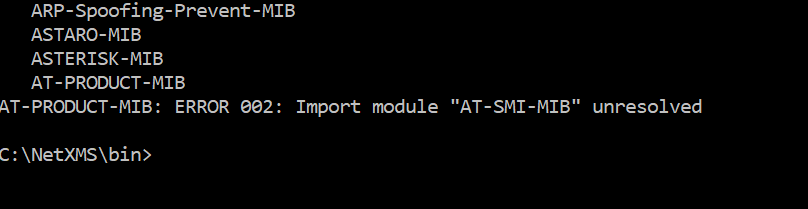

      at-product.mib.txt

      2018-09-04 12_04_04-Select C__WINDOWS_system32_cmd.exe.png

      1 Reply Last reply
      0
      • V
        V
        Victor Kirhenshtein
        wrote on last edited by
        #12

        Looks like you have MIB called AT-SMI-MIB missing. Check that you have MIB file with .txt extension starting with

        AT-SMI-MIB DEFINITIONS ::= BEGIN

        Best regards,
        Victor

        1 Reply Last reply
        0
        • R
          R
          rameshpavaluri
          wrote on last edited by
          #13

          Hi Victor,

          Thank you for help for MIBs

          i have found a problem with Layer 2 topology in Network maps

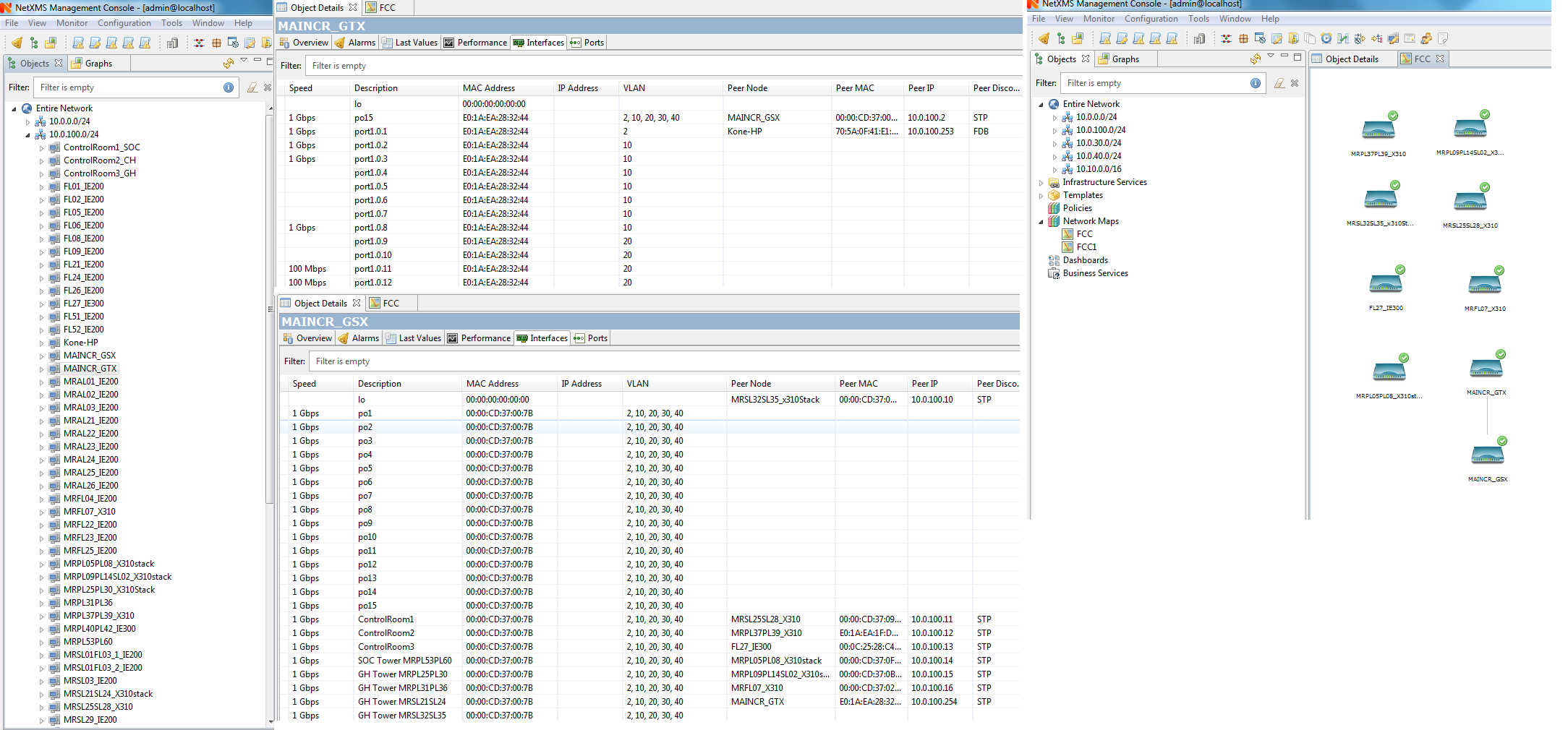
          From the below attachment you can find my main switch is MAINCR_GSX to which all the 59 other switches are connected.
          But when i select the MAINCR_GSX as seed node i can see only 7 switches connected to it.  I tried with/without include end nodes, given the discovery radius  , LLDP is enabled  but the result is same.

          I need to view, how all the 59 switches are interconnected to which port in Layer 2 topology

          Any help?

          Regards
          Ramesh
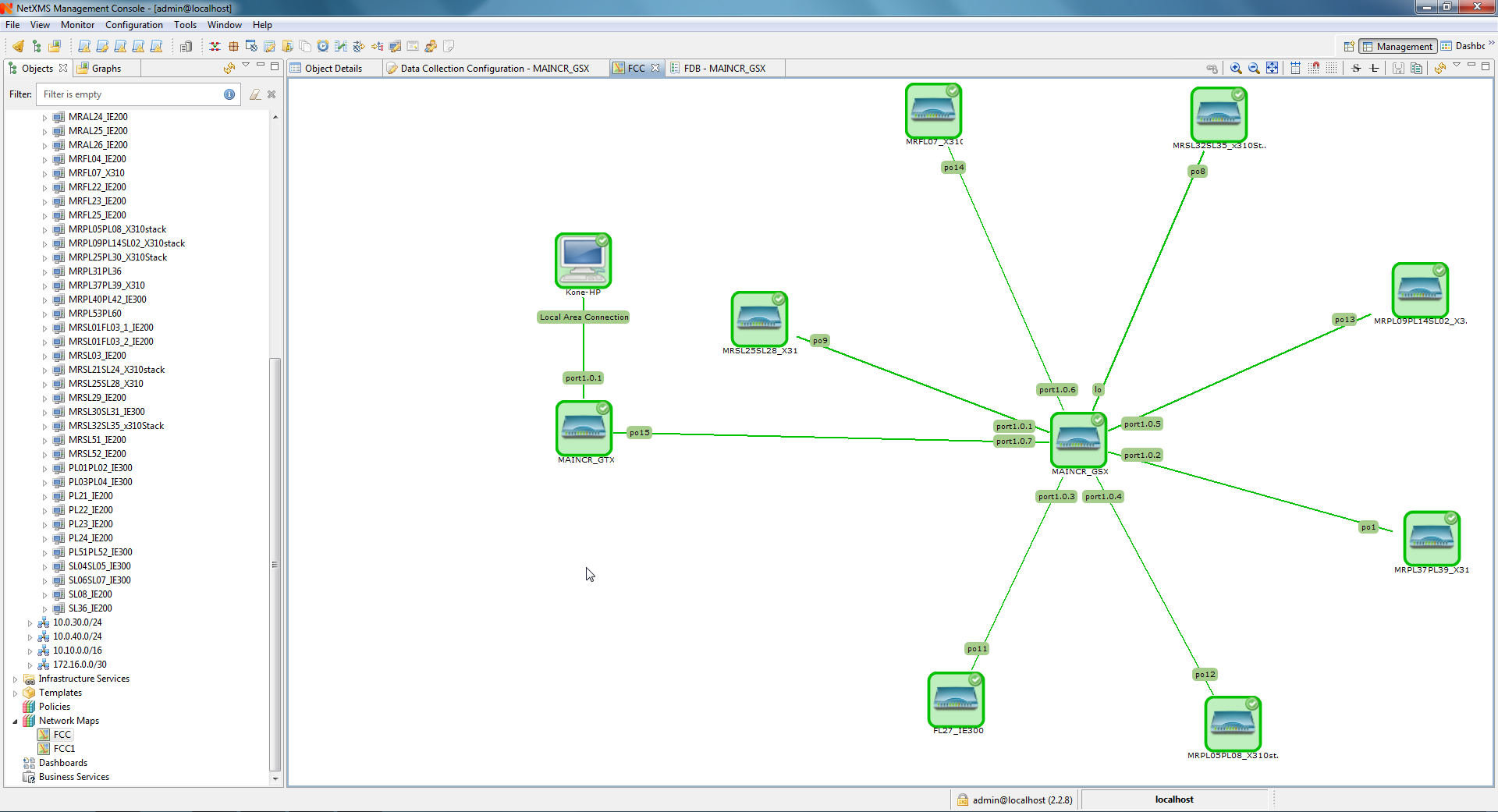

          2018-09-19 17_11_21-.png

          2018-09-19 17_49_28-NetXMS Management Console - admin@localhost.png

          1 Reply Last reply
          0
          • V
            V
            Victor Kirhenshtein
            wrote on last edited by
            #14

            Hi,

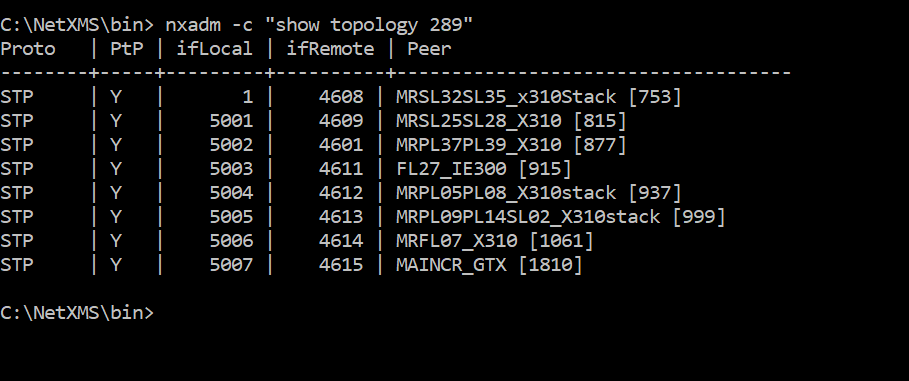
            please check object ID for MAINCR_GSX (you can find it on overview tab), then run the following command on NetXMS server command line:

            nxadm -c "show topology <id>"

            (replace <id> with actual node ID) and post it's output.

            Best regards,
            Victor

            1 Reply Last reply
            0
            • R
              R
              rameshpavaluri
              wrote on last edited by
              #15

              Hi Victor,

              please find the attached

              Regards
              Ramesh

              2018-09-25 13_52_30-Clipboard.png

              1 Reply Last reply
              0
              • V
                V
                Victor Kirhenshtein
                wrote on last edited by
                #16

                So rest of connections were not discovered. I see that all discovered connections were discovered using spanning tree information. This is less reliable method and used by server as last resort. Is it possible to turn on LLDP or CDP on your switches? It will greatly improve discovery accuracy. If not possible, make sure that you have spanning tree protocol enabled on all switches.

                Best regards,
                Victor

                1 Reply Last reply
                0
                • R
                  R
                  rameshpavaluri
                  wrote on last edited by
                  #17

                  Hi Victor,

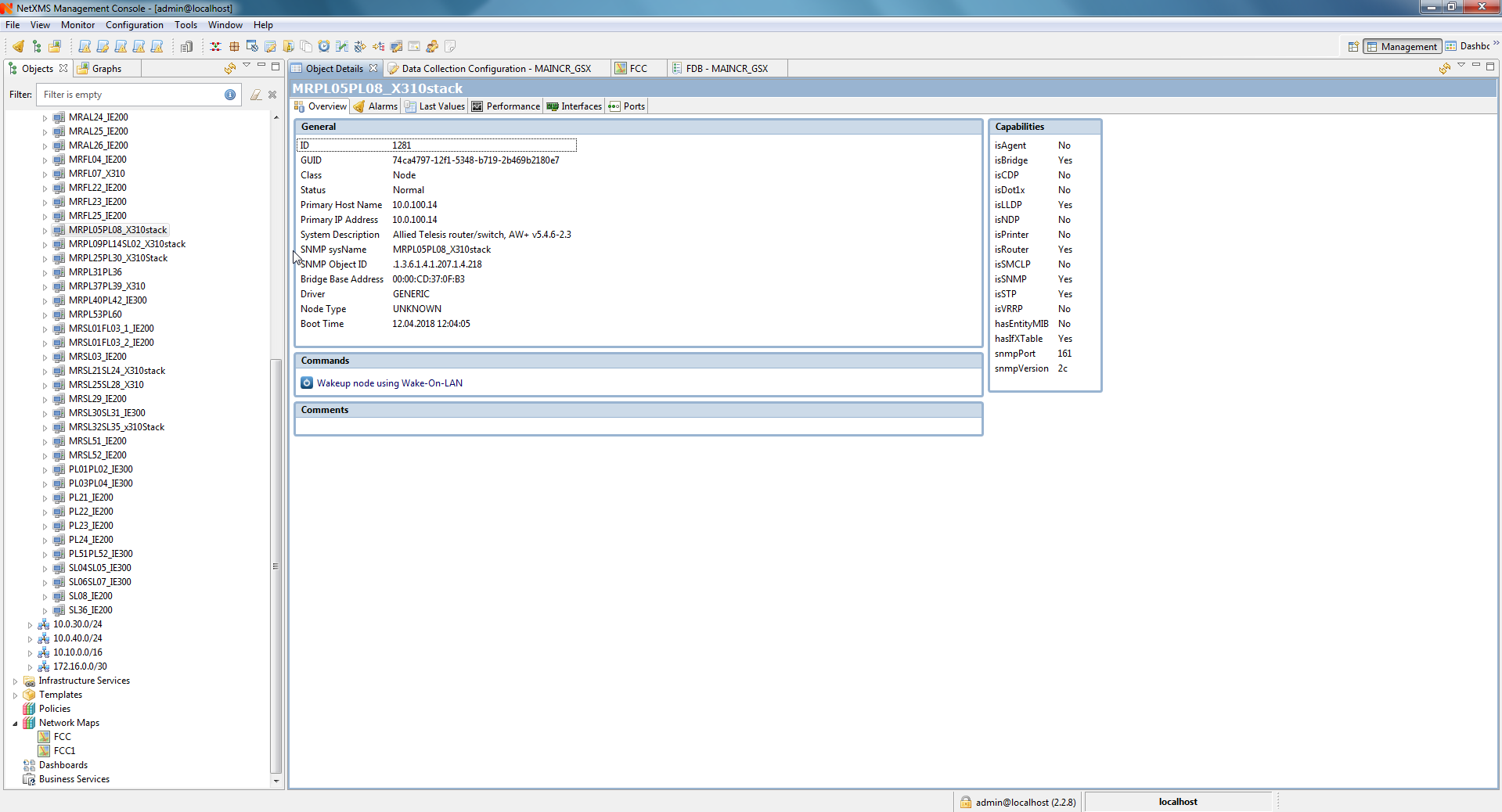
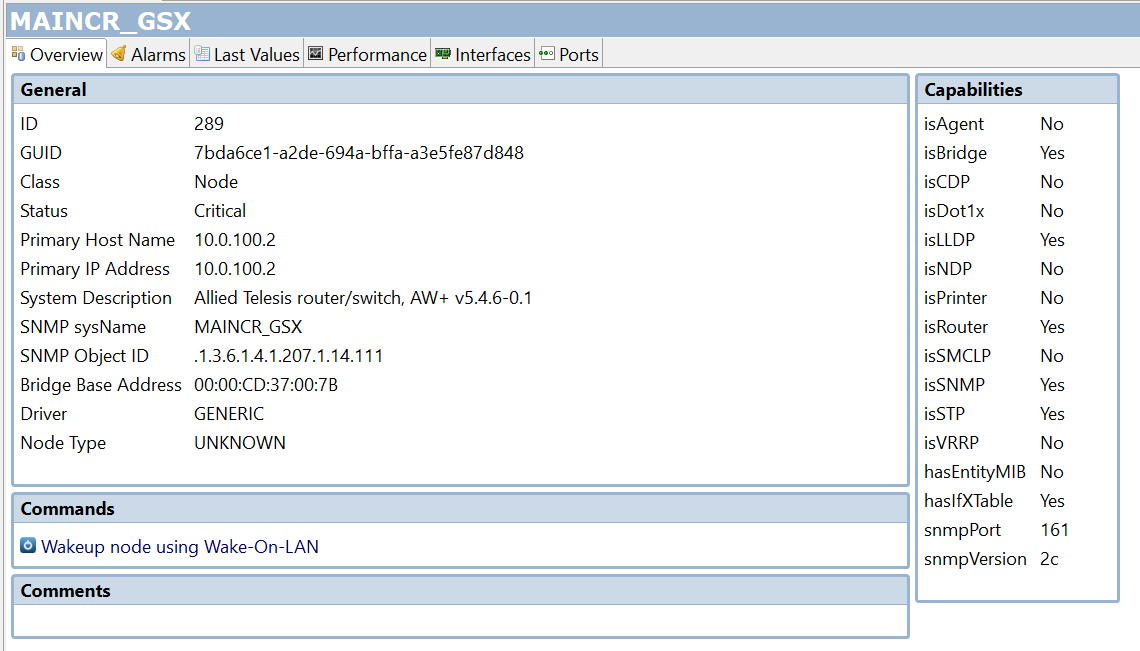
                  As shared before the LLDP is enabled on all the switches and attached the same

                  Regards
                  Ramesh

                  2018-09-25 16_03_33-NetXMS Management Console - admin@localhost.png

                  1 Reply Last reply
                  0
                  • R
                    R
                    rameshpavaluri
                    wrote on last edited by
                    #18

                    Hi Victor,

                    Could you please reply to my last post

                    Regards
                    Ramesh

                    1 Reply Last reply
                    0
                    • R
                      R
                      rameshpavaluri
                      wrote on last edited by
                      #19

                      Hi Victor/Team,

                      Could anybody in the forum reply to my previous query as i face difficult in network discovery

                      Regards
                      Ramesh

                      1 Reply Last reply
                      0
                      • V
                        V
                        Victor Kirhenshtein
                        wrote on last edited by
                        #20

                        Hi,

                        it needs detailed investigation by analyzing actual LLDP and other topology data from switches and checking how server process it. I don'yt have much time for that right now, please remind me later next week.

                        Best regards,
                        Victor

                        1 Reply Last reply
                        0
                        • R
                          R
                          rameshpavaluri
                          wrote on last edited by
                          #21

                          Hi Victor,

                          When are you available for online session and do we use team viewer or any other  preference?

                          Regards
                          Ramesh

                          1 Reply Last reply
                          0

                          Hello! It looks like you're interested in this conversation, but you don't have an account yet.

                          Getting fed up of having to scroll through the same posts each visit? When you register for an account, you'll always come back to exactly where you were before, and choose to be notified of new replies (either via email, or push notification). You'll also be able to save bookmarks and upvote posts to show your appreciation to other community members.

                          With your input, this post could be even better 💗

                          Register Login
                          Reply
                          • Reply as topic
                          Log in to reply
                          • Oldest to Newest
                          • Newest to Oldest
                          • Most Votes


                          • Login

                          • Don't have an account? Register

                          • Login or register to search.
                          Powered by NodeBB Contributors
                          • First post
                            Last post
                          0
                          • Categories
                          • Recent
                          • Tags
                          • Popular
                          • Users
                          • Groups