
Using filtering script in event processing policy to send single email
-
Hello,
My company uses netxms to monitor BGP connections in WAN circuits and I would like to set up an automated email when a circuit goes down.
Our monitoring is set up so the alert count increments every hour while the circuit is down, so the email alert sends every time the alert increments.
I would like to set this up so the email only sends on the original alert and does not send as the alert continues to increment.
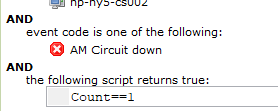
I was hoping to add a filtering script to the alert so that it only sends when the counter = 1, but I do not know what the proper syntax is or if that is even possible. I'm also open to other suggestions on how to accomplish this, thank you!

-
I may be wrong in interpreting your screenshots, but it looks like you are expecting the "Count" column from the alert is passed on to the event processing policy.
However, the event processing policy processes events and can create/update alerts from those events. Not the other way around.
The count you are seeing is not the event, but the alert count (i.e. alert has been triggered that many times).
EPP would not be aware of that figure.We're doing something somewhat similar for backup monitoring using increments on a persistent storage variable.
An alert is only triggered when that variable has reached a certain increment.
When the problem goes away, we receive the alert cancellation event and wipe the persistent storage variable again.
In our case it's a combination of DCI threshold script and event processing policy filter script (we're not using the actual "Persistent Storage" section in the event processing policy), in your case it would probably all be inside the event processing filter script. -
Tursiops, thank you for the response.
The method you're describing certainly seems like it would work for my situation. Could you please share some of your commands/syntax used to create and increment the persistent storage variable? I am new to netxms scripting and am not sure how to create a script to do this
-
Hi spiazza,
Without knowing the details of your setup, this is going to be a bit generic and definitely untested.
<identifier> needs to be something you can:
- take from the event message triggering the problem
- take from the event message showing the problem is resolved
Alternatively, if any device can only ever have one active alarm of this kind, you can simply replace it with something static like "AMCircuitState".
The event message is available as variable "EVENT_TEXT" in the filtering script (as per the hints available in the Filtering Script screen).
Filter script for Event Processing Policy when AM Circuit down is triggered:
CUSTOM_MESSAGE=sha1(<identifier>);
if ( #("node_".$node->id."_".CUSTOM_MESSAGE) != "" ) return false;
("node_".$node->id."_".CUSTOM_MESSAGE)=1;
return true;
More detailed explanation:
CUSTOM_MESSAGE=sha1(<identifier>);Create a hash from your identifier. This will be used to create a unique alarm as well as a unique persistent storage variable.
if ( #("node_".$node->id."_".CUSTOM_MESSAGE) != "" ) return false;If the persistent storage variable node_NODEID_CUSTOM_MESSAGE exists, return false. That means processing ends here (unless there is some other event processing policy that catches it). The variable should only exist if an alarm was triggered already. Also note: These persistent storage variables return an empty string, not null if they don't exist.
("node_".$node->id."_".CUSTOM_MESSAGE)=1;If the variable doesn't exist we move on to this step, which sets it to 1. So next time the event triggers, it will run into the previous line and processing will end without triggering additional emails/actions.
return true;Returning true, so the event triggers the configured actions.
Filter script for Event Processing Policy when AM Circuit up is triggered:
CUSTOM_MESSAGE=sha1(<identifier>);
if ( #("node_".$node->id."_".CUSTOM_MESSAGE) != "" ) ("node_".$node->id."_".CUSTOM_MESSAGE)=null;
return true;
Similar to the first script. This one will set the persistent storage variable to null (which removes it) and returns true, so you can trigger your actions to close the matching alert (and maybe send an email saying "all good, problem solved").
As actions you'd want:
- Your email action
- Generate an alarm with a key like "AMCircuitDown_%M". %M will be replaced with whatever is stored in "CUSTOM_MESSAGE" in your filter script.
Btw, if your event is triggered by a DCI, you can make your life a lot simpler by simply setting the "Repeat event" to "Never" in your DCI's threshold configuration.
I originally made the assumption your event is triggered by an SNMP Trap or Syslog message and may have sent you onto a more complicated track than necessary.
Cheers
-
Re-reading the original request, the filtering script can probably be even easier, as you really don't care about counting anything up (which the persistent storage would allow you to do).
You should be able to just use FindAlarmByKey to see if a matching alarm already exists, and if it does: return false, thus no new action will be triggered.
You still have to know the Alarm Key you'll be looking for though. -
I am using netxms version 1.2.13 are there any limitations I should be aware of? It could be an error on my part, but it seems like I am unable to create a persistent storage variable within the filtering script. Every time the alarm triggers the script runs fresh with no memory of the defined variables from the previous trigger. I see in the version 2.2 admin guide there is a "persistent storage" view within the "configuration" drop down and this version 1.2.13 does not have a "persistent storage" view.
As a test I entered the below code in the filtering script. The result was the action was never triggered. How can I make x persistent?
if ( x != "" ) return false;
x=1;
return true;
On the hyperlink you shared it says FindAlarmByKey is since version 2.0? Let me know if I just need to upgrade!
-
Hello! It looks like you're interested in this conversation, but you don't have an account yet.
Getting fed up of having to scroll through the same posts each visit? When you register for an account, you'll always come back to exactly where you were before, and choose to be notified of new replies (either via email, or push notification). You'll also be able to save bookmarks and upvote posts to show your appreciation to other community members.
With your input, this post could be even better 💗
Register Login