
[SOLVED] format string in DCI Container not working
-
Hello,
This is my first post, so I hope I am clear.
I having problems with formatting the DCI Containers on a network map. Running NetXMS 2.2.10 on Ubuntu.
I am reading these:
- https://docs.oracle.com/javase/7/docs/api/java/util/Formatter.html#syntax
- https://track.radensolutions.com/issue/NX-501
- https://www.netxms.org/documentation/adminguide/visualisation.html?highlight=visual
It seems that most common formatters would include:
%s - insert a string
%d - insert a signed integer (decimal)
%f - insert a real number, standard notationAnd we can see from the documentation:
For each Data Source can be configured: Data collection item, name, format string(like “Text: %.4f”), in case of table DCI also column and instance
So, my problem is that if I select a DCI, the Map displays the integer with 6 decimal places, and I want to reduce that to two. However ANY format string items do not work.
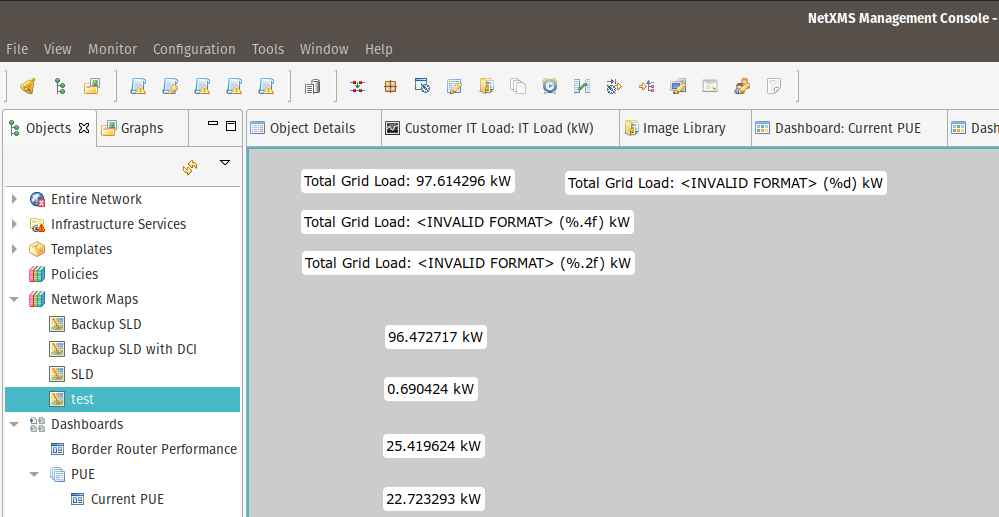
E.g. putting the suggested %.4f returns an <INVALID FORMAT> (%.4f), using %d returns the same. Switching the DCI itself between string and integer makes no difference.
Please can somebody help me understand what I an doing wrong?
Many thanks.
Alex
-
Hi,
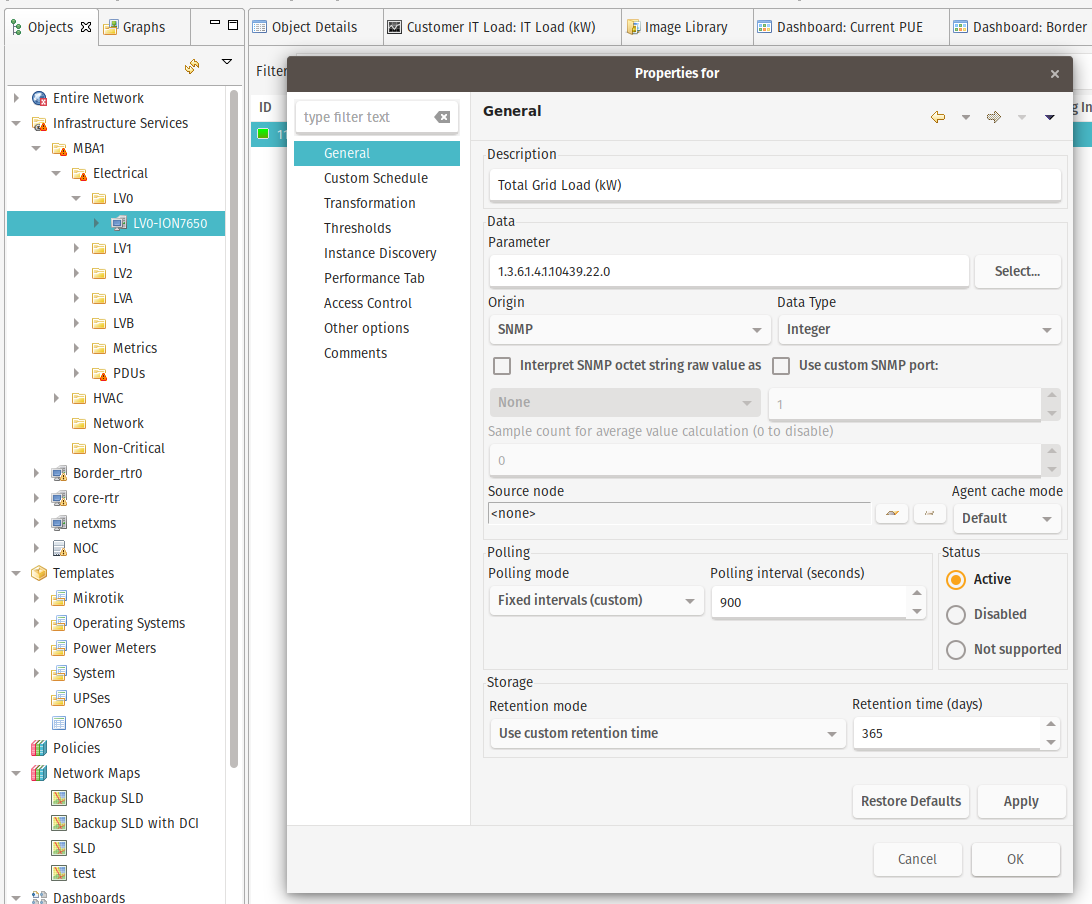
could you post your DCI configuration and some actual values?
Best regards,
Victor -
Hi,
Thanks for the response.
The DCI is a simple query an SNMP value (no transformations or anything) from a Schneider Powerlogic ION Power Meter, and the Map is a DCI Container, I have shown the raw value as well as some others with format string. I am aiming to get 2 deminal places precision.
I should add, that the DCI containers shown with data are using %s
Thanks,
Alex
-
Hi,
am I understood correctly that actual returned value contains floating point number and text "kW"? If yes, Java consider it as string and do not allow numeric formatting. You can change DCI data type to floating point number and use transformation script to remove unit indicator, like this:
if ($1 ~= "([0-9.]+) kW")
   return $1;
return $1;
Best regards,
Victor -
Hi,
I am sorry I was not clear.
The returned value for %s is, for example, 109.794250 plain and simple.
In the format string I have put %s kW so giving the result of 109.794250 kW
If I create a new DCI COntainer and leave the format string blank it returns: 109.794250
If I create a new DCI COntainer and put %s in the format string it returns: 109.794250I can use any text around the %s such as Total Grid Power: %s kW which returns: Total Grid Power: 109.794250 kW
What I want to do is take the result from %s and reduce it to two decimal places.
So I don't think that its a string.
Best regards,
Alex
-
Hello,
Thanks for all the feedback.
My problem was (of course) entirely my mistake.
I did not understand the difference between integer and Floating Point data type. An integer is just that, a whole number and so cannot get decimal places.
So trying to use %.2f format string with integer cant work. I Changed my DCIs to Floating point, and now %.2f for 2 decimal places is working fine.
Apologies to all.
Alex
Hello! It looks like you're interested in this conversation, but you don't have an account yet.
Getting fed up of having to scroll through the same posts each visit? When you register for an account, you'll always come back to exactly where you were before, and choose to be notified of new replies (either via email, or push notification). You'll also be able to save bookmarks and upvote posts to show your appreciation to other community members.
With your input, this post could be even better 💗
Register Login