Skip to content
  • Categories
  • Recent
  • Tags
  • Popular
  • Users
  • Groups
Skins
  • Light
  • Brite
  • Cerulean
  • Cosmo
  • Flatly
  • Journal
  • Litera
  • Lumen
  • Lux
  • Materia
  • Minty
  • Morph
  • Pulse
  • Sandstone
  • Simplex
  • Sketchy
  • Spacelab
  • United
  • Yeti
  • Zephyr
  • Dark
  • Cyborg
  • Darkly
  • Quartz
  • Slate
  • Solar
  • Superhero
  • Vapor

  • Default (Flatly)
  • No Skin
Collapse
Brand Logo

NetXMS Forum

  1. Home
  2. Support
  3. Data collection from different devices

Data collection from different devices

Scheduled Pinned Locked Moved Support
6 Posts 2 Posters 34.1k Views
  • Oldest to Newest
  • Newest to Oldest
  • Most Votes
Reply
  • Reply as topic
Log in to reply
This topic has been deleted. Only users with topic management privileges can see it.
  • M
    M
    Mortymer
    wrote on last edited by
    #1

    Hello,

    I have some different meters what I want to monitoring with netXMS. (electricity, gas, water, temperature ...)
    I made a simple application to get the current measures from the meters.
    With parameters I give the ip address and more others.
    How can I configure the NetXMS server and Agent to collect the measures from more than 200 meters.
    Not need to check the amounts on every seconds but I have to check every hours.
    This meters aren't support SNMP and I can't install any third party application but with this app l can collect the current amounts.
    The netxms agent can execute this app but I don't know how can I use one Agent to check all meters.
    Thank you for any help.

    1 Reply Last reply
    0
    • M
      M
      Mortymer
      wrote on last edited by
      #2

      So after I read what I found:
      1/ Now I know that I have to register the data collection items under an Agent. I can't use the Meter-node for this.
      2/ I setup the Agent config with the external application

      ExecTimeout = 5000
      FileStore = C:\NetXMS\var
      LogFile = c:\NetXMS\Log\agent.log
      RequireAuthentication = no
      SubAgent = winperf.nsm
      SubAgent = portcheck.nsm
      SubAgent = ping.nsm
      SubAgent = ssh.nsm

      ExternalParameterShellExec=EMC_Getbalance(*):C:\NetXMS\scripts\EMCCommunication.exe $1 $2

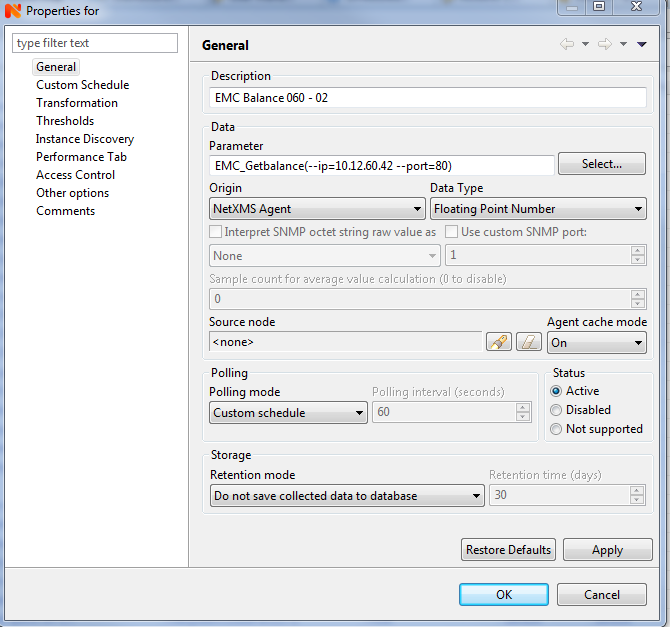
      I register one meter under and Agent (I attached the screesnhot) where I set the parameters for this meter.

      But at "Last values" tab I see "<<ERROR>>"
      I know that I did something wrong I have no idea what.

      Thank you for any help!


      EMC_060-02.PNG

      1 Reply Last reply
      0
      • T
        T
        Tursiops
        wrote on last edited by
        #3

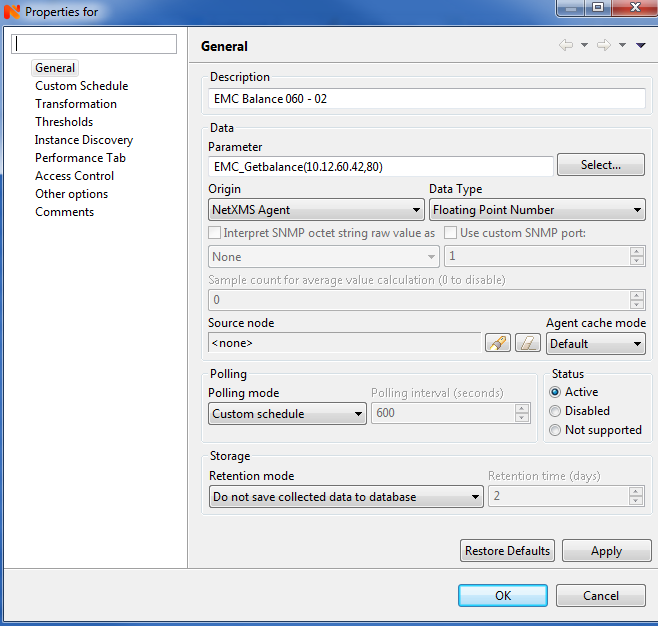
        I believe you need to separate the parameters with a ",", i.e. EMC_Getbalance(--ip=10.12.60.42,--port=80).
        Not sure how exactly your tool works, but if it always expects --ip= and --port, you could probably add that to your ExternalParameter and only pass the actual IP and port number, e.g. ExternalParameterShellExec=EMC_Getbalance(*):C:\NetXMS\scripts\EMCCommunication.exe --ip=$1 --port=$2.

        1 Reply Last reply
        0
        • M
          M
          Mortymer
          wrote on last edited by
          #4

          I modified the parameters but the problem is same 😞
          I see ERROR message.
          But the strange things that if I set the debug mode on Agent, I don't find any related information about the the Agent want to start this application.


          EMC_060-02-01.PNG

          EMC_060-02-02.PNG

          1 Reply Last reply
          0
          • T
            T
            Tursiops
            wrote on last edited by
            #5

            How long does it take your script to run?
            More than the 5 second timeout?
            Have you restarted the agent and did you run a Configuration Poll after adding the External Parameter?

            1 Reply Last reply
            0
            • M
              M
              Mortymer
              wrote on last edited by
              #6

              I increased the timeout from 5 seconds to 7 seconds and it works.
              Thank you!

              1 Reply Last reply
              0

              Hello! It looks like you're interested in this conversation, but you don't have an account yet.

              Getting fed up of having to scroll through the same posts each visit? When you register for an account, you'll always come back to exactly where you were before, and choose to be notified of new replies (either via email, or push notification). You'll also be able to save bookmarks and upvote posts to show your appreciation to other community members.

              With your input, this post could be even better 💗

              Register Login
              Reply
              • Reply as topic
              Log in to reply
              • Oldest to Newest
              • Newest to Oldest
              • Most Votes


              • Login

              • Don't have an account? Register

              • Login or register to search.
              Powered by NodeBB Contributors
              • First post
                Last post
              0
              • Categories
              • Recent
              • Tags
              • Popular
              • Users
              • Groups