
Dashboard element stacking
-
I am having an issue getting a couple elements to stack. On the first row I have columns set to '8' and elements set to 2/2,2/2,1/1,1/1,3/2 under the Layout. My assumption would be that the two elements set as 1/1 would stack vertically but they position side by side forcing me to set the last element to 2/2 instead of 3/2 for the first row. (Note: last element not shown)
I've solved all of my problems to date without bugging you guys but I'm stumped on this. How can I fix it? Edit XML?

-
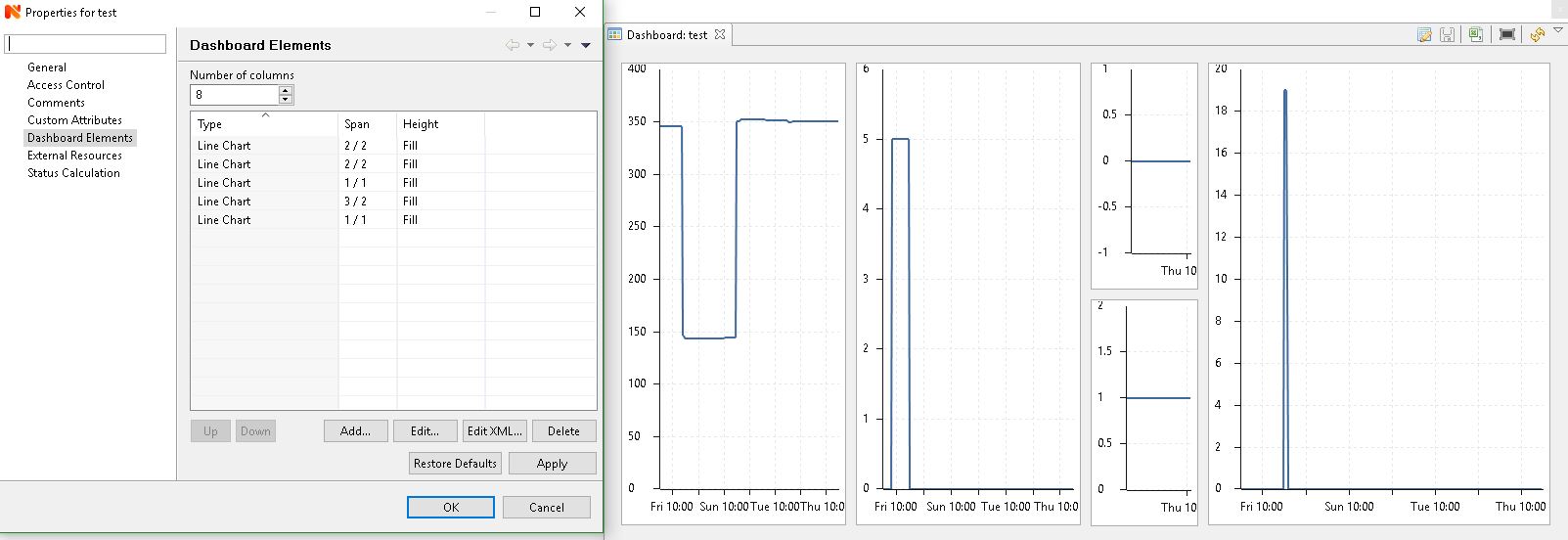
The dashboard is built left to right, top to bottom. The order is important here, as it leads to the following column assignment in your setup:
First row: 2, 2, 1, 1, 3 (one too many as it builds left to right and 1/1 fits next to 1/1 still)
Second row: 2, 2, empty(!), 3You want to move the second 1/1 item below the 3/2 one, which should give you what you're looking for:
First row: 2, 2, 1, 3
Second row: 2, 2, 1, 3I built a quick test dashboard which shows the layout and values.
-
That fixed it. Thank you for your help.


Hello! It looks like you're interested in this conversation, but you don't have an account yet.
Getting fed up of having to scroll through the same posts each visit? When you register for an account, you'll always come back to exactly where you were before, and choose to be notified of new replies (either via email, or push notification). You'll also be able to save bookmarks and upvote posts to show your appreciation to other community members.
With your input, this post could be even better 💗
Register Login