
Can't logon NetXMS Console thru LDAP authentication(Windows AD@Win2008)
-
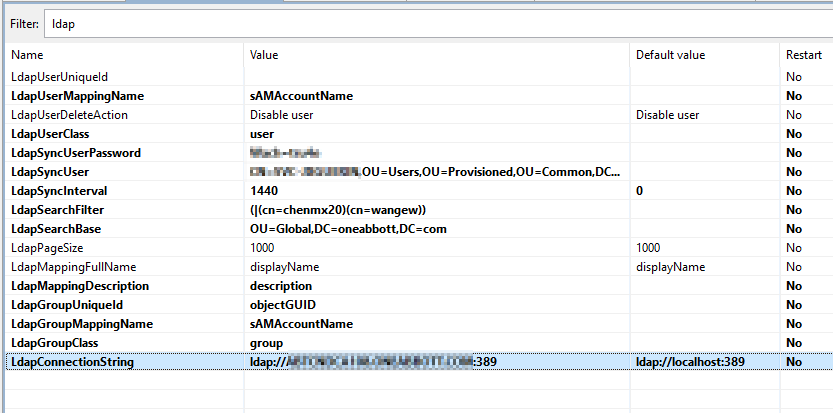
- I configured ldap parameters as attached picture #1, and run ldapsync with debug 4 level, everything goes fine and required users were synchronized from AD correctly.
2019.04.17 16:14:30.303 *D* LDAPConnection::initLDAP(): Connecting to LDAP server 2019.04.17 16:14:30.303 *D* LDAPConnection::initLDAP(): servers="xxxxxxx.mydomain.COM:389" port=389 secure=no 2019.04.17 16:14:30.365 *D* LDAPConnection::fillLists(): Found entry count: 2 2019.04.17 16:14:30.365 *D* LDAPConnection::fillLists(): Found dn: CN=WANGEW,OU=Jia Xing,OU=CN,OU=Asia,OU=Users,OU=Global,DC=mydomain,DC=com 2019.04.17 16:14:30.365 *D* LDAPConnection::fillLists(): User added: dn: CN=WANGEW,OU=Jia Xing,OU=CN,OU=Asia,OU=Users,OU=Global,DC=mydomain,DC=com, login name: WANGEW, full name: Wang, Eric W, description: EMPLOYEE 2019.04.17 16:14:30.365 *D* LDAPConnection::fillLists(): Found dn: CN=CHENMX20,OU=Jia Xing,OU=CN,OU=Asia,OU=Users,OU=Global,DC=mydomain,DC=com 2019.04.17 16:14:30.365 *D* LDAPConnection::fillLists(): User added: dn: CN=CHENMX20,OU=Jia Xing,OU=CN,OU=Asia,OU=Users,OU=Global,DC=mydomain,DC=com, login name: CHENMX20, full name: Chen, Marshall, description: EMPLOYEE 2019.04.17 16:14:30.365 *D* LDAPConnection::closeLDAPConnection(): Disconnect form LDAP server 2019.04.17 16:14:30.365 *D* UpdateLDAPUser(): User added: ID: (null) DN: CN=WANGEW,OU=Jia Xing,OU=CN,OU=Asia,OU=Users,OU=Global,DC=mydomain,DC=com, login name: WANGEW, full name: Wang, Eric W, description: EMPLOYEE 2019.04.17 16:14:30.365 *D* UpdateLDAPUser(): User added: ID: (null) DN: CN=CHENMX20,OU=Jia Xing,OU=CN,OU=Asia,OU=Users,OU=Global,DC=mydomain,DC=com, login name: CHENMX20, full name: Chen, Marshall, description: EMPLOYEE-
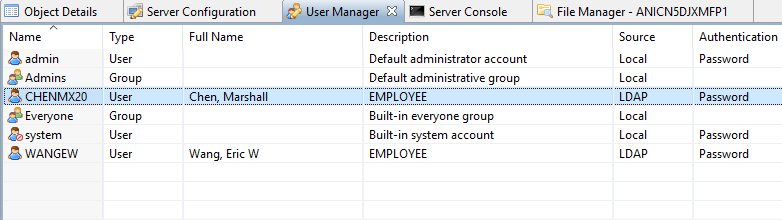
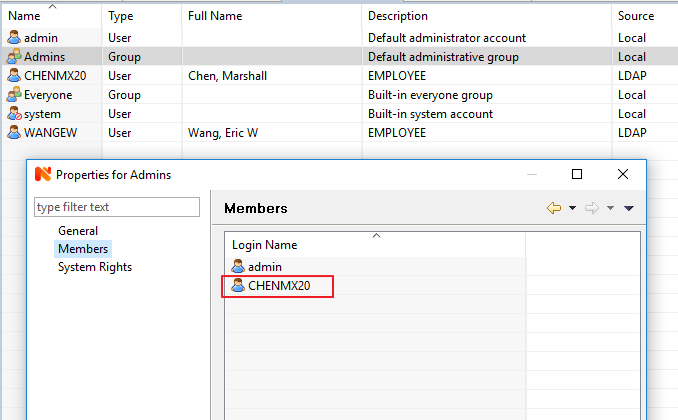
After that I manually added the LDAP user into local 'Admins' group with all objects access.(pciture 2, 3)
-
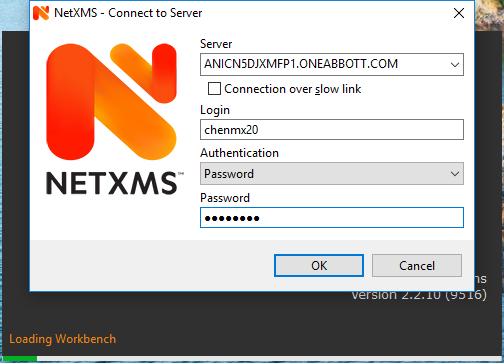
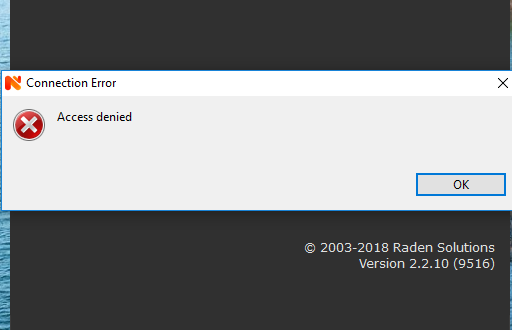
All looks like very good, when I use this LDAP user to logon NetXMS console, it always pop up 'Access Dinied' windows. So I turned on Debug 4 level but unfortunantly there is nothing related the authentication failure.
2019.04.17 16:17:59.063 *D* [client.session     ] Client session with ID 2 registered
2019.04.17 16:17:59.063 *D* [client.session.2   ] Read thread started
2019.04.17 16:17:59.094 *D* [client.session.2   ] Server time zone: CST+08CDT
===> Anyone who knows something can help me on this? thanks in advance.
-
Your server is probably configured to be case sensitive in regards to usernames (that's the default).
The LDAP username is all uppercase, while you're logging in with the name in all lowercase.
So either use the all caps name to log in, or set the "CaseInsensitiveLoginNames" server configuration option to "1" and restart your NetXMS server service. -
@tursiops said in Can't logon NetXMS Console thru LDAP authentication(Windows AD@Win2008):
Your server is probably configured to be case sensitive in regards to usernames (that's the default).
The LDAP username is all uppercase, while you're logging in with the name in all lowercase.
So either use the all caps name to log in, or set the "CaseInsensitiveLoginNames" server configuration option to "1" and restart your NetXMS server service.Good catch Tursiops. You are absolutely correct, it's the case sensitive issue. It's no problem by using the id with uppercase. The option 'CaseInsensitvieLoginNames' is the perfect resolution for this issue. Very appreciate your support Tursiops.
Hello! It looks like you're interested in this conversation, but you don't have an account yet.
Getting fed up of having to scroll through the same posts each visit? When you register for an account, you'll always come back to exactly where you were before, and choose to be notified of new replies (either via email, or push notification). You'll also be able to save bookmarks and upvote posts to show your appreciation to other community members.
With your input, this post could be even better 💗
Register Login