
Todays dumb question *** solved ***
-
What am I doing wrong here? - the OR is not working in Automatic Bind Rules.
left($node->name,4) == "rawd" || left($node->name,4) == "rawq";These on their own work. left($node->name,4) == "rawd"; and left($node->name,4) == "rawq"; but not when I add the OR (or what I thing is the OR).
my understanding is based on this:
https://www.netxms.org/documentation/adminguide/data-collection.html#instanceCan anyone point me in the direction of where any of this is in any doco?
-
I am assuming this line is only part of your full script? Otherwise, the or statement doesn't really do anything.
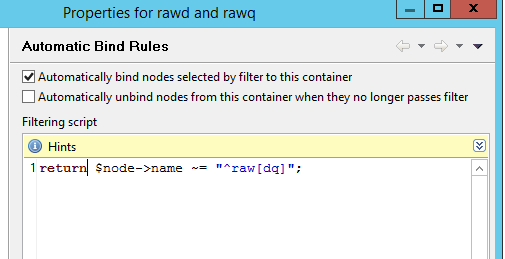
If you want to bind a node to a container based on name starting with rawd or rawq, you will have to add a "return" in front of your line, so that the result of your OR statement is actually used.
Alternatively you can also usereturn $node->name ~= "^raw[dq]"; -
I told you it was a dumb question!!
It is confusing because auto bind asks for a script - but it accepts code as well - which is just one part of what is confusing.
From a solution perspective - fantastic - it works perfectly!! I use it not in a script - just using it "as is"
As much as I think netxms is fantastic, some basic tutorials that demonstrate the syntax and basic script functionality would be a great benefit to those new to netxms.
Another example of something that I should be able to do better. My Windows container uses the following auto bind but I would rather just search for Windows in sysDescription - but I do not know the name of that variable at a netxms level and I do not know the syntax for "contains". I tried like, but that did not work.
So todays dumb question
What is wrong with return $node->sysDescription like "Windows";
The server has these two attributes in Object view:
System Description=Hardware: Intel64 Family 6 Model 79 Stepping 1 AT/AT COMPATIBLE - Software: Windows Version 6.2 (Build 9200 Multiprocessor Free)
SNMP Object ID=.1.3.6.1.4.1.311.1.1.3.1.2For my Windows container:
works
return $node->snmpOID == ".1.3.6.1.4.1.311.1.1.3.1.2";does not work
return $node->sysDescription like "Windows";
-
Todays answer - add the wild card!!.
return $node-> sysDescription like "*Windows*";
Thanks Victor:
https://www.netxms.org/forum/configuration/snmp-traps-handling/msg4957/#msg4957 -
The following pages might be useful for scripting:
For the node object, there's documentation on attributes here: https://wiki.netxms.org/wiki/NXSL:Node (for class reference, see https://wiki.netxms.org/wiki/Category:NXSL_Class_Reference)
Comparison operators are documented here: https://wiki.netxms.org/wiki/UM:NetXMS_Scripting_Language_(NXSL)#Comparison_Operators
Function Reference (not sure how up to date that is in regards to new functions): https://wiki.netxms.org/wiki/NXSL_Function_Reference -
-

Hello! It looks like you're interested in this conversation, but you don't have an account yet.
Getting fed up of having to scroll through the same posts each visit? When you register for an account, you'll always come back to exactly where you were before, and choose to be notified of new replies (either via email, or push notification). You'll also be able to save bookmarks and upvote posts to show your appreciation to other community members.
With your input, this post could be even better 💗
Register Login