
Instance discovery filter - multiple OIDs
-
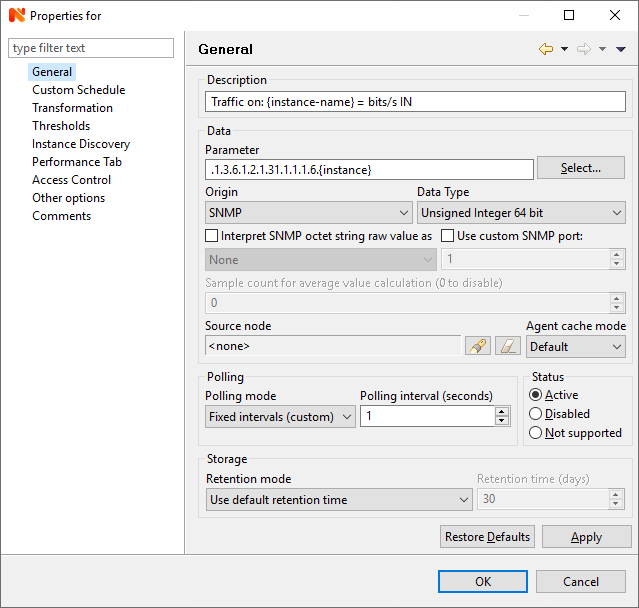
I have set up a DCI with instance discovery for traffic on all ports of a Cisco switch.
4 OIDs always come back as unsupported.
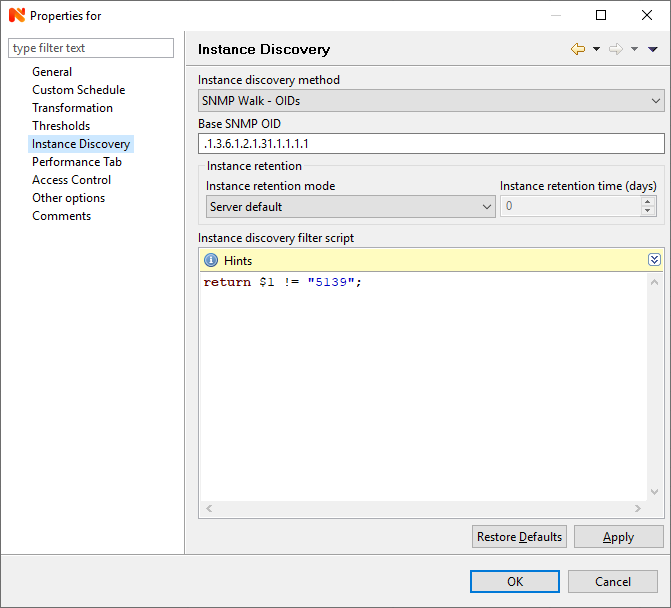
I have managed to get the filter script to filter out one of them with one specific OID, but how do I properly filter out unsupported OIDs? Is there a way to tell it to ignore them if they are unsupported?
I've tried searching and my setup is similar to this:
https://www.netxms.org/forum/configuration/instance-discovery-filter-scrip/msg10449/#msg10449This successfully filters one result:
return $1 != "5139";These are the attempts I have made - none of them filter multiple results: (the three using SNMPGetValue don't work at all with the individual OID)
snmp = CreateSNMPTransport($node);
return SNMPGetValue(snmp, ".1.3.6.1.2.1.31.1.1.1.6." . $1) != 5139;

snmp = CreateSNMPTransport($node);
return SNMPGetValue(snmp, ".1.3.6.1.2.1.31.1.1.1.6." . $1) != 0;

snmp = CreateSNMPTransport($node);
return SNMPGetValue(snmp, ".1.3.6.1.2.1.31.1.1.1.6." . $1) != "5139";

if($1 == "5139")
	return false;
if($1 == "5138")
	return false;
if($1 == "5137")
	return false;
if($1 == "12001")
	return false;
I'm sure I'm missing something obvious, any help is appreciated!
Thanks!
-
Try this filter script:
snmp = CreateSNMPTransport($node);
return SNMPGet(snmp, ".1.3.6.1.2.1.31.1.1.1.6." . $1) != null;
It will filter out all instances where SNMP-GET on .1.3.6.1.2.1.31.1.1.1.6.{instance} fails.
Best regards,
Victor -
Victor, thanks.
Initially this didn't work, but then I changed:
snmp = CreateSNMPTransport($node);
return SNMPGet(snmp, ".1.3.6.1.2.1.31.1.1.1.6." . $1) != null;
To:
snmp = CreateSNMPTransport($node);
return SNMPGetValue(snmp, ".1.3.6.1.2.1.31.1.1.1.6." . $1) != null;
And it seems to be working now.
Thank you!
Hello! It looks like you're interested in this conversation, but you don't have an account yet.
Getting fed up of having to scroll through the same posts each visit? When you register for an account, you'll always come back to exactly where you were before, and choose to be notified of new replies (either via email, or push notification). You'll also be able to save bookmarks and upvote posts to show your appreciation to other community members.
With your input, this post could be even better 💗
Register Login