
Single subnet active discovery fails with log showing wrong subnet
-
I experience problems with active subnet discovery which I can't make sense of. I allready set the logging to Level 9 on the server and Level 7 on the proxy. The "probe" i use is a raspberry in a different location, tunneling in. Everything works fine for nodes which I added manual.
However, active discovery does not discover anything, and seems not too run at all:
2019.07.17 02:47:48.841 *D* [poll.discovery ] Starting active discovery check on range 10.85.27.5 - 10.85.27.252 via proxy probe-box-085-Q21 [596]
2019.07.17 02:47:49.150 *D* [poll.discovery ] Finished active discovery check on range 10.85.28.5 - 10.85.27.252 via proxy probe-box-085-Q21 [596]That doesn't look right, does it? The subnet is wrong in the second line.
I tested several ways to enter the 10.85.27.0/24 into the Active Discovery Targets (see GUI-setting-Discovery.png):
Subnet 10.85.27.0/24
Range 10.85.27.1 - 10.85.27.254
Range 10.85.27.5 - 10.85.27.252The error does not disappear, and no nodes are added.
On the proxy probe, the log shows:
2019.07.17 02:34:10.750 *D* [CS-2(19442)] Received control message CMD_GET_NXCP_CAPS
2019.07.17 02:34:10.750 *D* [CS-2(19442)] Sending message CMD_NXCP_CAPS (ID 0; size 16; uncompressed)2019.07.17 02:34:11.677 *D* [CS-2(19442)] Received message CMD_GET_LIST (3)
2019.07.17 02:34:11.677 *D* [CS-2(19442)] Requesting list "ICMP.ScanRange(10.85.27.5,10.85.27.252)"
2019.07.17 02:34:11.678 *D* [CS-2(19442)] GetListValue(): result is 404 (UNKNOWN_PARAMETER)
2019.07.17 02:34:11.678 *D* [CS-2(19442)] Sending message CMD_REQUEST_COMPLETED (ID 3; size 32; uncompressed)
2019.07.17 02:34:11.987 *D* [CS-2(19442)] Communication channel closed by peer
[...]Any ideas where to look?
Server:
NetXMS Server Version 2.2.15 Build 9523 (2.2.15.2) (UNICODE)
NetXMS Core Agent Version 2.2.15 Build 9523 (2.2.15.2) (UNICODE)Probe Proxy:
NetXMS Core Agent Version 2.2.8 Build 9514 (2.2.8-32-g4a24d07a2a) (UNICODE)
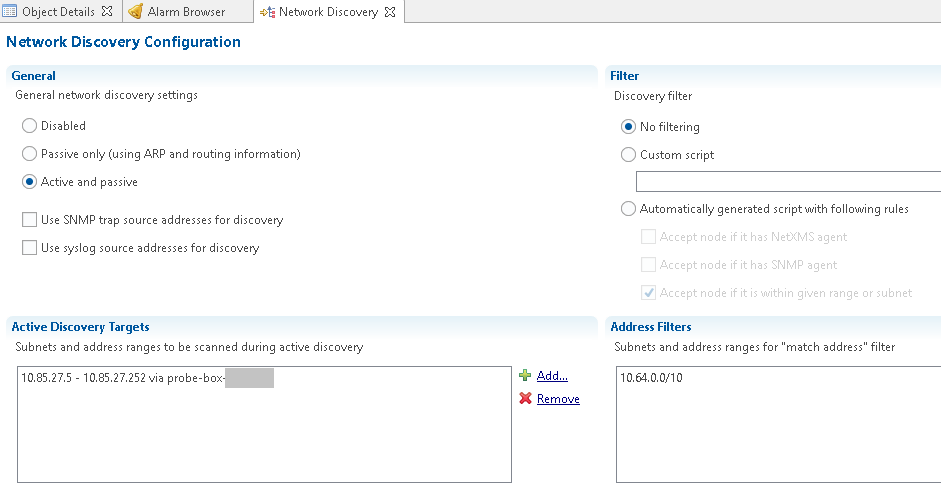
-
Hi,
real problem here is on proxy side:
2019.07.17 02:34:11.677 *D* [CS-2(19442)] Requesting list "ICMP.ScanRange(10.85.27.5,10.85.27.252)"
2019.07.17 02:34:11.678 *D* [CS-2(19442)] GetListValue(): result is 404 (UNKNOWN_PARAMETERParameter ICMP.ScanRange was added in 2.2.12, so you have to upgrade your proxy.
Best regards,
Victor -
-
We will add Raspberry to automated release builds, but currently it is built manually from time to time.
-
If updated the server, and changed from Raspberry to a Ubuntu, but the problem still exists:
probe-user@probe-box:~$ nxagentd -v
NetXMS Core Agent Version 2.2.16 Build 9524 (2.2.16) (UNICODE)probe-user@probe-box:~$ cat /var/log/nxagentd | grep Scan -A 5
2019.07.17 12:02:34.193 *D* [comm.cs.249 ] Received message CMD_GET_LIST (3)
2019.07.17 12:02:34.194 *D* [comm.cs.249 ] Requesting list "ICMP.ScanRange(10.85.27.1,10.85.27.254)"
2019.07.17 12:02:34.194 *D* [comm.cs.249 ] GetListValue(): result is 404 (UNKNOWN_PARAMETER)
2019.07.17 12:02:34.194 *D* [comm.cs.249 ] Sending message CMD_REQUEST_COMPLETED (ID 3; size 32; uncompressed)That's all the updates i can do. Building it myself from the GIT sources is above my Linux knowledge.

-
Did you load ping subagent on proxy?
-
@victor said in Single subnet active discovery fails with log showing wrong subnet:
Did you load ping subagent on proxy?
Negative. This is the agent config:
# Log File
LogFile = /var/log/nxagentd
DebugLevel = 9

MasterServers = lab.lab-network.example
ServerConnection = lab.lab-network.example

EnableProxy = Yes
EnableSNMPProxy = Yes
EnableSNMPTrapProxy = Yes
EnableTCPProxy = Yes
Does that mean that the ICMP subagent is required for active discovery?
-
Yes. You have to have
SubAgent = ping.nsm
in nxagentd.conf.
-
Hello! It looks like you're interested in this conversation, but you don't have an account yet.
Getting fed up of having to scroll through the same posts each visit? When you register for an account, you'll always come back to exactly where you were before, and choose to be notified of new replies (either via email, or push notification). You'll also be able to save bookmarks and upvote posts to show your appreciation to other community members.
With your input, this post could be even better 💗
Register Login