Skip to content
  • Categories
  • Recent
  • Tags
  • Popular
  • Users
  • Groups
Skins
  • Light
  • Brite
  • Cerulean
  • Cosmo
  • Flatly
  • Journal
  • Litera
  • Lumen
  • Lux
  • Materia
  • Minty
  • Morph
  • Pulse
  • Sandstone
  • Simplex
  • Sketchy
  • Spacelab
  • United
  • Yeti
  • Zephyr
  • Dark
  • Cyborg
  • Darkly
  • Quartz
  • Slate
  • Solar
  • Superhero
  • Vapor

  • Default (Flatly)
  • No Skin
Collapse
Brand Logo

NetXMS Forum

  1. Home
  2. Support
  3. How to hide unwanted objects?

How to hide unwanted objects?

Scheduled Pinned Locked Moved Support
3 Posts 2 Posters 30.8k Views
  • Oldest to Newest
  • Newest to Oldest
  • Most Votes
Reply
  • Reply as topic
Log in to reply
This topic has been deleted. Only users with topic management privileges can see it.
  • T
    T
    tfines
    wrote on last edited by
    #1

    Section 10.1.1 of the manual indicates you can "Hide unmanaged objects"

    How?  Or How can I hide any object for that matter?

    I can set an object to Unmanaged.  But it still is listed.  I've browsed through the menus, searched the docs, the forums, and Googled, and I still can't find where to actually set a 'Hide' flag.

    I want to hide some irrelevant objects.  For example, my PC's Virtualbox IP subnet, only used on my PC, is something I will never ever want status on, and is just noise on the list of objects.

    1 Reply Last reply
    0
    • V
      V
      Victor Kirhenshtein
      wrote on last edited by
      #2

      Hi,

      this option is in object browser's view menu (see attached screenshot).

      Best regards,
      Victor
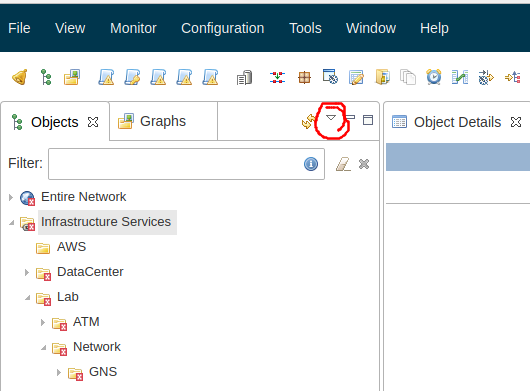

      view_menu.png

      1 Reply Last reply
      0
      • T
        T
        tfines
        wrote on last edited by
        #3

        Aha! Many thanks!

        1 Reply Last reply
        0

        Hello! It looks like you're interested in this conversation, but you don't have an account yet.

        Getting fed up of having to scroll through the same posts each visit? When you register for an account, you'll always come back to exactly where you were before, and choose to be notified of new replies (either via email, or push notification). You'll also be able to save bookmarks and upvote posts to show your appreciation to other community members.

        With your input, this post could be even better 💗

        Register Login
        Reply
        • Reply as topic
        Log in to reply
        • Oldest to Newest
        • Newest to Oldest
        • Most Votes


        • Login

        • Don't have an account? Register

        • Login or register to search.
        Powered by NodeBB Contributors
        • First post
          Last post
        0
        • Categories
        • Recent
        • Tags
        • Popular
        • Users
        • Groups