
Problem with subgents
-
Hi All,
I can't not see the loaded sub agents(Linux) in server console(windows):
log shows successfully loaded
could please help me .plz give me examples for logwatch config ...
Thanks,
pasupuleti -
please advise..........
please advise..........
log file showing :/usr/local/bin/nxagentd -D
Configuration file OK
[29-Jun-2009 02:10:26] Debug: Log file opened
[29-Jun-2009 02:10:26] Debug: Subagent API initialized
[29-Jun-2009 02:10:27] Subagent "/usr/local/lib/libnsm_linux.so" loaded successfully
[29-Jun-2009 02:10:27] Subagent "Linux" already loaded from module "/usr/local/lib/libnsm_linux.so"
[29-Jun-2009 02:10:27] Subagent "/usr/local/lib/libnsm_ping.so" loaded successfully
[29-Jun-2009 02:10:27] Subagent "/usr/local/lib/libnsm_portCheck.so" loaded successfully
[29-Jun-2009 02:10:27] Debug: LogWatch: registered parser for file /var/log/messages, trace level set to 0
[29-Jun-2009 02:10:27] Debug: LogParser: parser thread for file "/var/log/messages" started
[29-Jun-2009 02:10:27] Debug: LogParser: file "/var/log/messages" successfully opened
[29-Jun-2009 02:10:27] Subagent "/usr/local/lib/libnsm_logwatch.so" loaded successfully
[29-Jun-2009 02:10:28] Debug: Trying to bind on 0.0.0.0:4703
[29-Jun-2009 02:10:28] Listening on socket 0.0.0.0:4703
[29-Jun-2009 02:10:29] NetXMS Agent startedbut i'm unable to see in the server console
Tools->Info->Agent->Subagent List.Thanks,
pasupuleti -
Usage: nxagentd [options]
Where valid options are:
-c <file> : Use configuration file <file> (default {search})
-C : Check configuration file and exit
-d : Run as daemon/service
-D : Turn on debug output
-f : Run in foreground
-h : Display help and exit
-M <addr> : Download config from management server <addr>
-p : Path to pid file (default: /var/run/nxagentd.pid)
-P <text> : Set platform suffix to <text>
-r <addr> : Register agent on management server <addr>
-v : Display version and exit -
but i'm unable to see in the server console(windows)
Tools->Info->Agent->Subagent List.
suggest how to Configure the PING subagentThanks,
pasupuleti -
Hello!
Could you please post a screenshot of subagents' list output?
Best regards,
Victor -
Hi Victor,
Thanks for your reply ..........
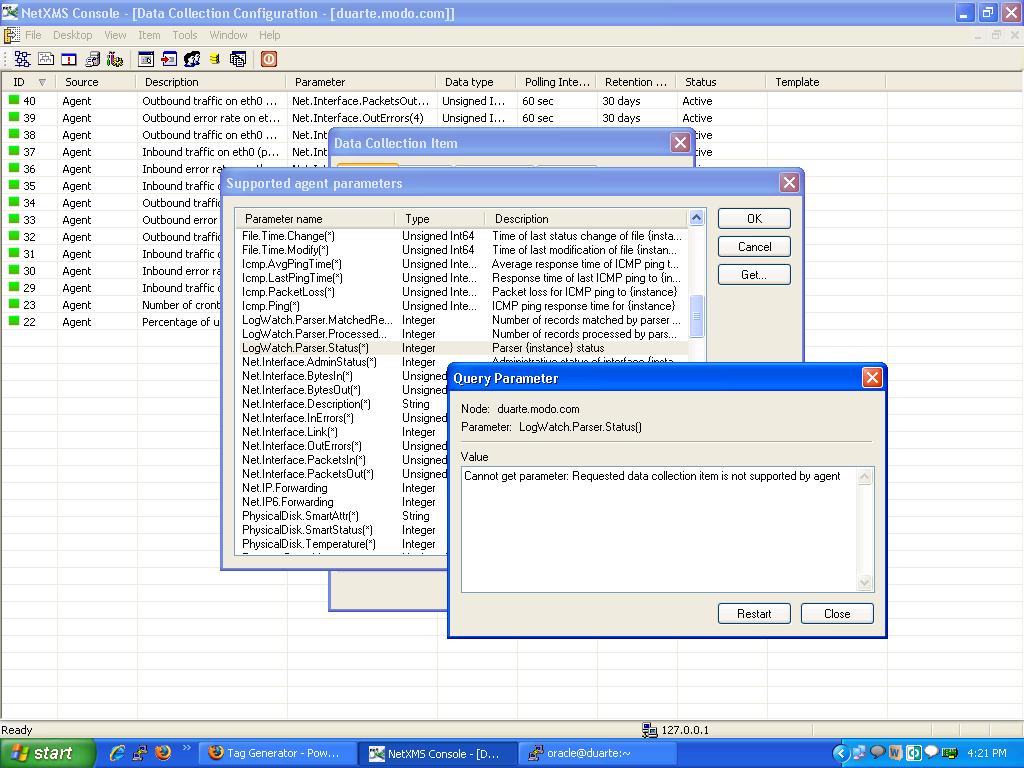
I'm getting following error while accessing the subagent parameters
Cannot get parameter: Requested data collection item is not supported by agent
please find an attachment of screen shot ..regards
pasupuleti
-
Hi!
It's a known bug - parameters LogWatch.Parser.* are not working. However, you don't need them to do log monitoring - it's just a parser statistics.
What about PING subagent - do you still have problems mentioned in your previous post?
Best regards,
Victor -
HI Victor ,
Now subagent list showing fine.but problem is ,while accessing the parameters showing the following message as Cannot get parameter: Requested data collection item is not supported by agent
for PING subagentregards
pasupuleti -
When you query Icmp.* parameters, you should be asked for additional arguments. For Icmp.Ping, you should enter IP address you wish to ping. Agent should do ping to given address respond with ping response time. For all other Icmp.* parameters you should specify name or IP address of preconfigured target. See this document: https://www.netxms.org/documentation/ping_subagent.shtml.
Best regards,
Victor
Hello! It looks like you're interested in this conversation, but you don't have an account yet.
Getting fed up of having to scroll through the same posts each visit? When you register for an account, you'll always come back to exactly where you were before, and choose to be notified of new replies (either via email, or push notification). You'll also be able to save bookmarks and upvote posts to show your appreciation to other community members.
With your input, this post could be even better 💗
Register Login