
NetXMS server is not up and running. (code=exited, status=3)
-
Hi, there. when I tried to up and running the NetXMS server with the following command:
sudo system start netxmsd
The computer screen sent back the following error:
Loaded: loaded (/lib/systemd/system/netxmsd.service; disabled; vendor preset: enabled)
Active: failed (Result: exit-code) since Mon 2020-11-23 20:42:22 UTC; 1s ago
Process: 20731 ExecStart=/usr/bin/netxmsd -d (code=exited, status=0/SUCCESS)
Main PID: 20739 (code=exited, status=3)Nov 23 20:42:22 hpserver1 systemd[1]: Starting NetXMS Server...
Nov 23 20:42:22 hpserver1 systemd[1]: Started NetXMS Server.
Nov 23 20:42:22 hpserver1 systemd[1]: netxmsd.service: Main process exited, code=exited, status=3/NOTIMPLEMENTED
Nov 23 20:42:22 hpserver1 systemd[1]: netxmsd.service: Failed with result 'exit-code'.Any idea is wellcome to fix this netXMS server start procedure issue.
Thanks in advance.
-
-
Hi, pvo I appreciate your sooner reply to my post. I followed your suggestion. I copy and paste the lates line of the fie netxmsd
2020.11.23 20:42:22.383 *E* [ ] Your database has format version 35.17, but server is compiled for version 36.17
With this information in mind. Do I need to update the Mariadb server?
Thanks in Advance.
-
Hi,
looks like you just need to run DB upgrade:
nxdbmgr upgrade
Best regards,
Victor -
HI, Victor. I appreciate a lot your sooner reply to my post. I did it. The computer screen sent the following message:
josemb@hpserver1:~$ nxdbmgr upgrade
NetXMS Database Manager Version 3.6.252 Build 3.6-252-g302ee75631 (UNICODE)Upgrading database...
Database is lockedBTW, I don't remember that I locked the netXMS database.
Any idea how I can fix this database issue ?
Thanks in Advance
-
When NetXMS server starts, it makes a record in the database to mark that it's locked. This is to avoid another copy of NetXMS server to start on the same database. NetXMS server should remove this mark when it's being terminated, but sometimes, it does not happen.
You can unlock the database by issuingnxdbmgr unlock -
Hi, Filipp. Thanks for your help. I did it. The computer screen sent the following message:
nxdbmgr unlock
NetXMS Database Manager Version 3.6.252 Build 3.6-252-g302ee75631 (UNICODE)Database is locked by server 148.202.43.20 [hpserver1 Linux Release 4.15.0-118-generic]
Do you wish to force database unlock? (Yes/No) Yes
Database lock removed############################
Then I typed:
nxdbmgr upgrade
NetXMS Database Manager Version 3.6.252 Build 3.6-252-g302ee75631 (UNICODE)Upgrading database...
Upgrading from version 35.17 to 36.0
Upgrading from version 36.0 to 36.1
Upgrading from version 36.1 to 36.2
Upgrading from version 36.2 to 36.3
Upgrading from version 36.3 to 36.4
Upgrading from version 36.4 to 36.5
Upgrading from version 36.5 to 36.6
Upgrading from version 36.6 to 36.7
Upgrading from version 36.7 to 36.8
Upgrading from version 36.8 to 36.9
Upgrading from version 36.9 to 36.10
Upgrading from version 36.10 to 36.11
Upgrading from version 36.11 to 36.12
Upgrading from version 36.12 to 36.13
Upgrading from version 36.13 to 36.14
Upgrading from version 36.14 to 36.15
Upgrading from version 36.15 to 36.16
Upgrading from version 36.16 to 36.17
Database upgrade succeeded########
The netxmd is up and running
[sudo] password for josemb:
josemb@hpserver1:~$ sudo systemctl status netxmsd
● netxmsd.service - NetXMS Server
Loaded: loaded (/lib/systemd/system/netxmsd.service; disabled; vendor preset:
Active: active (running) since Wed 2020-11-25 18:07:08 UTC; 8s ago
Process: 6600 ExecStart=/usr/bin/netxmsd -d (code=exited, status=0/SUCCESS)
Main PID: 6608 (netxmsd)
Tasks: 103 (limit: 4915)
CGroup: /system.slice/netxmsd.service
└─6608 /usr/bin/netxmsd -dNov 25 18:07:08 hpserver1 systemd[1]: Starting NetXMS Server...
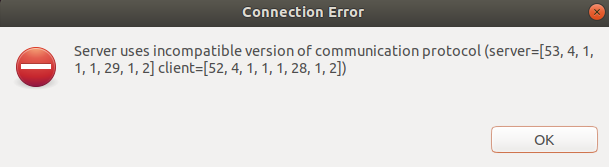
Nov 25 18:07:08 hpserver1 systemd[1]: Started NetXMS Server.But when I used the Managment console. I could not log to the Netxms server. The managment tool program sent a popup window. I attach it.
The content of the popup windows is:
Server usees incompatible version of communication protocol (server=53,4,1,1,1,29,1,2]client=[52,4,1,1,1,28,1,2]
I appreciate any help. Thanks in advance
-
Seems that you have too old management console (server uses newer protocol version). You have to upgrade it to version 3.6.
Best regards,
Victor -
Hello! It looks like you're interested in this conversation, but you don't have an account yet.
Getting fed up of having to scroll through the same posts each visit? When you register for an account, you'll always come back to exactly where you were before, and choose to be notified of new replies (either via email, or push notification). You'll also be able to save bookmarks and upvote posts to show your appreciation to other community members.
With your input, this post could be even better 💗
Register Login