Skip to content
  • Categories
  • Recent
  • Tags
  • Popular
  • Users
  • Groups
Skins
  • Light
  • Brite
  • Cerulean
  • Cosmo
  • Flatly
  • Journal
  • Litera
  • Lumen
  • Lux
  • Materia
  • Minty
  • Morph
  • Pulse
  • Sandstone
  • Simplex
  • Sketchy
  • Spacelab
  • United
  • Yeti
  • Zephyr
  • Dark
  • Cyborg
  • Darkly
  • Quartz
  • Slate
  • Solar
  • Superhero
  • Vapor

  • Default (Flatly)
  • No Skin
Collapse
Brand Logo

NetXMS Forum

  1. Home
  2. Support
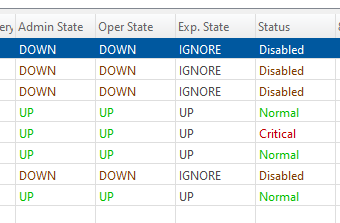
  3. strange Critical interface Status

strange Critical interface Status
Scheduled Pinned Locked Moved Support
14 Posts 3 Posters 69.9k Views
  • Oldest to Newest
  • Newest to Oldest
  • Most Votes
Reply
  • Reply as topic
Log in to reply
This topic has been deleted. Only users with topic management privileges can see it.
  • P
    P
    pvo
    wrote on last edited by
    #3

    It was reported by and Linux agent 3.7.130 on CentOS 7.
    The interface is OpenVPN interface tun0. After agent restart everything was OK.

    There were lot of following messages in the agent log

    2021.01.22 22:17:14.368 *E* [                   ] Unable to accept incoming connection (24 Too many open files)
    

    When I check the number of open files by agent now and compare it with the number after start it grows.
    The most open files are of these types (listed by lsof -p, the name of the server with agent is changed to xxxxx):

    nxagentd 2524095 root *360u  IPv4         3489842327      0t0        TCP xxxxx:netxms-agent->192.168.201.1:36936 (CLOSE_WAIT)
    nxagentd 2524095 root *361r  FIFO               0,12      0t0 3489847436 pipe
    

    If the agent sends the Status via different TCP connection then the Oper State the above error message in the log can be the reason.

    The agent is a Zone proxy and a lot of AgentExecuteActionWithOutput calls are done on the agent. This can be the reason for the open pipes, but not so many actions are started at the same time that it could exceed the maximal number of open files.
    The maximal number of open files is set to 65535. I can set a higher value, but it is short term solution only.

    1 Reply Last reply
    0
    • P
      P
      pvo
      wrote on last edited by
      #4

      Current open files situation on the agent:
      2279 connections form the server
      12745 pipes

      1 Reply Last reply
      0
      • P
        P
        pvo
        wrote on last edited by
        #5

        I had to restart the agent once again because there were the same messages in the log.
        The problem with interface status didn't occur again therefore it is sure tah the main reason for the strange Status was the agent problem with the open files.
        Before restart there were:
        80 connections from the server
        43694 pipes

        I don't understand the number of open open pipes.
        Currently (30 minutes after agent restart) there are  4228 open pipes but the number but that number is not only rising but also falling.
        What is strange that there were only 214 running processes on the agent at this time therefore it cannot be pipes waiting for the output form the processes started by AgentExecuteActionWithOutput call or the pipes are not closed by the agent.

        1 Reply Last reply
        0
        • V
          V
          Victor Kirhenshtein
          wrote on last edited by
          #6

          It looks like pipes are not closed ater command execution (maybe if certain conditions are met). We will investigate it further.

          Best regards,
          Victor

          1 Reply Last reply
          0
          • P
            P
            pvo
            wrote on last edited by
            #7

            Can I help with some specific logging?

            1 Reply Last reply
            0
            • V
              V
              Victor Kirhenshtein
              wrote on last edited by
              #8

              I was unable to reproduce this issue so far. What kind of actions and/or external parameters you are using? Can you share your agent configuration file?

              Best regards,
              Victor

              1 Reply Last reply
              0
              • P
                P
                pvo
                wrote on last edited by
                #9

                I've attached the agent configuration file.


                nxagentd.conf

                1 Reply Last reply
                0
                • V
                  V
                  Victor Kirhenshtein
                  wrote on last edited by
                  #10

                  Are you using TCP proxy functionality?

                  1 Reply Last reply
                  0
                  • P
                    P
                    pvo
                    wrote on last edited by
                    #11

                    No, Im not (as far as I know). I use SNMP proxy only but it is a Zone proxy therefore I've enabled all proxies.
                    It is no problem to disable SNMPTrapProxy, SyslogProxy, and TCPProxy.

                    1 Reply Last reply
                    0
                    • V
                      V
                      Victor Kirhenshtein
                      wrote on last edited by
                      #12

                      Can you get lsof output before and after action execution and check for possible new entries? And if there will be new entries, please post them.

                      1 Reply Last reply
                      0
                      • P
                        P
                        pvo
                        wrote on last edited by
                        #13

                        OK I will do it, but the Actions are used in DCIs therefore it would be better to stop disable all DCIs using the Actions and start the DCI script manually. It takes some time to prepare it.

                        1 Reply Last reply
                        0
                        • P
                          P
                          pvo
                          wrote on last edited by
                          #14

                          I've set all Nodes behind the proxy as unmanaged  and disabled all DCIs od the proxy to avoid false results.
                          Then I've captured the lsof output of the  nxagentd process to a file before the action few seconds after the action and the diff output of the two files is following (server name is changed to xxxxx):

                          55a56
                          > nxagentd 100 root   16u  IPv4         1130371273      0t0        TCP xxxxx:netxms-agent->192.168.201.1:51656 (CLOSE_WAIT)
                          58a60,61
                          > nxagentd 100 root   20r  FIFO               0,12      0t0 1130371274 pipe
                          > nxagentd 100 root   21w  FIFO               0,12      0t0 1130371274 pipe
                          

                          Then I captured the output 1 minute after the action and the lines were still there. 2 minutes after the action all 3 lines have disappeared from the lsof output.
                          This means that closing the pipes takes some time even if the process on the other side of the pipe is no longer running (checked with ps).
                          I did the test multiple times, each time with the same result.

                          The question is whether if a large number of requests come, closing pipes does not take longer a therefore the average number of open pipes is increasing.
                          Another question is how to modify the configuration to avoid this. CPU and free memory on the server and proxy are OK all the time and the actions DCIs are started every 15 minutes.

                          1 Reply Last reply
                          0

                          Hello! It looks like you're interested in this conversation, but you don't have an account yet.

                          Getting fed up of having to scroll through the same posts each visit? When you register for an account, you'll always come back to exactly where you were before, and choose to be notified of new replies (either via email, or push notification). You'll also be able to save bookmarks and upvote posts to show your appreciation to other community members.

                          With your input, this post could be even better 💗

                          Register Login
                          Reply
                          • Reply as topic
                          Log in to reply
                          • Oldest to Newest
                          • Newest to Oldest
                          • Most Votes


                          • Login

                          • Don't have an account? Register

                          • Login or register to search.
                          Powered by NodeBB Contributors
                          • First post
                            Last post
                          0
                          • Categories
                          • Recent
                          • Tags
                          • Popular
                          • Users
                          • Groups