
Windows Event Viewer warning - H_PdhObjectItems: PDH Error
-
Hi,
Using NetXMS server 3.5.152 running on Windows 2016 (VM), agent 3.5.152 on running mostly Win 2016, Win 2019 VMs.
I am getting a warning logged to the Windows Event Viewer for most servers on my monitoring list:
H_PdhObjectItems: PDH Error C0000BB8 in call to PdhEnumObjectItems (The specified object was not found on the computer.)
If I disable collection of performance counter metadata, the warning is no longer logged.
Servername>Properties>Polling> Disable reading of Windows performance counters metadataInstead, if I switch to logging to a file with debug level 7, I can see a couple of parameters that are causing a problem.
2021.03.01 09:22:51.815 *D* [comm.cs.392 ] Requesting parameter "GPS.LocationData"
2021.03.01 09:22:51.815 *D* [comm.cs.392 ] GetParameterValue(): result is 404 (UNKNOWN_PARAMETER)and less frequently:
] Requesting parameter "Hardware.System.ProductCode"
2021.03.01 09:53:00.371 *D* [comm.cs.409 ] GetParameterValue(): result is 404 (UNKNOWN_PARAMETER)
2021.03.01 09:53:00.371 *D* [comm.cs.409 ] Sending message CMD_REQUEST_COMPLETED (ID 310583; size 32; uncompressed)
2021.03.01 09:53:00.371 *D* [comm.cs.409 ] Received message CMD_KEEPALIVE (310584)
2021.03.01 09:53:00.371 *D* [comm.cs.409 ] Sending message CMD_REQUEST_COMPLETED (ID 310584; size 32; uncompressed)
2021.03.01 09:53:00.386 *D* [comm.cs.409 ] Received message CMD_GET_PARAMETER (310585)
2021.03.01 09:53:00.386 *D* [comm.cs.409 ] Requesting parameter "Hardware.System.Version"
2021.03.01 09:53:00.386 *D* [comm.cs.409 ] GetParameterValue(): result is 0 (SUCCESS)Regarding "Location":
I looked into our "Location" policy and found that under settings, "Location for this device is off".
The option to change this is greyed out so its off by design.Is there a way to fix these collection problems without disabling all performance counter collection?
View of the object data for a typical server (attached)
Regards,
Doug
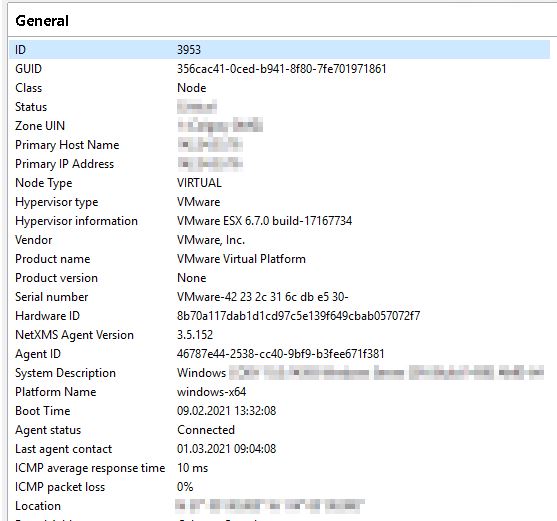
-
Hi,
second issue (404 errors for certain parameters) are normal system activity - server requests various data from nodes, but not every node support all parameters, so 404 response is expected.
PDH error is a bit more strange. When collecting performance counter metadata, agent reads all available objects and counters for each object. Such error means that PDH API reports object, but on attempt to read counters for that object returns error that such object is not found. We will add actual object name to this error message in next patch release - it will help to debug this issue further.
Best regards,
Victor -
-
-
Hi,
can you show exact errors you are getting?
Best regards,
Victor -
Hi Victor,
H_PdhObjectItems: PDH Error C0000BB8 in call to PdhEnumObjectItems for {f3e82f6e-9df4-425d-a5d5-3a9832005b16} (Das angegebene Objekt wurde nicht auf dem Computer gefunden.)H_PdhObjectItems: PDH Error C0000BB8 in call to PdhEnumObjectItems for {7d937e49-cfd5-438f-af4f-b3047d90a5c3} (Das angegebene Objekt wurde nicht auf dem Computer gefunden.)
H_PdhObjectItems: PDH Error C0000BB8 in call to PdhEnumObjectItems for {115b92b4-7191-491a-a9b5-93c8e9fb641b} (Das angegebene Objekt wurde nicht auf dem Computer gefunden.)
best regards,
Alwin -
This is normal behavior - for some reasons PDH reports temporary objects that cannot actually be accessed. You can safely ignore those errors.
Best regards,
Victor
 We have now try to solve this problem, but there is know way for us to do that. Any news on the case yet?
Hello! It looks like you're interested in this conversation, but you don't have an account yet.
Getting fed up of having to scroll through the same posts each visit? When you register for an account, you'll always come back to exactly where you were before, and choose to be notified of new replies (either via email, or push notification). You'll also be able to save bookmarks and upvote posts to show your appreciation to other community members.
With your input, this post could be even better 💗
Register Login