
Daylight savings time issue
-
Hi
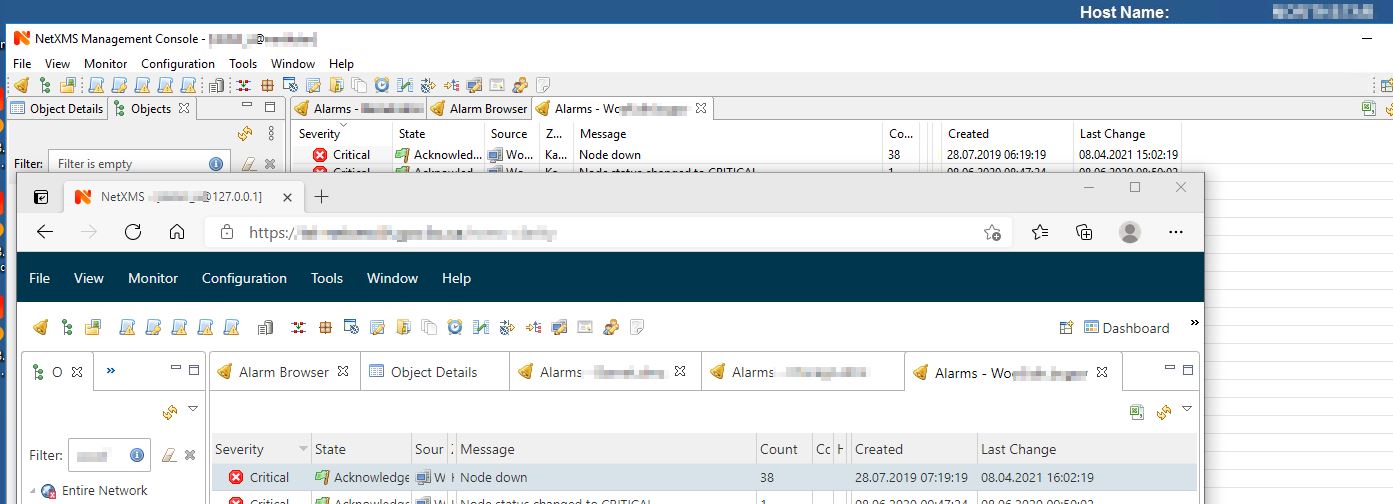
I am running NetXMS 3.5 application on a Windows 2016 application server using Apache Tomcat for the web interface.After daylight savings time came into effect, it was noticed that the web interface was one hour ahead of the console interface for the same events. Users would see "last change" one hour ahead of the local time in DST.
I took a look at the java settings on the app server and applied an explicit time zone to the JVM
-Duser.timezone=Pacific Standard TimeThis did not change anything even for newly logged events.
To see if this did effect the JVM, I changed it to
-Duser.timezone=GMTI noticed the Tomcat logs did change and logged the JVM startup in GMT instead of PDT but the web interface still showed times as before - one hour head of local time.
On my desktop, I modified the Date/Time settings and disabled "adjust for daylight savings time automatically".
This did change the times displayed on my desktop browser but I did not see this as a solution.How can I get the local times to display on browsers correctly?
Attachment shows console and web interface with different times for the same event. Desktop web browser is one hour too far ahead.
Thanks.
Doug
-
In case there was an issue with the Tomcat/Java used by the instance, I installed netxms-webui-3.5.125-x64.exe (self-contained Jetty engine). The result was the same - the timestamp on the application server was mismatched by 1 hour for the web session.
The timezone on each desktop is "Pacific Standard Time". When I change my desktop Date/Time setting to turn OFF "Adjust for daylight saving time automatically", the timestamps of the console and the webui now match but my desktop clock is one hour too early.
We have been using NetXMS and did not have an issue with daylight saving time before.
Any ideas on how can I fix this.

-
Hi,
it seems to be related to how underlying framework (Eclipse RAP) handles time zone settings provided by browser. I will investigate it further.
Did you tried connecting from different browser? If you set workstation to other UTC-7 time zone without DST, will both desktop and web client show correct time?
Best regards,
Victor -
Hi
I tried a few browsers, mostly Edge (Chrome).
Here is a comparison for various timezones and some browsers. I have screen shots for each situation in case you need to see them offline. The results are quite inconsistent. In those cases, I closed my browser(s) and restarted with the same inconsistency.The tables that I would be fine if only I were in the "Central Time" or "Eastern Time"!
NB - added Google Chrome and updated Firefox-(Arizona Time + Eastern Time.)
Thanks.
Regards
Doug

-
I have updated my test server to v3.8 using
netxms-server-3.8.267-x64.exeThis included switching from Java8 to Java OpenSDK13.
My web browser timestamps are still one hour ahead of what they is supposed to be.
Any solution would be greatly appreciated.
Regards
Doug
Hello! It looks like you're interested in this conversation, but you don't have an account yet.
Getting fed up of having to scroll through the same posts each visit? When you register for an account, you'll always come back to exactly where you were before, and choose to be notified of new replies (either via email, or push notification). You'll also be able to save bookmarks and upvote posts to show your appreciation to other community members.
With your input, this post could be even better 💗
Register Login