
Apply status to interface from DCI threshold on switch
-
I've been playing with netxms this week for the first time and have been loving it!
I have created a DCI for an interface to measure the current bits/s by right clicking it and using the built-in 'create data collection items'.
I've also successfully created the thresholds and the events are firing in the event monitor when they're met.
However, if I configure event processing to generate an alarm, the alarm is put on the switch and not the interface itself.
Is there a way to make the alarm generate on the interface? I've looked through the admin guide and searched around, but maybe I'm missing something simple.Thanks!
-
That's how the system is built - while interfaces exist as child objects of a node, events and alarms are created on the node itself.
Interface name is present in event's parameters, so if you need it for some custom processing in Event Processing Policy, you can get it there using NXSL (the built-in scripting language). -
Ok, that makes sense. I'm probably going about this the wrong way then?
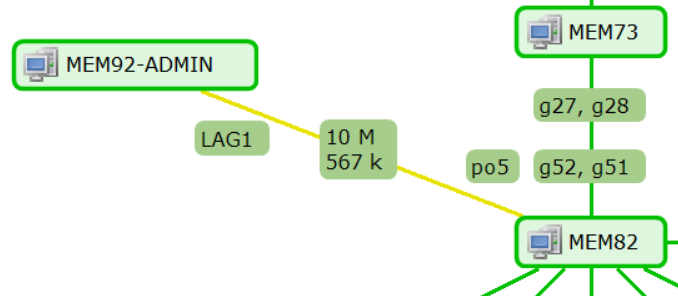
I've seen screenshots where people have a connector between 2 devices on a map where the connector color changes based on bandwidth usage.
I assumed I had to apply the status to the interface and set the color of the connector to the status of the interface.
What's the proper way to do this where a DCI threshold changes the color of a connector and doesn't affect the status of one of the switches it connects? -
Hi,
changing color of the link is also possible if it has DCIs associated - then you can select option "include active thresholds into calculation" in link properties and it will change color if there is active threshold on one of associated DCIs. Side effect is that values of those DCIs will be displayed on the link as well.
Best regards,
Victor -
Hello! It looks like you're interested in this conversation, but you don't have an account yet.
Getting fed up of having to scroll through the same posts each visit? When you register for an account, you'll always come back to exactly where you were before, and choose to be notified of new replies (either via email, or push notification). You'll also be able to save bookmarks and upvote posts to show your appreciation to other community members.
With your input, this post could be even better 💗
Register Login