
Install Server 3.9.156 fails with DB Error
-
Hi @all,
at install from the Server V3.9.156 (over V3.8, Win10, MySQL DB) i got the error:
2021.07.28 10:45:23.820 *I* [logger             ] Log file opened (rotation policy 2, max size 16777216)
2021.07.28 10:45:23.838 *I* [db.drv             ] Database driver "pgsql.ddr" loaded and initialized successfully
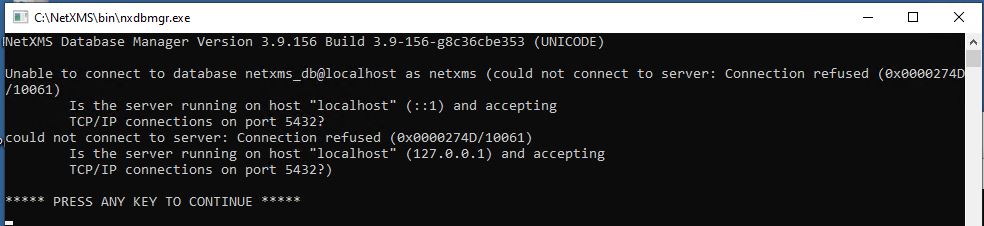
2021.07.28 10:46:13.417 *E* [                   ] Unable to establish connection with database (could not connect to server: Connection refused (0x0000274D/10061)
	Is the server running on host "localhost" (::1) and accepting
	TCP/IP connections on port 5432?
could not connect to server: Connection refused (0x0000274D/10061)
	Is the server running on host "localhost" (127.0.0.1) and accepting
	TCP/IP connections on port 5432?)
(please see screenshot from install at attachment)
But we use MySQL as database.
The netxmsd.conf was completly rewriten from installer with postgress config data.
So i had to copy my old MySQL config into the netxmsd.conf file. After that i had to do a manual upgrade the database with "nxdbmgr upgrade".
After that, i can start the NetXMS Core Service.
Maybe a Dev should take a look into the setup process...
Greetings
Marco
-
Hi,
this should be fixed in installer version 3.9.178.
Best regards,
Victor -
-
What database are you using? What's the contents of netxmsd.conf? Did you install or upgrade?
-
Thanks for your response, sorry for the delay as it was a long holiday weekend here.
This is a new install on Win 10. During install I selected pgsql. (I'm new to installing NetXMS and 'sql' databases)
Here's a copy of the netxmsd.conf
#
# Configuration file generated on Tue Aug 31 15:50:03 2021
#DBDriver=pgsql.ddr
DBServer=localhost
DBName=netxms_db
DBLogin=sa
LogFile=C:\NetXMS\log\netxmsd.log -
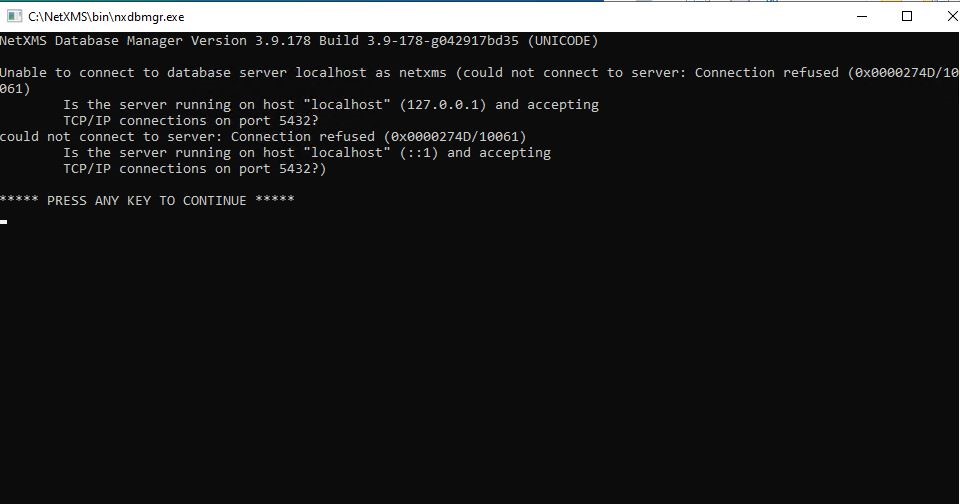
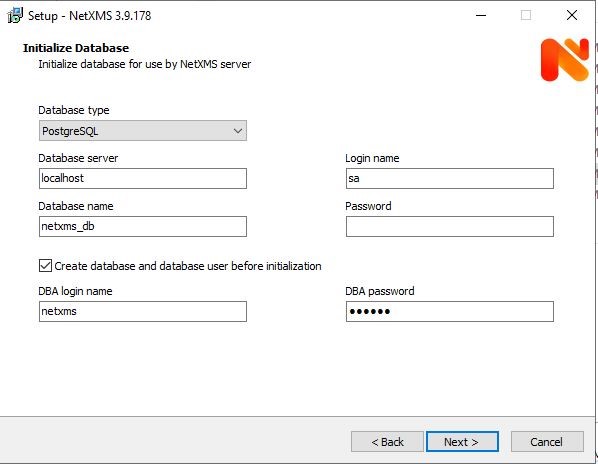
I've attached a couple screenshots of the connection refused window (after the install) and one of the Initialize Database window with the database selection type of PostgreSQL (note was not sure if this database should have been setup prior to the install as I wasn't exactly sure what to fill in for the various fields for the Database Server/Name, Login Name/Password)
thx
-
Yes, Postgres should be installed prior to installing NetXMS. https://www.enterprisedb.com/downloads/postgres-postgresql-downloads
During installation of Posgres you will enter password for super user named "postgres". When installing NetXMS, use DBA login name "postgres" and the password that you entered.Login name, database name and password could be anything - the installed will create postgres uses with that login name and password and will create a database. These credential will be written to NetXMS server configuration file (netxmsd.conf), so when it starts, it will use this information to communication to the database.
-
-
Hello! It looks like you're interested in this conversation, but you don't have an account yet.
Getting fed up of having to scroll through the same posts each visit? When you register for an account, you'll always come back to exactly where you were before, and choose to be notified of new replies (either via email, or push notification). You'll also be able to save bookmarks and upvote posts to show your appreciation to other community members.
With your input, this post could be even better 💗
Register Login