Skip to content
  • Categories
  • Recent
  • Tags
  • Popular
  • Users
  • Groups
Skins
  • Light
  • Brite
  • Cerulean
  • Cosmo
  • Flatly
  • Journal
  • Litera
  • Lumen
  • Lux
  • Materia
  • Minty
  • Morph
  • Pulse
  • Sandstone
  • Simplex
  • Sketchy
  • Spacelab
  • United
  • Yeti
  • Zephyr
  • Dark
  • Cyborg
  • Darkly
  • Quartz
  • Slate
  • Solar
  • Superhero
  • Vapor

  • Default (Flatly)
  • No Skin
Collapse
Brand Logo

NetXMS Forum

  1. Home
  2. Support
  3. Many unsupported DCIs since updating NetXMS

Many unsupported DCIs since updating NetXMS

Scheduled Pinned Locked Moved Support
6 Posts 3 Posters 33.2k Views
  • Oldest to Newest
  • Newest to Oldest
  • Most Votes
Reply
  • Reply as topic
Log in to reply
This topic has been deleted. Only users with topic management privileges can see it.
  • S
    S
    stoffmann
    wrote on last edited by
    #1

    Hi,

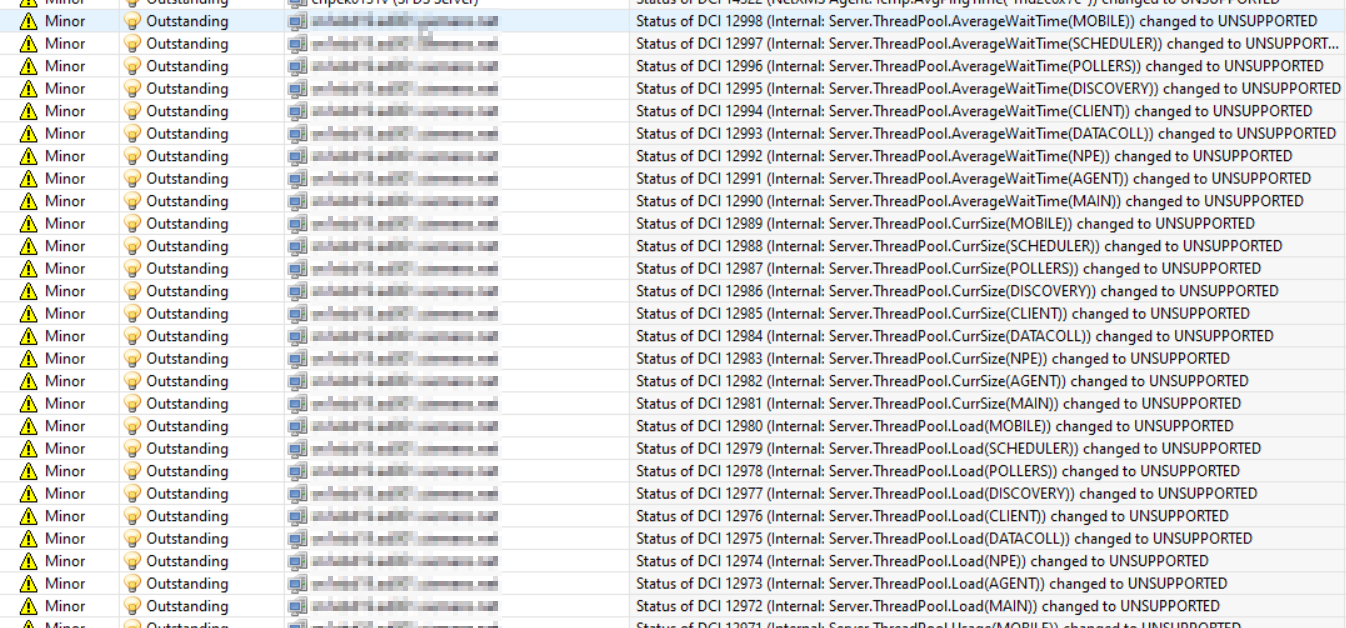
    after updating NetXMS to the latest version, I get a lot of alarms because of unsupported DCIs (see attachment 1).
    I had this once in the past and was able to fix this by setting the "ImportConfigurationOnStartup" setting to always. This time it doesn't help.
    Any suggestions?

    Best regards

    Stefan


    2021-12-13 08_29_13-NetXMS Management Console - hofma04s@sn1ebd19.ad001.siemens.net.png

    2021-12-13 08_30_26-NetXMS Management Console - hofma04s@sn1ebd19.ad001.siemens.net.png

    1 Reply Last reply
    0
    • A
      A
      Alex Kirhenshtein
      wrote on last edited by
      #2

      Hello.

      These metrics are provided by the netxmsd itself, and they are from the template System/NetXMS Server/Thread pools.
      Template is applied based on the $node->isLocalManagement flag, which is always set by the monitoring server.

      So the only possible cause for this I can imagine is that this node was server's node for some time, then server was started on different node (e.g. high availability setup with active/passive nodes).
      Template is removed on the configuration poll, so it will remain active for a while - hence the alarms (which should be automatically terminated, if I recall correctly).

      Check following:

      1. is this node your active netxms server?
      2. does it have isLocalManagement flag set? (right click on the node -> Execute server script -> "println($node->isLocalManagement);")
      3. what happens with these metrics if you force configuration poll on this node?
      1 Reply Last reply
      0
      • S
        S
        stoffmann
        wrote on last edited by
        #3

        Hi Alex,
        thanks for Your reply.

        Here are my answers:

        1. It is the active server (we only have one)
        2. I think no. The command returns false. Please see the attache screenshot.
        3. I did the poll today, let's see if the alarms come back tomorrow

        Some additional info that I think might help.

        • After terminating the alarms they come back the next day.
        • In addition to the update, the NetXMS installation was moved to a new server.

        Best regards

        Stefan
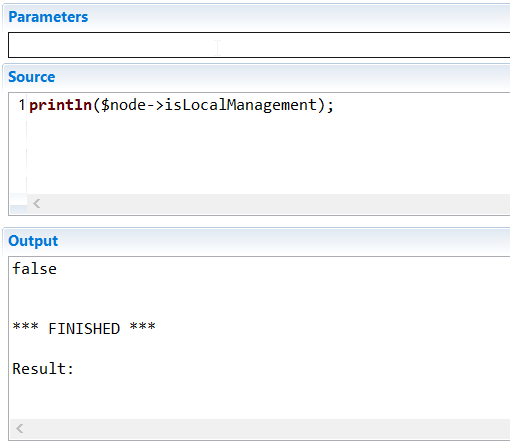

        2021-12-16 09_40_15-NetXMS Management Console - hofma04s@sn1ebd19.ad001.siemens.net.png

        1 Reply Last reply
        0
        • S
          S
          stoffmann
          wrote on last edited by
          #4

          Hi,

          the alarms are back, so the Cofiguration Poll had no effect. So I think it's the "isLocalManagement flag".
          If I understand You right, is has to be true if this is the active NetXMS server. How can I set it to true?.

          Regards

          Stefan

          1 Reply Last reply
          0
          • S
            S
            stoffmann
            wrote on last edited by
            #5

            Any idea? Do You need more informations?

            Best regards

            Stefan

            1 Reply Last reply
            0
            • V
              V
              Victor Kirhenshtein
              wrote on last edited by
              #6

              Hi,

              isLocalManagement flag is set automatically. I suggest to find node that currently holds management server flag using object query or NXSL script, delete it, then set server configuration parameter RoamingServer to true and change primary IP address on node that should be local management server to 127.0.0.1. That way management node will be fixed.

              Best regards,
              Victor

              1 Reply Last reply
              0

              Hello! It looks like you're interested in this conversation, but you don't have an account yet.

              Getting fed up of having to scroll through the same posts each visit? When you register for an account, you'll always come back to exactly where you were before, and choose to be notified of new replies (either via email, or push notification). You'll also be able to save bookmarks and upvote posts to show your appreciation to other community members.

              With your input, this post could be even better 💗

              Register Login
              Reply
              • Reply as topic
              Log in to reply
              • Oldest to Newest
              • Newest to Oldest
              • Most Votes


              • Login

              • Don't have an account? Register

              • Login or register to search.
              Powered by NodeBB Contributors
              • First post
                Last post
              0
              • Categories
              • Recent
              • Tags
              • Popular
              • Users
              • Groups