
Report server - Windows
-
This is a continuation of this thread:
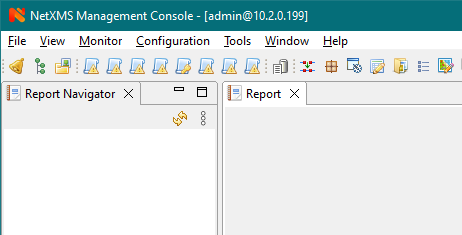
https://www.netxms.org/forum/general-support/install-report-server/15/Based on what I can find, the report server is now included in the main NetXMS installation. I'm currently on 4.0.2157 and after reading one of the other threads (not the documentation), learned that I had to install Java 15 on the server itself. I now have a report navigator window (again, something I learned from a forum post, not the documentation) that looks like the attached image.
The last response on the thread linked above said I had to create the reports myself. I have no idea how to do that, or where to put the files (on Windows) that previous post is referencing to even begin to try and make my own.
The documentation that is available: https://www.netxms.org/documentation/adminguide/reporting.html, references using Jaspersoft Studio, although the documentation states "Simplest way to create jar files are using Maven, empty project is provided in samples archive.". Which is it?
Samples archive is not linked, where is this archive? The documentation only talks about the format of the file expected, and not how to create it.
I downloaded Jaspersoft Studio, and have no idea what do do from this point. Am I supposed to connect to the NetXMS DB with a data adapter?
Thanks
-
Check this repo: https://github.com/netxms/sample-report
-
@alk said in Report server - Windows:
Check this repo: https://github.com/netxms/sample-report
Thank you for the link. Can you let me know where this is in the documentation? Did I miss something?
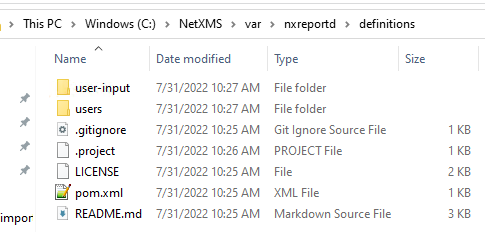
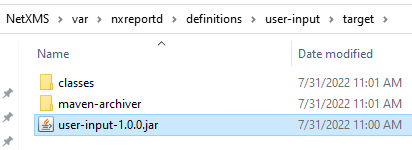
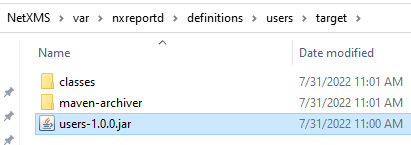
What do I do with it? I was able to get Maven to compile the .jar files. I placed them in what I think is the correct place, see photos below.
After restarting the core service along with the reporting service, I still have an empty report navigator window.
Thanks
-
You need to copy just .jar (or .zip) files to definitions folder. These files will be unpacked by the reporting server and deployed automatically.
-
Thank you.
I now have the reports in the console and can run the sample reports.
How do I create a new report?
How does Jaspersoft studio know what fields are available? Does it need to / can it connect to the database directly?
Or do I just have to build my own query, replacing this line and write the XML to display it?
<![CDATA[SELECT id, name, full_name, description, email, phone_number FROM users ORDER BY name]]>My goal is to create a report to list the quantity of each type of device in the entire organization.
Thanks
-
Simplest way is to copy any sample report, change name in file .project, then import into jaspersoft studio. Another way - copy, import, then rename project in the studio.
Once done, edit pom.xml and change "buildUuid" to any other UUID (it's used to distinguish between deployed reports).Then open main.jrxml and start designing.
DB connection is provided by the reporting server or jaspersoft studio during development phase.
Fields are either defined manually, or you can click "read" in query editor. -
-
-
-
Jasper Reports is a 3rd-party product. All custom extensions (parameter types for GUI, etc.) are described the repository i've shared earlier.
Report designer is unrelated to the NetXMS and you should see TIBCO's guides.
Check section "Resources" at https://www.jaspersoft.com/products/jaspersoft-studio, specifically this video: https://www.youtube.com/watch?v=yRLvJgz9Dxk.Alternatively, we can offer you custom development or training on both NetXMS and reporting. Plese contact [email protected] for offer.
@blairmc96 said in Report server - Windows:
Can I please get some help with this?
Hello! It looks like you're interested in this conversation, but you don't have an account yet.
Getting fed up of having to scroll through the same posts each visit? When you register for an account, you'll always come back to exactly where you were before, and choose to be notified of new replies (either via email, or push notification). You'll also be able to save bookmarks and upvote posts to show your appreciation to other community members.
With your input, this post could be even better 💗
Register Login