Skip to content
  • Categories
  • Recent
  • Tags
  • Popular
  • Users
  • Groups
Skins
  • Light
  • Brite
  • Cerulean
  • Cosmo
  • Flatly
  • Journal
  • Litera
  • Lumen
  • Lux
  • Materia
  • Minty
  • Morph
  • Pulse
  • Sandstone
  • Simplex
  • Sketchy
  • Spacelab
  • United
  • Yeti
  • Zephyr
  • Dark
  • Cyborg
  • Darkly
  • Quartz
  • Slate
  • Solar
  • Superhero
  • Vapor

  • Default (Flatly)
  • No Skin
Collapse
Brand Logo

NetXMS Forum

  1. Home
  2. Support
  3. Agent Tables

Agent Tables

Scheduled Pinned Locked Moved Support
6 Posts 3 Posters 31.2k Views
  • Oldest to Newest
  • Newest to Oldest
  • Most Votes
Reply
  • Reply as topic
Log in to reply
This topic has been deleted. Only users with topic management privileges can see it.
  • R
    R
    richard21
    wrote on last edited by
    #1

    I have a Script that is populating an External table with the status of Veeam Backup Jobs.
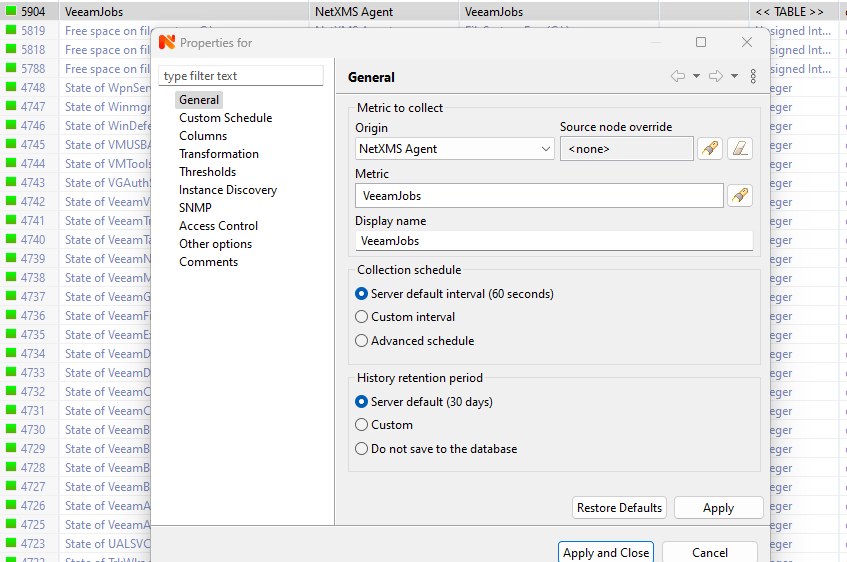
    this is working and I can see the table in the client however I cant create an instance for each row bassed on the index to allow me to create thresholds for each backup.

    if i create a table DCI and use tablename(1) then I just get in supported 


    Table in Gui.png

    Table DCI.png

    1 Reply Last reply
    0
    • F
      F
      Filipp Sudanov
      wrote on last edited by
      #2

      Can you show your external table configuration in agent configuration file?

      1 Reply Last reply
      0
      • R
        R
        richard21
        wrote on last edited by
        #3

        Hi Filipp,

        sorry for the late reply I only just saw your reply this is the external table config in the agent config

        [ExternalTable/VeeamJobs]
        Command = powershell C:\tools\Get-VeeamJobs.ps1
        Separator = |
        InstanceColumns=Name
        Description=Veeam Backup Jobs
        PollingInterval = 60
        ColumnType = Index:int32
        ColumnType = Name:string
        ColumnType = Status:string
        ColumnType = Result:string
        ColumnType = StartTime:string
        ColumnType = EndTime:string
        ColumnType = Duration:float
        ColumnType = HrsSinceLastRun:float

        1 Reply Last reply
        0
        • F
          F
          Filipp Sudanov
          wrote on last edited by
          #4

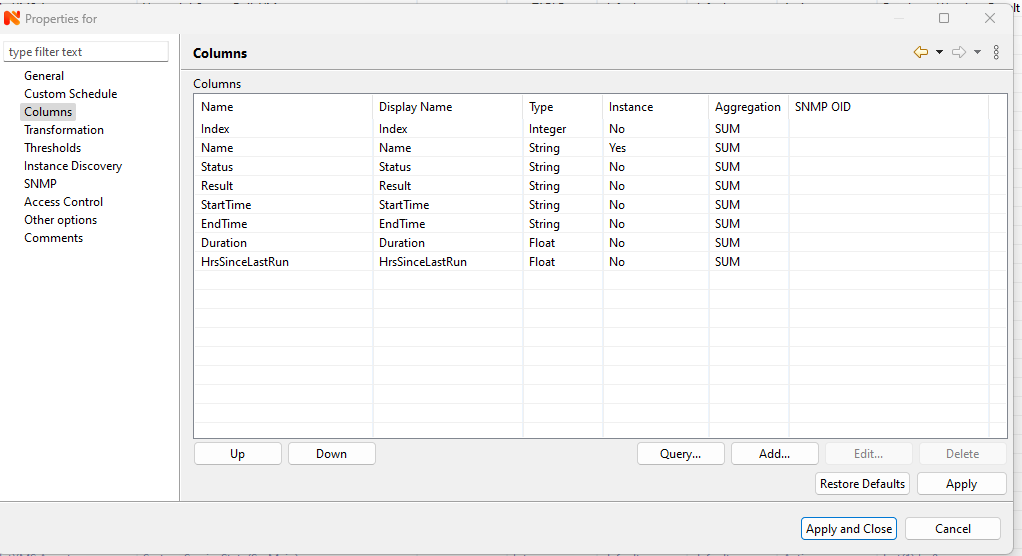
          And what is in Columns in table properties?

          1 Reply Last reply
          0
          • R
            R
            richard21
            wrote on last edited by
            #5

            This is the table properties within NETXMS


            netxms.png

            1 Reply Last reply
            0
            • V
              V
              Victor Kirhenshtein
              wrote on last edited by
              #6

              I probably do not completely understand what the issue is. Configuration looks correct, you set "Name" column as instance column, not an "Index". But it should work both ways.
              1 Reply Last reply
              0

              Hello! It looks like you're interested in this conversation, but you don't have an account yet.

              Getting fed up of having to scroll through the same posts each visit? When you register for an account, you'll always come back to exactly where you were before, and choose to be notified of new replies (either via email, or push notification). You'll also be able to save bookmarks and upvote posts to show your appreciation to other community members.

              With your input, this post could be even better đź’—

              Register Login
              Reply
              • Reply as topic
              Log in to reply
              • Oldest to Newest
              • Newest to Oldest
              • Most Votes


              • Login

              • Don't have an account? Register

              • Login or register to search.
              Powered by NodeBB Contributors
              • First post
                Last post
              0
              • Categories
              • Recent
              • Tags
              • Popular
              • Users
              • Groups