
Reporting Module not working 4.1.420
-
I've installed NetXMS-Server 4.1.420, WebGUI: nxmc-legacy-4.1.420 , WebServer: Jetty 9.4.45 all on the same Ubuntu 22.04 machine
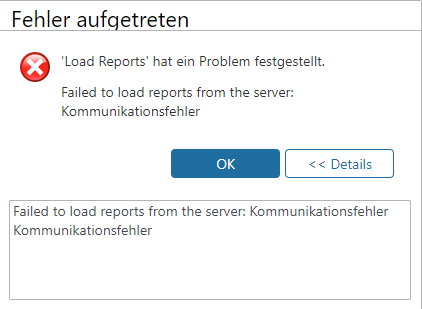
After I installed the netxms-reporting (4.1.420) Module I get the attached error in the WebGUI when I open the Reports-Tab.
I'm using the default Port and Hostname 127.0.0.1:4710
Also I didn't see any option to change the listening Port for the netxms-reporting Modul.
Is this Modul only locally on the same machine usable?

-
Try running
systemctl daemon-reload
as it's suggesting.Then try
systemctl start netxms-reporting.servicesystemctl status netxms-reporting.service
and
journalctl -u netxms-reporting.service
should provide information about status of the reporting service -
Thank you for your quick reply.
At first the "daemon-reload" did nothing,
because for unknown reasons there was no "netxms-reporting.service" but a "nxreport.service".I just renamed the services under "/etc/systemd/system/" as well as "/lib/systemd/system/". Then the service could start successfully.
Attached is a snapshot of "journalctl -u netxms-reporting.service", does this work correctly?
where can I define the IP and port on which the reporting service listens? Currently it is bound to 127.0.0.1:4710

-
Listening IP can be change by setting java option nxreportd.bindAddress, simplest way to do it is adding -Dnxreportd.bindAddress=1.2.3.4 to JAVA_OPTIONS in /usr/bin/nxreportd
Port is currently hard-coded. If it's causing problems, it could be made configurable is some future patch release.
-
Thanks, the connection seems to work with that.
Now I have another problem unfortunately
I used the instructions from How To: NetXMS Reports in 2021 and used the sample file as a test. The report is correctly displayed to me on the main NetXMS, but the report cannot be generated. When clicking on "execute now" a pop-up appears with the message "Sample Report - Users execution started successfully" and then the status in the results shows Error.
journalctl -axeu netxms-reporting.service throws the error
"java.sql.SQLException: Access denied for user '<user>'@'localhost' (using password: YES)".As I understand it, the reporting server gets the SQL credentials from the main netxms. How should this work, since the main netxms accesses SQL via <user>@localhost, but the reporting server has to access via <user>@<reporting-server-ip>?
-
Yes, reporting process gets database credentials from netxmsd process. What is the value of DBServer= in your netxmsd.conf ?
-
In the netxmsd.conf the parameter DBServer=127.0.0.1 was entered.
I have now entered the IP of the main server.
Afterwards I created a new user for the reporting server with read-only permission on the SQL-DB and now the reporting module is running.So now there are the following DB users:
<user>@<main-netxms>
<user>@<netxms-reporting>Thanks for your help
Hello! It looks like you're interested in this conversation, but you don't have an account yet.
Getting fed up of having to scroll through the same posts each visit? When you register for an account, you'll always come back to exactly where you were before, and choose to be notified of new replies (either via email, or push notification). You'll also be able to save bookmarks and upvote posts to show your appreciation to other community members.
With your input, this post could be even better 💗
Register Login