
Issues with mapping and GPS Coordinates
-
I'm not sure if I'm doing something wrong, or if things are just broken; I'm not having much luck with mapping.
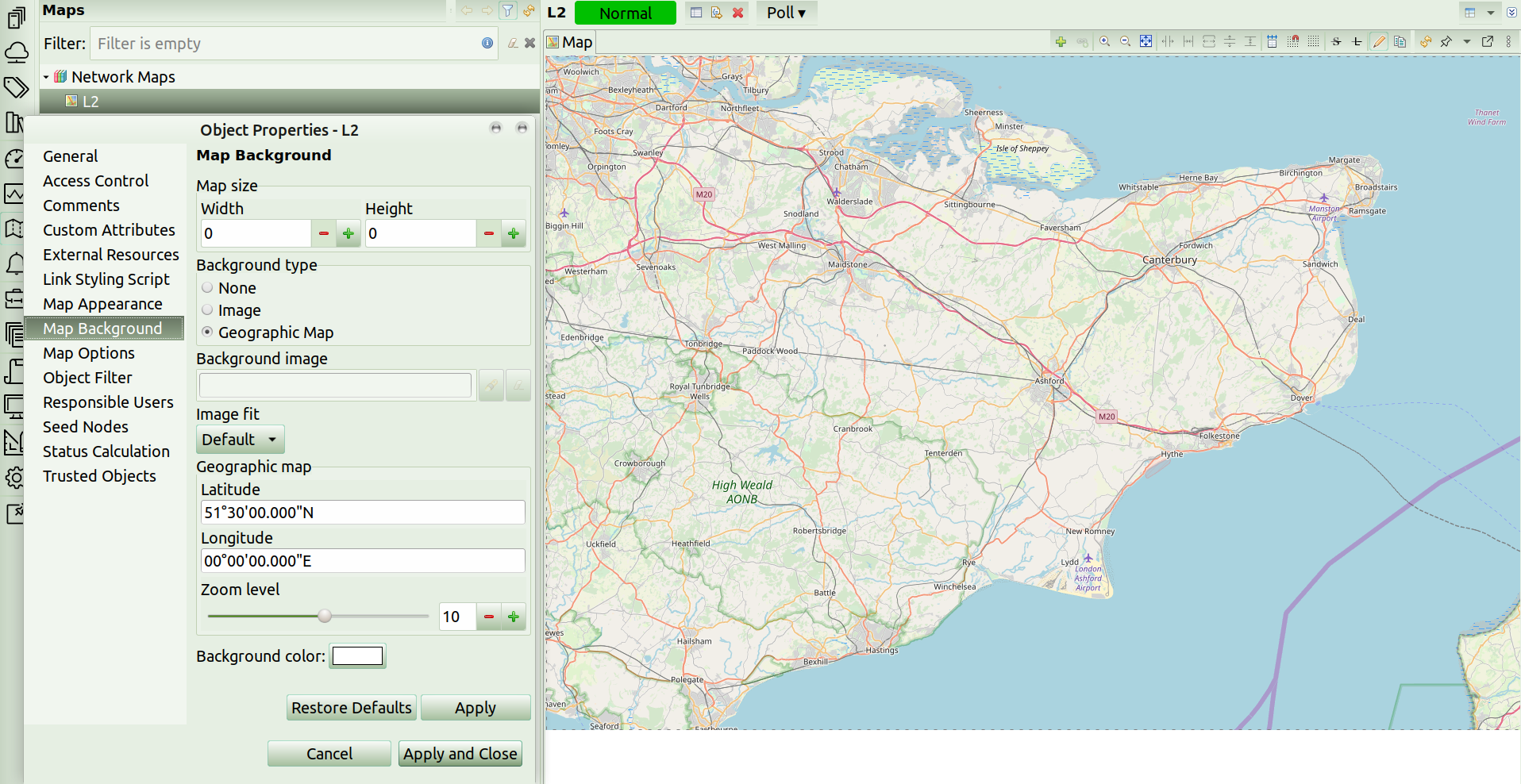
I created a map with the background set to Geographic Map. I then set the GPS coordinates. However, the map displayed is something totally different:
https://ibb.co/dbVqwM7I guess that is problem #1.
My second problem, is that objects don't display based on the location set in the object properties. (although if the problem #1 above is broken, then this problem #2 is never going to look right).
Shouldn't objects appear on the Geo-location Map based on the location set in their properties?
My third issue is that (I assumed) setting a location (or location details like city, district, zip code, etc) on a container would push those values down to lower level objects, including location/GPS details. If all objects in a container are at the same location then wouldn't setting the values at a higher level cause them to be set automatically on the lower level object?
-
Map coordinates are set on the upper left corner (this may change in the future, but that's how it currently is).
Geographical map acts only as a backdrop on network maps, there is no link with object geographical coordinates. There were thoughts to introduce network map type that would use objects coordinates, but we are not there yet.
There is, however a way to view devices positioned on a map - it's Tools->World map, or on devices which have geolocation entered there's Geolocation tab.
-
Can you send a screenshot of "Map coordinates are set on the upper left corner" ? I'm not sure if I'm missing something.
If I set the map coordinates in the properties, it refuses to even show me that part of the world. https://ibb.co/dbVqwM7
(please see map coordinates as they are set, vs the map that is displayed). I can't even get my part of the world to load in the map view, at all... that's sort of my biggest problem. -
I mean that coordinates set in map properties correspond to what's in the upper left corner of the map. So e.g. if I take latitude 51°30'N and longitude 0, I'll have London in the corner of my map.
-
Hello! It looks like you're interested in this conversation, but you don't have an account yet.
Getting fed up of having to scroll through the same posts each visit? When you register for an account, you'll always come back to exactly where you were before, and choose to be notified of new replies (either via email, or push notification). You'll also be able to save bookmarks and upvote posts to show your appreciation to other community members.
With your input, this post could be even better 💗
Register Login