
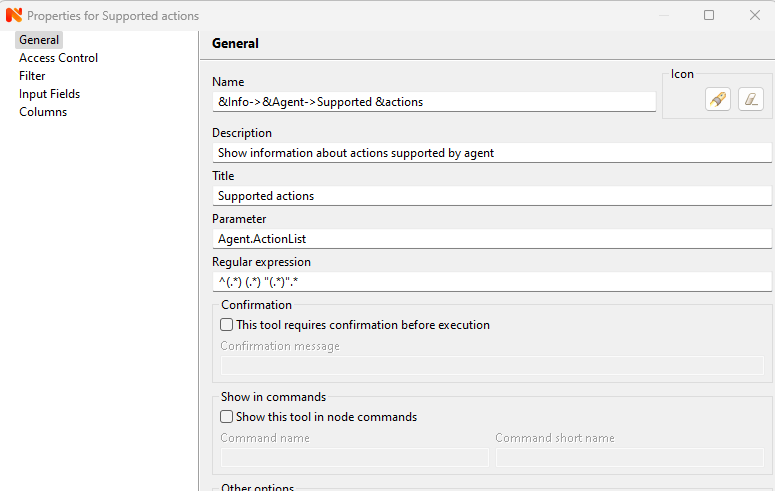
Server crash on "Supported actions"
-
Please enable
CreateCrashDumps
in server config file and specify folder to store them by DumpDirectory parameter in config (Default is C:\)
Share the file somewhere and send me link to in in private message (or I can provide a place to upload it if needed)
-
I tried that but it seems there is no crash dump created. Is this possible or am I looking at the wrong place?
-
Well, could be that something related to crash dumps is broken.
As additional check, can you stop NetXMS Core service and run server manually from Windows command line:
c:\NetXMS\bin\netxmsd -D 6
pls show last line of output, when it crashes.
-
I switched to DebugLevel = 7 before trying the crash dump, so I have this already:
2024.09.10 08:35:09.059 *D* [db.cpool ] Handle 00000217E16C5300 acquired (call from c:\jenkins\workspace\release-windows\src\server\core\objtools.cpp:86)
2024.09.10 08:35:09.060 *D* [db.cpool ] Handle 00000217E16C5300 released
2024.09.10 08:35:09.060 *D* [db.cpool ] Handle 00000217E16C5300 acquired (call from c:\jenkins\workspace\release-windows\src\server\core\objtools.cpp:120)
2024.09.10 08:35:09.060 *D* [db.cpool ] Handle 00000217E16C5300 released
2024.09.10 08:35:09.060 *D* [db.cpool ] Handle 00000217E16C5300 acquired (call from c:\jenkins\workspace\release-windows\src\server\core\objtools.cpp:561)
2024.09.10 08:35:09.060 *D* [db.cpool ] Handle 00000217E16C5300 released
2024.09.10 08:35:09.060 *D* [client.session.0 ] Sending message CMD_REQUEST_COMPLETED (32 bytes)
2024.09.10 08:35:09.060 *D* [db.cpool ] Handle 00000217E16C5300 acquired (call from c:\jenkins\workspace\release-windows\src\server\core\objtools.cpp:255)
2024.09.10 08:35:09.061 *D* [node.agent ] Node::createAgentConnection(XXXX [46389]): using agent tunnel
2024.09.10 08:35:09.061 *D* [agent.conn.403 ] New connection created (address=UNSPEC port=0 compression=allowed)
2024.09.10 08:35:09.061 *D* [agent.tunnel.180 ] Sending message CMD_CREATE_CHANNEL (2)
2024.09.10 08:35:09.063 *D* [agent.tunnel.180 ] Received message CMD_REQUEST_COMPLETED (2)
2024.09.10 08:35:09.063 *D* [agent.tunnel.180 ] createChannel: new channel created (ID=290)
2024.09.10 08:35:09.064 *D* [agent.tunnel.180 ] Received message CMD_CHANNEL_DATA (290)
2024.09.10 08:35:09.064 *D* [agent.conn.403 ] Using NXCP version 5
2024.09.10 08:35:09.064 *D* [agent.conn.403 ] Sending message CMD_REQUEST_SESSION_KEY (1) to agent at UNSPEC
2024.09.10 08:35:09.066 *D* [agent.tunnel.180 ] Received message CMD_CHANNEL_DATA (290)
2024.09.10 08:35:09.066 *D* [agent.conn.403 ] Received message CMD_SESSION_KEY (1) from agent at UNSPEC
2024.09.10 08:35:09.079 *D* [agent.conn.403 ] Sending message CMD_AUTHENTICATE (2) to agent at UNSPEC
2024.09.10 08:35:09.080 *D* [agent.tunnel.180 ] Received message CMD_CHANNEL_DATA (290)
2024.09.10 08:35:09.080 *D* [agent.conn.403 ] Received message CMD_REQUEST_COMPLETED (2) from agent at UNSPEC
2024.09.10 08:35:09.080 *D* [agent.conn.403 ] Sending message CMD_SET_SERVER_CAPABILITIES (3) to agent at UNSPEC
2024.09.10 08:35:09.080 *D* [agent.tunnel.180 ] Received message CMD_CHANNEL_DATA (290)
2024.09.10 08:35:09.080 *D* [agent.conn.403 ] Received message CMD_REQUEST_COMPLETED (3) from agent at UNSPEC
2024.09.10 08:35:09.081 *D* [node.agent ] Node::createAgentConnection(XXXX [46389]): conn=000002178265C090
2024.09.10 08:35:09.081 *D* [agent.conn.403 ] Sending message CMD_GET_LIST (4) to agent at UNSPEC
2024.09.10 08:35:09.081 *D* [agent.tunnel.180 ] Received message CMD_CHANNEL_DATA (290)
2024.09.10 08:35:09.081 *D* [agent.conn.403 ] Received message CMD_REQUEST_COMPLETED (4) from agent at UNSPEC -
Looks like DumpDirectory should be specified for dump collection to work. Pls create C:\NetXMS\crash
folder and try the following in netxmsd.conf:CreateCrashDumps=yes
DumpDirectory=C:\NetXMS\crash -
I did that, I see there a log file created, but no dump files unfortunately.
-
Log file in C:\NetXMS\crash ?
Pls share it -
-
The crash collector service seems to be running fine, so seems that server is nor really crashing.
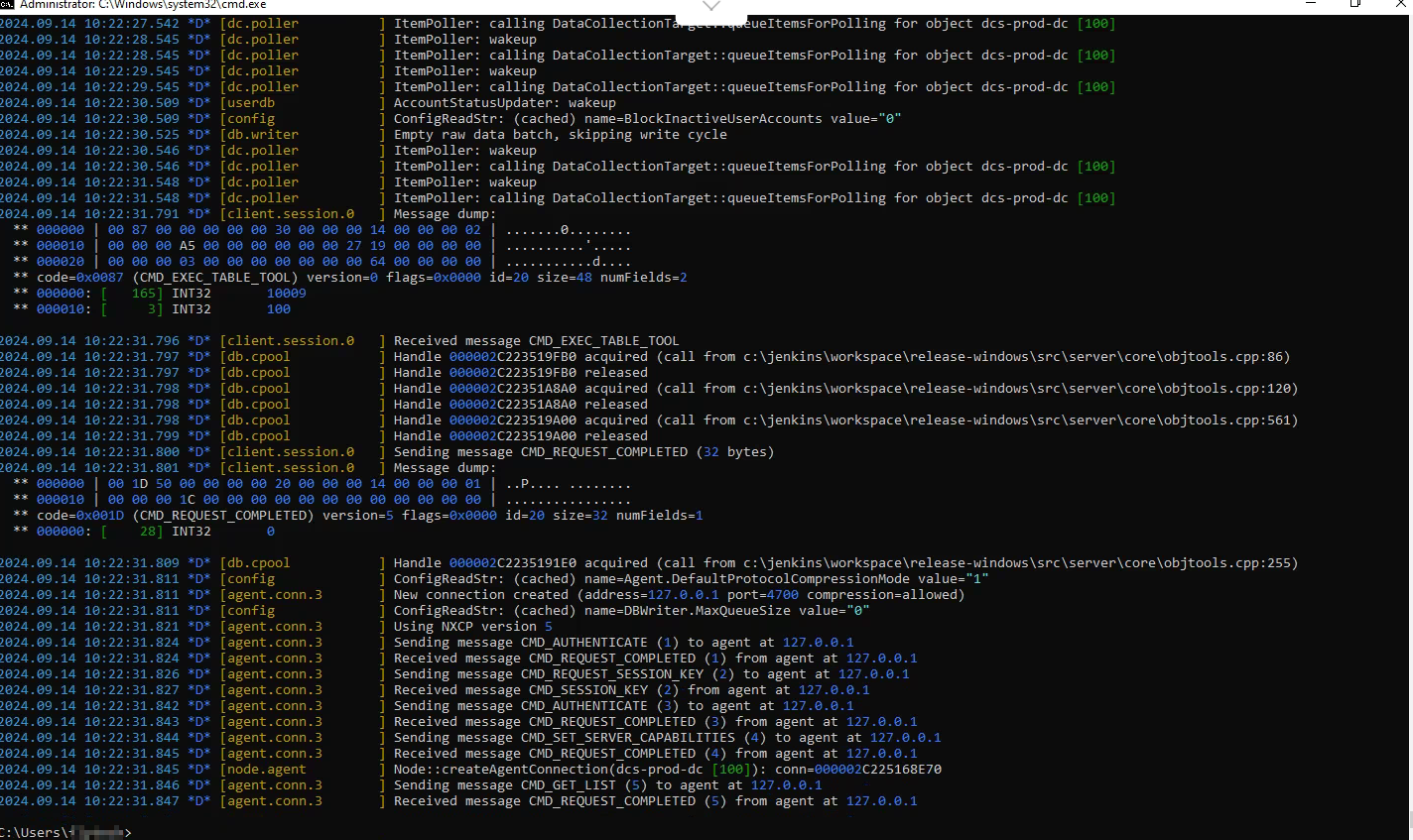
Can you stop netxms core service and run it from command line:
C:\NetXMS\bin\netxmsd -D 6
and once the issue occurs, pls share the screenshot of whole cmd window.
-
I just did an empty server installation for testing, it still happens. The server process just exits.
-
Does it happen with some remote agent, or also with agent that runs along with the server?
For now the reason is not clear. Can you enable DebugLevel 8 on the server and that agent and share their logs?
Any chances we can remote access to this Windows system?
-
Ok, I did some further testing. As I said, I installed a blank server, but the agent had already some configuration pulled from our production server, and one setting trigged the crash apparently.
The issue seems to be an "Action" with long command:Action = Test:echo abcdefghijklmnopqrstuvwxyzABCDEFGHIJKLMNOPQRSTUVWXYZ1234567890!@$%abcdefghijklmnopqrstuvwxyzABCDEFGHIJKLMNOPQRSTUVWXYZ1234567890!@$%abcdefghijklmnopqrstuvwxyzABCDEFGHIJKLMNOPQRSTUVWXYZ1234567890!@$%abcdefghijklmnopqrstuvwxyzABCDEFGHIJKLMNOPQRSTUVWXYZ1234567890!@$%abcdefghijklmnopqrstuvwxyzABCDEFGHIJKLMNOPQRSTUVWXYZ1234567890!@$%abcdefghijklmnopqrstuvwxyzABCDEFGHIJKLMNOPQRSTUVWXYZ1234567890!@$%Add this to the agent's configuration and the object tool "Supported actions" will crash the server process.
-
Just fixed it. Fix will be included into next release. Thank you for debugging and providing steps to reproduce!
Best regards,
Victor
Hello! It looks like you're interested in this conversation, but you don't have an account yet.
Getting fed up of having to scroll through the same posts each visit? When you register for an account, you'll always come back to exactly where you were before, and choose to be notified of new replies (either via email, or push notification). You'll also be able to save bookmarks and upvote posts to show your appreciation to other community members.
With your input, this post could be even better 💗
Register Login