Skip to content
  • Categories
  • Recent
  • Tags
  • Popular
  • Users
  • Groups
Skins
  • Light
  • Brite
  • Cerulean
  • Cosmo
  • Flatly
  • Journal
  • Litera
  • Lumen
  • Lux
  • Materia
  • Minty
  • Morph
  • Pulse
  • Sandstone
  • Simplex
  • Sketchy
  • Spacelab
  • United
  • Yeti
  • Zephyr
  • Dark
  • Cyborg
  • Darkly
  • Quartz
  • Slate
  • Solar
  • Superhero
  • Vapor

  • Default (Flatly)
  • No Skin
Collapse
Brand Logo

NetXMS Forum

  1. Home
  2. Support
  3. How to set node dependencies

How to set node dependencies

Scheduled Pinned Locked Moved Support
15 Posts 3 Posters 106.6k Views
  • Oldest to Newest
  • Newest to Oldest
  • Most Votes
Reply
  • Reply as topic
Log in to reply
This topic has been deleted. Only users with topic management privileges can see it.
  • F
    F
    Filipp Sudanov
    wrote on last edited by
    #2

    NetXMS has automatic event correlation based on topology. For this to work, NetXMS server should have snmp access to all routers between itself and your APs, then it would have full topology picture.

    You can check by right-clicking on an AP, Route from... and choosing NetXMS server node. The other way to check is probably an automatic L3 network map.

    I might be wrong about peculiarities of how all this works, would be good to hear if this works on your system.

    1 Reply Last reply
    0
    • R
      R
      redlam
      wrote on last edited by
      #3

      Everything I am monitoring does have SNMP access. Each site has two Mikrotik routers and some UBNT access points. It seems that the server is not able to determine the topology with much accuracy. There is a lot missing. None of the access points show up, there are a lot of links and routers missing. I'm guessing this is why the automatic dependencies are not working properly.  

      The Layer 2 topology is the only map that seems to work, but still missing a lot of devices. I don't really care about the map so much if I could find a way to manually set up dependencies. If the only way to have dependencies is to have a fully functioning topology map then I guess I can start troubleshooting that instead.

      1 Reply Last reply
      0
      • V
        V
        Victor Kirhenshtein
        wrote on last edited by
        #4

        Hello!

        Can you show what NetXMS discovered for one such tower router (ad-hoh topology map for example, or export if interface table on relevant devices), and what is actual topology. We can troubleshoot topology discovery from there.

        Another option for manual correlation is to somehow determine or mark relations between devices. Actual implementation will depend on your setup, below is just one example.
        If you have setup like one router per tower with bunch of other devices connected to that router, you can place devices for each tower into separate container. Then you can add custom filter script to EPP rule that process SYS_NODE_DOWN event, and in that script check if device is a main tower router or additional device, and in second case, check current state of main router for the tower (which can be found based on container membership). If tower router is down, then block processing of SYS_NODE_DOWN in question.
        Instead of placing devices from each tower into separate container, you can set custom attribute indicating tower number and maybe device role.

        Best regards,
        Victor

        1 Reply Last reply
        0
        • R
          R
          redlam
          wrote on last edited by
          #5

          I'm not sure how to export but hopefully these screenshots are what you are needing. This is a tower site fed by wireless backhaul. One main mikrotik router. Plugged into this router we have another mikrotik acting as an environmental alarm, and two UBNT access points. I suspect its not working because the UBNT devices do not detect a peer node, but I really have no idea. I know UBNT snmp is not the best.

          https://www.dropbox.com/scl/fi/hv6p9a3orqtxfa07osbhq/9-19-2024-7-36-41-AM.jpg?rlkey=wzauszd3qdj3qge19ns2lrkvp&dl=0

          Link Preview Image
          Dropbox - 400

          favicon

          (www.dropbox.com)

          Link Preview Image
          Dropbox - 400

          favicon

          (www.dropbox.com)

          https://www.dropbox.com/scl/fi/74dwk46uk64plorghqv2c/9-19-2024-7-42-29-AM.jpg?rlkey=of5mdqhcpazwzp917yg51kc9s&dl=0

          Link Preview Image
          Dropbox - 400

          favicon

          (www.dropbox.com)

          1 Reply Last reply
          0
          • V
            V
            Victor Kirhenshtein
            wrote on last edited by
            #6

            Do those Ubiquity APs support LLDP?

            Also, important part of topology-based correlation is ability of the server to find route from itself to managed devices. Try to select one of the Ubiquity APs, choose "route from" from context menu, and select node representing NetXMS server itself as source. Will it show complete IP path?

            Best regards,
            Victor

            1 Reply Last reply
            0
            • R
              R
              redlam
              wrote on last edited by
              #7

              From what I can find they do not support LLDP, only CDP.

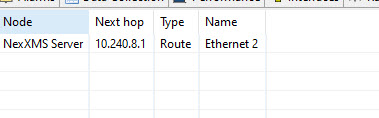
              I tried "route from" and pointed to the server and got this result:


              9-19-2024 11-30-43 AM.jpg

              1 Reply Last reply
              0
              • F
                F
                Filipp Sudanov
                wrote on last edited by
                #8

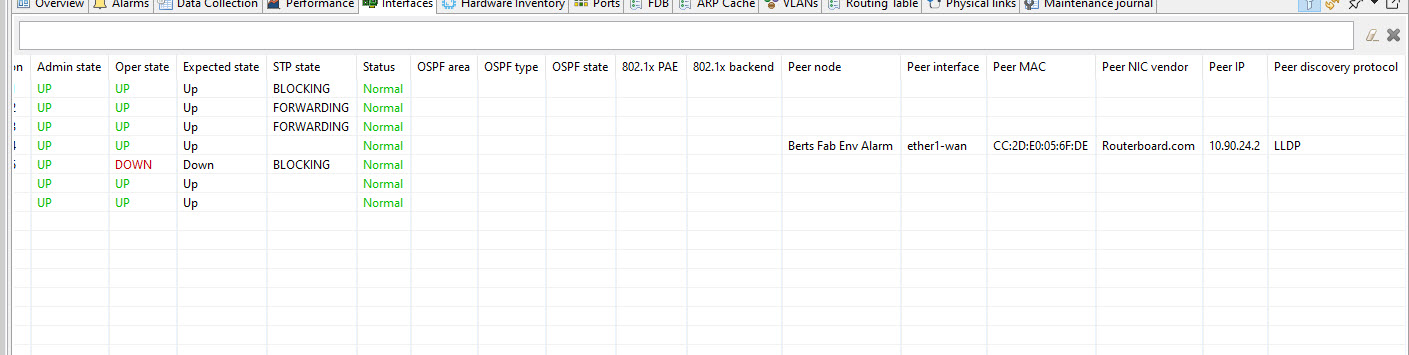
                Can you also show screenshot of interfaces for tower's main router? Does it see APs as peer nodes?

                As for "route from" NetXMS server - it shows 10.240.8.1 as the next hop, but looks like there's no corresponding node in NetXMS, that's why it can not continue.

                1 Reply Last reply
                0
                • R
                  R
                  redlam
                  wrote on last edited by
                  #9

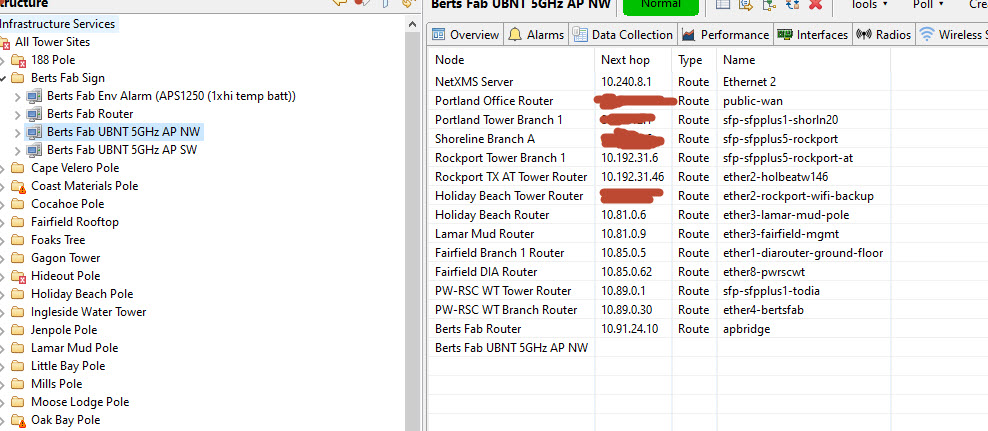
                  I added the rest of the routers between the server and the tower and now "route from" works and knows the whole route back to the server.

                  The main tower routers still do not see the UBNT access points as peer nodes. I can't see any way to manually add them.


                  10-1-2024 8-12-16 AM.jpg

                  10-1-2024 8-12-28 AM.jpg

                  1 Reply Last reply
                  0
                  • V
                    V
                    Victor Kirhenshtein
                    wrote on last edited by
                    #10

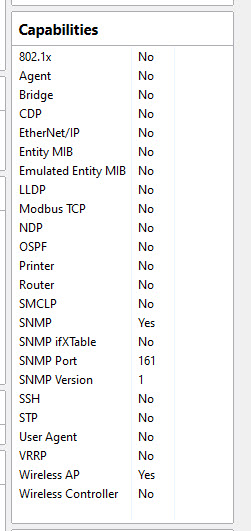
                    Could you please show capabilities for Ubuntu AP and adjacent router?

                    We currently does not have an option to configure L2 links manually, although we have this as feature request.

                    Best regards,
                    Victor

                    1 Reply Last reply
                    0
                    • R
                      R
                      redlam
                      wrote on last edited by
                      #11

                      Can you be more specific about capabilities? The mikrotik does support LLDP but the UBNT AP does not. Is that what you are meaning?

                      1 Reply Last reply
                      0
                      • V
                        V
                        Victor Kirhenshtein
                        wrote on last edited by
                        #12

                        I mean what NetXMS shows on overview page for those nodes in "Capabilities" section - to check how server sees those devices.

                        1 Reply Last reply
                        0
                        • R
                          R
                          redlam
                          wrote on last edited by
                          #13

                          Attached. Thanks


                          10-10-2024 8-44-04 AM.jpg

                          1 Reply Last reply
                          0
                          • V
                            V
                            Victor Kirhenshtein
                            wrote on last edited by
                            #14

                            So the problem here is that AP in question does not support neither LLDP nor CDP (not even spanning tree), so there is no way of getting topology information from it. CDP/LLDP not being supported in this context only means that information collected via those protocols is not made available via SNMP, even if device can send/receive CDP or LLDP packets.
                            If there is topology information available through vendor MIBs, then we probably can implement topology information reading on driver level.

                            Best regards,
                            Victor

                            1 Reply Last reply
                            0
                            • R
                              R
                              redlam
                              wrote on last edited by
                              #15

                              I believe after messing around with this for some time it is working. Once I added all nodes on the routes between the server and the nodes, did "route from" to the Netxms server, initial testing is showing dependencies working properly. Even on the UBNT ap's and other devices without SNMP. 

                              Big thank you to everyone who helped get me through this!

                              1 Reply Last reply
                              0

                              Hello! It looks like you're interested in this conversation, but you don't have an account yet.

                              Getting fed up of having to scroll through the same posts each visit? When you register for an account, you'll always come back to exactly where you were before, and choose to be notified of new replies (either via email, or push notification). You'll also be able to save bookmarks and upvote posts to show your appreciation to other community members.

                              With your input, this post could be even better 💗

                              Register Login
                              Reply
                              • Reply as topic
                              Log in to reply
                              • Oldest to Newest
                              • Newest to Oldest
                              • Most Votes


                              • Login

                              • Don't have an account? Register

                              • Login or register to search.
                              Powered by NodeBB Contributors
                              • First post
                                Last post
                              0
                              • Categories
                              • Recent
                              • Tags
                              • Popular
                              • Users
                              • Groups