
Data Collection Configuration - Trigger email when node goes down
-
Hello,
can you help me to figure out, how to send emails from Data Colection Configuration when node goes down?
I have mailing template with some collecting parameters.
I would like to set up some parameter with threshold which collect something like Internal:ICMP ping: packet loss when >99% ... but this took too long to (when node goes down it jumps like 1,3,5% per poll) . Is there any better approach?
Some nodes have only ICMP ping (not NetXMS agent or SNMP). When I browse Metric to collect from internal Origin, there is only ICMP ping which don't work well.Thank you:)
-
NetXMS is running node status poll every minute. If node stops responding SYS_NODE_DOWN event should be generated (the other option is SYS_NODE_UNREACHABLE - if NetXMS detects that loss of communication is due to some other node). So if you need notifications, notification actions in EPP should be configured for these events.
You can check Event Log on a node to see what events were actually generated.
-
Hello, I have few more questions. When SYS_NODE_DOWN trigger EPP to send email, is it possible to send it after some time, like if this node is 3-5 polls (3-5 min) down instead of instantly (or delayed) send this notification? I would like to prevent spamming when node is flapping.
Is there any option how to send email from EPP, when node is down (for example 60 min) and goes online? Like device is offline for 5 min (send email) and devices goes online (send me email about it again).
I still think Data Collection Configuration from template and binding to nodes is better, I can poll these values faster and trigger Deactivation event when node is online. Like this one:

Can I get SYS_NODE_DOWN to Data Collection Configuration like internal metric?
Thank you for help. -
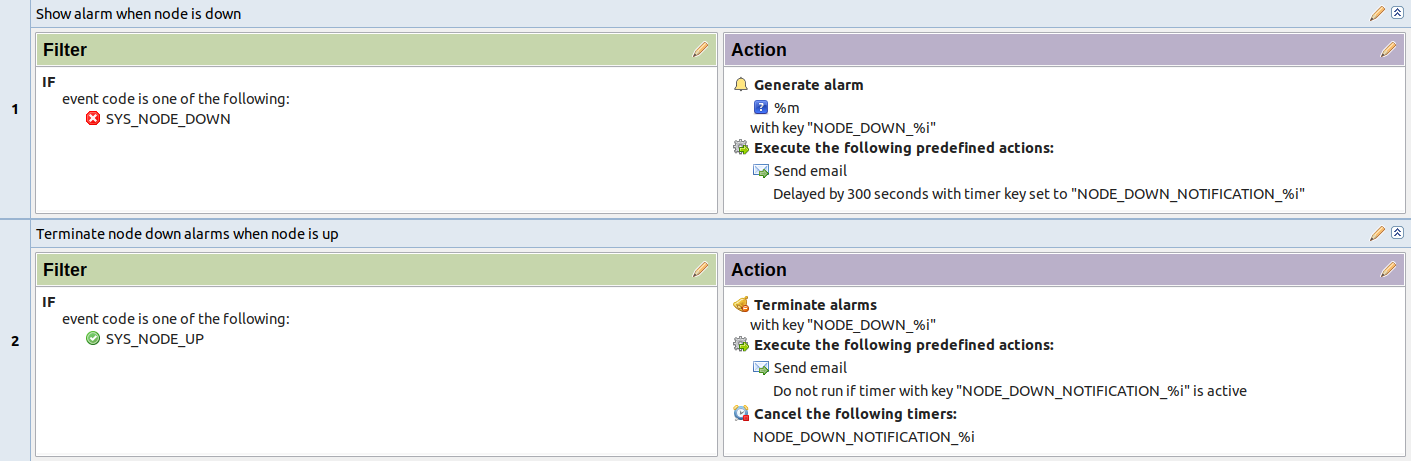
Documentation has an example of how to configure delayed notification and notification when node is back up: https://netxms.org/documentation/adminguide/event-processing.html#actions
Using a DCI for ICMP packet loss can be a way, but it does not cover situations when icmp is not working, but node is still accessible via SNMP or via NetXMS Agent
-
Hello,
Thank you for the link to the documentation. It seems that EPP is a much better approach.
May I ask a few more questions?- If I want to assign source objects to a list of objects, is that possible? Or do I have to select them one by one?
- Is it possible to select an entire container with nodes in the Infrastructure section?
- In the Server Actions section, I have a mail action with a delay. Can I configure it to repeat, for example, every hour while a node is down?
Thank you for the information

-
When selecting source objects, you can select several objects at once using Control or Shift buttons. You can select containers - this means that rule will be applicable to all child nodes of that container. Or you may leave Source Objects empty - this would mean any node.
Repeating is easily achieved for DCI thresholds - in threshold configuration there's Repeat event setting. This will generate repeated events and EPP rule would send new notifications.
But there is no setting to repeat SYS_NODE_DOWN event, so we would need to go a bit more advanced way.
You can create a script DCI (or Internal DCI with metric Dummy and have the script in transformation script). The script isreturn $node->state & NodeState::Unreachable;This will return 0 when the node is connected and 1 when node is down, so you can configure threshold and enable event repetition. It won't be a good idea to use SYS_NODE_DOWN event for that threshold as SYS_NODE_DOWN has one set of parameters when it's generated by the system, but events that are generated from threshold have different set of parameters. So recommendation is to create a new event template to be used for that threshold.
-
Thank you. I will apply EPP to the container — that should do the trick.
The DCI thresholds are working fine and repeatable without any issues, but sending repeated emails via EPP could be a problem. I don't want to configure 100 server actions with hourly delays.
I'll try to handle that part with a script. Thanks again.
By the way, there might be a bug in theSYS_NODE_DOWNevent.
I followed the documentation on how to send an email when a node goes down and then comes back up.
Specifically, this part:If, in addition, we want to send a notification when a node comes up, but only if a notification about it going down was sent: https://netxms.org/documentation/adminguide/_images/delayed_action_2.png
Somehow, I'm receiving "ONLINE" emails even though there was no "OFFLINE" event.
For example, in one case, there was noSYS_NODE_DOWNevent at all — only
SYS_NODE_UP, which triggered the email.
The blocking partNODE_DOWN_NOTIFICATION_%idoesn't seem to be working.
This node has only ICMP polling.
Do you have any idea how to fix this?Thank you:)

-
This one is bugged way more.
Ofline email:
Condition: IF source object is one of the following: Ustredna.CPU1.Policka AND SYS_NODE_DOWN
Online email:
Condition: IF source object is one of the following: Ustredna.CPU1.Policka AND SYS_NODE_UP
This is what happened with node:

And we got only ONLINE emails


There should be a 180 sec delay with NODE_DOWN_NOTIFICATION_%i
Which is correct behaviour, email is not recieved.
BUT Do not run if timer with key NODE_DOWN_NOTIFICATION_%i is active is not working and it sent emailAny idea? Thank you.
-
Looks a bit strange... I suggest checking if the actual timer is really running - this can be done in Configuration->Scheduled tasks, you need to enable "Show system tasks" from the three-dot menu in the upper right corner
-
Hello! It looks like you're interested in this conversation, but you don't have an account yet.
Getting fed up of having to scroll through the same posts each visit? When you register for an account, you'll always come back to exactly where you were before, and choose to be notified of new replies (either via email, or push notification). You'll also be able to save bookmarks and upvote posts to show your appreciation to other community members.
With your input, this post could be even better 💗
Register Login