Skip to content
  • Categories
  • Recent
  • Tags
  • Popular
  • Users
  • Groups
Skins
  • Light
  • Brite
  • Cerulean
  • Cosmo
  • Flatly
  • Journal
  • Litera
  • Lumen
  • Lux
  • Materia
  • Minty
  • Morph
  • Pulse
  • Sandstone
  • Simplex
  • Sketchy
  • Spacelab
  • United
  • Yeti
  • Zephyr
  • Dark
  • Cyborg
  • Darkly
  • Quartz
  • Slate
  • Solar
  • Superhero
  • Vapor

  • Default (Flatly)
  • No Skin
Collapse
Brand Logo

NetXMS Forum

  1. Home
  2. Support
  3. Scheduled Tasks

Scheduled Tasks

Scheduled Pinned Locked Moved Support
3 Posts 2 Posters 28.5k Views
  • Oldest to Newest
  • Newest to Oldest
  • Most Votes
Reply
  • Reply as topic
Log in to reply
This topic has been deleted. Only users with topic management privileges can see it.
  • G
    G
    gmonk63
    wrote on last edited by
    #1

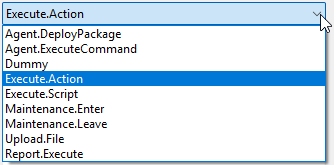
    There seems to be new task schedule options but not documentation on how to use them. I am curious about Execute.Action and if this allows us to run any existing actions we may have defined.

    Thanks


    2026-05-28 10_50_31-Edit Scheduled Task.png

    1 Reply Last reply
    0
    • F
      F
      Filipp Sudanov
      wrote on last edited by
      #2

      This is internal mechanism used for delayed action execution from a EPP rule. You can configure action in EPP with a delay, e.g. in Maintenance Start rule and you'll see what params this scheduled task gets. Nothing strictly forbids from scheduling your own action executions, but since this is internal mechanism, params or anything may change in the future.
      Minimal set of params looks like this:
      action=1;event=51385
      so you need to know ID of action (it's not visible in the GUI) and you need to specify some event.

      More recommended way is to use Execute.Script, in this case param field is just script name from script library (and script parameters in bracket if these are needed).

      1 Reply Last reply
      0
      • G
        G
        gmonk63
        wrote on last edited by
        #3

        Filipp,

        Thank you for the clarification I appreciate it. I will look into using Execute.Script

        1 Reply Last reply
        0

        Hello! It looks like you're interested in this conversation, but you don't have an account yet.

        Getting fed up of having to scroll through the same posts each visit? When you register for an account, you'll always come back to exactly where you were before, and choose to be notified of new replies (either via email, or push notification). You'll also be able to save bookmarks and upvote posts to show your appreciation to other community members.

        With your input, this post could be even better 💗

        Register Login
        Reply
        • Reply as topic
        Log in to reply
        • Oldest to Newest
        • Newest to Oldest
        • Most Votes


        • Login

        • Don't have an account? Register

        • Login or register to search.
        Powered by NodeBB Contributors
        • First post
          Last post
        0
        • Categories
        • Recent
        • Tags
        • Popular
        • Users
        • Groups