
Stuck file Agent
-
-
Hi!
Yo can use File.Count parameter. Full syntax is following:
File.Count(path, pattern, recursive, size, age)
where
path path to directory or file to check pattern pattern for file name matching recursive recursion flag; if set to 1 or true, agent will scan subdirectories size size filter (bytes); if < 0, only files with size less than abs(value) will match; if > 0, only files with size greater than value will match; if 0, all files will match age age filter (seconds); if < 0, only files created after now - abs(value) will match; if > 0, only files created before now - value will match; if 0, all files will match path argument is mandatory, all other are optional.
So, to count number of .txt files older than 15 minutes in c:\tmp, you can use
File.Count('C:\tmp', '*.txt', 0, 0, 900)
And after that you just need to set threshold for this parameter to >0, generate appropriate event, and process it as usual.
Best regards,
Victor -
Victor,
Great help, how ever i am looking for Error in Tomcat log file. basically tomcat will write the log on console. I have tried with several agents but no luck. Could you please don't hesitate to assist me.
And i am not able to understand threshold theory, i have gone through the user manual and google search too. If you have any information on the same please help me.
Thanks,
JP. -
Hi Victor,
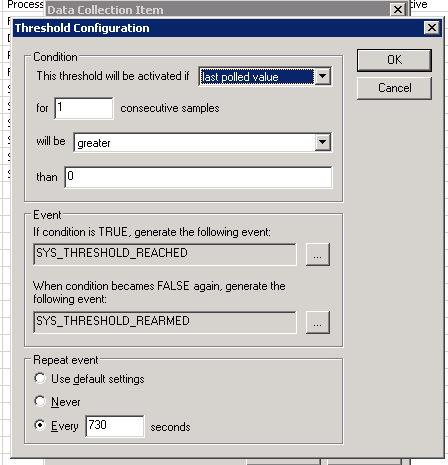
As per your suggestions i have created txt file monitoring by parameter as 'Temp\','SAS*.txt',true,>0,90 And threshold screen shot is attached. Today what i have observed is there is one file sit from 2 days but i didn't get alarm and i have created totally 5 DCIs all are connected to SYS_THRESHOLD_REACHED. But When ever the process down i am getting only Java process Alarm Remaining are not. Please advise me and confirm me like we have to choose different Threshold for every DCI.
Thanks,
JP
-
First of all, you have to specify full path, not just Temp. Second, you have syntax errors in recursion and size parameters - you should use only digits here. So, parameter should looks like
File.Count('C:\Temp', 'SAS*.txt', 1, 0, 90)
to count number of files older than 90 seconds.
Then, threshold by itself looks correct, but did you create appropriate rule in event processing policy?
Also, take a look at this step-by-step configuration example: https://www.netxms.org/documentation/confexample/. It's quite old, and screens will look a bit different, but you should get an idea.
Best regards,
Victor
Hello! It looks like you're interested in this conversation, but you don't have an account yet.
Getting fed up of having to scroll through the same posts each visit? When you register for an account, you'll always come back to exactly where you were before, and choose to be notified of new replies (either via email, or push notification). You'll also be able to save bookmarks and upvote posts to show your appreciation to other community members.
With your input, this post could be even better 💗
Register Login