
That was the issue. Somehow admin and admins were removed from permissions on the Infrastructure and Network containers. I added permissions back in and now my account has access.
Thank you very much.
That was the issue. Somehow admin and admins were removed from permissions on the Infrastructure and Network containers. I added permissions back in and now my account has access.
Thank you very much.
Sorry to bump, but, I have spend a bit of time on this and can't figure out anything. I have removed myself and admin from groups and given all permissions to both accounts and don't have access to everything.
I have to login as System to see any of my nodes.
Thanks for any further help on this.
That was it.
When I login as admin (local) I still have the same issues. I noticed that on 'Admins' (Group), not all 'System Rights' were checked. I clicked restore to default and it didn't change what was checked. I manually checked everything that was checked for 'admin' (local), which was everything except 'View all alarm categories' and 'Schedule file upload'. I logged back in and still having the same issues.
I normally login with an AD account. My account is in the 'Admins' (Group) under my System Rights, nothing is checked.
So, even though most everything is checked on admin (user) and Admins (group), I still have no access.
On my user account where it says 'Authentication', it changes from 'Password' to 'Unknown' as soon as put my account into the 'Admins' (Group).
Should everything be checked form both admin and admins? If I am in admins, then should my account have all checks or would it be blank from inheritance of the Admins group?
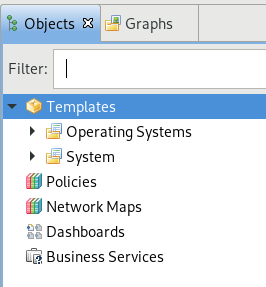
Today I started to have an issue where I created a new node and the node instantly disappeared. I tried to find it and I noticed that the Infrastructure and Network sections are missing on the left hand side. I also seemingly, even with admin, have permission problems. I did a search for the newly created node, and it displayed in the search results. Everything I tried to do to that node, poll, configure, etc. gave me Access Denied errors.
I don't know if all of this is related, nor what I did to cause it. I am the only person who logs into this system and it was working earlier today. I was just creating DCI objects on some nodes. I then went to create a new node, which again, it just disappeared. I then noticed that Infrastructure and Network were missing from the GUI.
Any ideas on how to get things back to normal?
Thanks. Screenshot is attached to show the items missing in the GUI.
That was it!!
Thanks for your patience on this. I know it took awhile.
I noticed that on my NetXMS server, where the agent is installed, and the machine I want to be a proxy, where it says isagent it says no. Is that a display bug, or is my NetXMS server not seeing itself as an agent. As shown above, my agent service is running.
Could this be the issue?
nxagentd.conf from NetXMS Agent
# Log File
LogFile=/var/log/nxagentd
DebugLevel=6

# IP white list, can contain multiple records separated by comma.
# CIDR notation supported for subnets.
MasterServers=127.0.0.0/8

SubAgent = ssh.nsm
cat /var/log/nxagentd | grep ssh from NetXMS Agent which acts as Proxy
2018.02.01 13:33:25.204 *E* Error loading subagent module "ssh.nsm": /usr/lib/x86_64-linux-gnu/netxms/ssh.nsm: cannot open shared object file: No such file or directory
2018.02.06 09:37:39.437 *E* Error loading subagent module "ssh.nsm": /usr/lib/x86_64-linux-gnu/netxms/ssh.nsm: cannot open shared object file: No such file or directory
2018.02.06 13:57:35.483 *I* Subagent "SSH" (ssh.nsm) loaded successfully (version 2.2.3)
2018.02.06 15:02:40.687 *I* Subagent "SSH" (ssh.nsm) loaded successfully (version 2.2.3)
2018.02.07 16:05:19.093 *I* Subagent "SSH" (ssh.nsm) loaded successfully (version 2.2.3)
2018.02.07 16:09:25.185 *D* SSH: using libssh version 0.6.1/openssl/zlib
2018.02.07 16:09:25.185 *I* Subagent "SSH" (ssh.nsm) loaded successfully (version 2.2.3)
Am I correct that you were not asking for any logs on the server that the script is stored? That doesn't have the agent on it as I didn't think it was needed.
Thanks for your continued help and patience on this.
I'm up to date now and the ssh.nsm is loaded.
On the properties for my client where I want to run the script, I have SSH with proper credentials and the Proxy set to my NetXMS server.
On the General Tab of the DCI for my client I have Origin SSH, Data Type String, Parameter uname -a.
I have not done anything to the NetXMS server other than confirm ssh.nsm is loaded.
I get a "Not supported" for the DCI configuration. Have I done all of the steps?
I'm running Ubuntu 14.04.5 and did an apt-get update/upgrade.
dpkg -s netxms-agent is 2.2.2-1.
Do I need to update OS or source list to get 2.3?
Thanks for checking.
Is it possible to make that file available via FTP or another method? Would it be as simple as downloading a single file and putting it in the right place?
I don't have the ssh.nsm file on my system.
I believe I am running 2.2.2 on Ubuntu as that is the console version I am connecting with.
How do I get the ssh.nsm on my server? I want the NetXMS server running the agent to be the proxy.
What is the SSH subagent and how do I load it or configure it. What machine does that go on? The Proxy, or the machine I want to SSH into? Maybe that is the last step to getting this to work. My DCI came back unsupported.
I only setup the Trusted Node because another thread had it. I'll remove that setting.
I don't remember the reason why, but I have "CheckTrustedNodes" set to "1". Is this possible with it set to "1"?
I found one article on SSH SubAgent and I am not sure I am understanding the right information. I think it said to setup an "Action". So under "Configuration - Actions Configuration", I created an action to "Execute command on management server". For "Command", I put uname -a just for a test.
If this is the right way to go, how do I trigger that "Action"? If this is the wrong approach, then can I get a more detailed explanation on setting up the SSH SubAgent?
Thanks
I hope on the right path for using native SSH-based DCI.
On my license server, the server where I want the command to run, I don't have NetXMS Agent installed. I right click on it and go to Properties and under 'Communications - SSH', I put in the username and password for a user that can SSH into the license server. Under Proxy, I put in my NetXMS server because that server has the NetXMS Agent installed. It is the only Linux node I have with NetXMS Agent installed. All other nodes just have SNMP.
On my NetXMS Server (with the agent installed) I right click on that node and when to Trusted Nodes. Here I entered the License Server, the server I want to run code on.
Lastly I created a Test DCI. Origin SSH. Data Type String. Parameter uname -a.
This is not working. Am I even going about this the right way?
Thanks
I found information on ExternalParameter and ExternalParameterProvider. On my systems, I currently don't have the NetXMS agent, I have only SNMP agent.
Can the SSH-based DCI be used with SNMP only or does it need the NetXMS agent?
I did a search on the forum and web for SSH-based DCI and didn't see a good explanation. When I go into the DCI and choose "Origin - SSH", I don't see where to enter any kind of script. Is this the right place for SSH-based DCI or is the process different?
I'm trying to use NetXMS to monitor license usage on RLM and FlexLM License servers. There are commands you can run that give the output. I'd like to run them throughout the day and have NetXMS capture the output.
I have created a shell script on one license server, and when I type sh license_usage.sh it outputs the correct number of licenses in use.
How can I get NetXMS to capture the output of that script and make it a DCI for my node?
Great. That works. I had tried that, but I guess never with the right syntax.
That didn't fix it for me. I must be doing something else wrong.
Please find attached screen shot.
@tomaskir said in Suggestion - Apply template to containers:
This is already entirely possible.
Simply use auto-bind scripts...
Here is an example:parents = GetNodeParents($node); foreach(p : parents) { // if the node has a parent with this name if (p->name == "Something") { // auto-bind node return true; } // otherwise do not auto-bind the node return false;
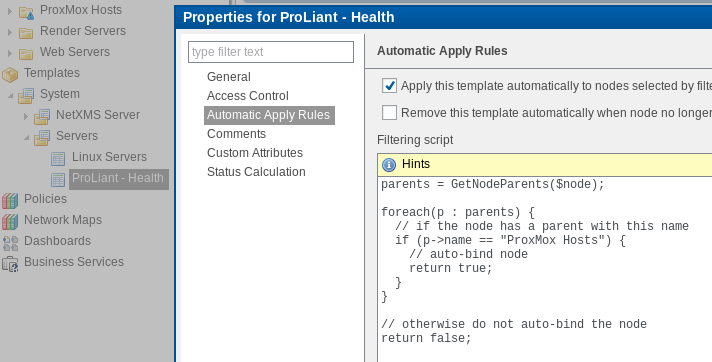
I am having a problem with this script. I have copied and pasted it into a template on the Automatic Apply Rules section. I changed "Something" to the name of one of my containers, and when I ran a poll Configuration (full) on one of my nodes that is in that container, the node did not get added to the template.
I noticed that there is an uneven number of "}" and put them in various places with no luck. My guess is I am having a simple syntax issue. Should this script work exactly as posted?
Thanks
Great news that this is coming and I can wait for that feature.