Skip to content
  • Categories
  • Recent
  • Tags
  • Popular
  • Users
  • Groups
Skins
  • Light
  • Brite
  • Cerulean
  • Cosmo
  • Flatly
  • Journal
  • Litera
  • Lumen
  • Lux
  • Materia
  • Minty
  • Morph
  • Pulse
  • Sandstone
  • Simplex
  • Sketchy
  • Spacelab
  • United
  • Yeti
  • Zephyr
  • Dark
  • Cyborg
  • Darkly
  • Quartz
  • Slate
  • Solar
  • Superhero
  • Vapor

  • Default (Flatly)
  • No Skin
Collapse
Brand Logo

NetXMS Forum

A

Alwin

@Alwin
Unfollow Follow
About
Posts
19
Topics
5
Shares
0
Groups
0
Followers
0
Following
0

Posts

Recent Best Controversial

  • NetXMS 7.0.2 crashes with SIGSEGV shortly after startup
    A Alwin
    Support

    Hi Alex,

    thank you for the detailed analysis. We checked our current NetXMS 6.2.5 installation.

    1. Both Dell drivers are present:

    dell.ndd 426K
    dell-pwc.ndd 168K

    1. Old NetXMS libraries are still present in /usr/local/lib:
      We found both .so.50 and .so.61 versions, including the libraries you mentioned:

    libnxsrv.so.61
    libnxsl.so.61
    libnetxms.so.61
    ..

    1. The old Dell driver is actively loaded under NetXMS 6.2.5.
      Our server log contains several entries such as:

    Network device driver DELL-PWC loaded successfully

    This confirms that the old driver is still being loaded in our current 6.2.5 installation.
    We have not removed or modified any files yet, as the current production server is still running 6.2.5.

    Your explanation sounds very plausible and matches what we found.
    We will prepare a clean upgrade to 7.0.2, removing the obsolete driver and libraries as suggested.

    Thanks again for investigating this issue!

    Best regards
    Alwin


  • NetXMS 7.0.2 crashes with SIGSEGV shortly after startup
    A Alwin
    Support

    Hi Alex,

    Thank you for your detailed analysis on github.

    I would like to provide some additional information about our installation procedure and attach two files for your investigation:

    coredump_7.0.2_first_try.txt – the complete core dump information from our first attempt with NetXMS 7.0.2.
    NetXMS_packages_6.2.5_before_Update_to_7.0.2.txt – package and library information collected from our currently running NetXMS 6.2.5 installation, before upgrading to 7.0.2.
    Our NetXMS installations are not based on Ubuntu/Debian packages. We always download the official source tarball and compile NetXMS locally.

    Our upgrade procedure is as follows:

    cd /tmp
    wget https://netxms.org/download/releases/7.0/netxms-7.0.2.tar.gz
    tar zxvf netxms-7.0.2.tar.gz
    cd netxms-7.0.2
    ./configure --enable-release-build --with-server --with-odbc --with-agent --with-internal-libargon2
    make
    make install
    nxdbmgr upgrade
    systemctl start netxmsd
    

    This might also explain why the package-related commands (dpkg and apt-cache) do not provide any useful information in our environment.

    Would the attached information and our installation procedure be helpful for your further investigation? Perhaps this already provides some additional clues before we schedule another attempt with NetXMS 7.0.2.

    As a next step, we are planning to repeat the test with script DCIs disabled to determine whether they are involved in triggering the crash.

    Since another test would require a maintenance window and a subsequent rollback to 6.2.5, we would appreciate your feedback on whether the information provided so far might already help narrow down the issue.

    Best regards
    Alwin


    coredump_7.0.2_first_try.txt

    NetXMS_packages_6.2.5_before_Update_to_7.0.2.txt


  • NetXMS 7.0.2 crashes with SIGSEGV shortly after startup
    A Alwin
    Support

    Hello,

    we recently upgraded our NetXMS server from version 6.2.5 to 7.0.2

    Unfortunately, the server starts successfully but crashes with a segmentation fault approximately 60 seconds after startup. We have since reverted to NetXMS 6.2.5, which is running normally again.

    Environment
    OS: Ubuntu 24.04 LTS
    Database: Microsoft SQL Server
    ODBC Driver: Microsoft ODBC Driver 18 for SQL Server
    Build: 7.0-951-g0771917ac1

    NetXMS Log

    2026.11.06 15:23:46.624 *I* [startup] NetXMS Server started
    2026.11.06 15:23:46.728 *D* [dc.cache] Finished caching of DCI values

    Approximately two seconds later:
    Segmentation fault (core dumped)
    System log:

    System Log:

    Nov 06 15:23:46 SERVERNAME systemd[1]: Started netxmsd.service - NetXMS Server.
    Nov 06 15:24:05 SERVERNAME systemd[1]: netxmsd.service: Main process exited, code=dumped, status=11/SEGV
    Nov 06 15:24:05 SERVERNAME systemd[1]: netxmsd.service: Failed with result 'core-dump'.

    Core dump analysis

    Signal: 11 (SEGV)
    Current thread: Thread 108442

    Relevant stack trace:
    #0 HashMapBase::_get
      (libnetxms.so.70 + 0x56b80)

    #1 HashMap<NXSL_Identifier, NXSL_ExtMethod>::get
      (libnxsl.so.70 + 0x27818)

    #2 NXSL_VM::callMethod
      (libnxsl.so.70 + 0x573be)

    #3 NXSL_VM::execute
      (libnxsl.so.70 + 0x5aba2)

    #4 NXSL_VM::run
      (libnxsl.so.70 + 0x60f30)

    #5 NXSL_VM::run
      (libnxcore.so.70 + 0x2270e6)

    #6 DataCollectionTarget::getMetricFromScript
      (libnxcore.so.70 + 0x227399)

    #7 GetItemData
      (libnxcore.so.70 + 0x1cada9)

    #8 DataCollector
      (libnxcore.so.70 + 0x1cdb31)

    #9 ThreadPoolExecute
      (libnxcore.so.70 + 0x231ac0)

    This suggests that the crash occurs while NXSL is looking up an external method during execution of a script-based DCI.

    We use a script-based DCI that reads the installed products table from a NetXMS agent:

    function main()
    {
       result = "Fehler bei der Ermittlung";
    
       table = $node.readAgentTable("System.InstalledProducts");
    
       if (table != null)
       {
          indexName = table.getColumnIndex("NAME");
          indexVersion = table.getColumnIndex("VERSION");
          indexUser = table.getColumnIndex("USER");
    
          result = "nicht installiert";
    
          search = $1.toLowerCase();
    
          for (row = 0; row < table.rowCount; row++)
          {
             name = table.get(row, indexName).toLowerCase();
             user = table.get(row, indexUser).trim();
    
             if (name.contains(search) && (user == ""))
             {
                result = table.get(row, indexVersion);
                break;
             }
          }
       }
    
       return result;
    }
    

    In addition, shortly before the problem occurred, we installed Ubuntu system updates, including kernel updates. It's possible that the problems didn't occur until after the updates were installed—unfortunately, we can't say for sure.

    libsqlite3-0/noble-updates 3.45.1-1ubuntu2.9 amd64 [aktualisierbar von: 3.45.1-1ubuntu2.8]
    linux-cloud-tools-common/noble-updates 6.8.0-149.149 all [aktualisierbar von: 6.8.0-147.147]
    linux-firmware-amd-graphics/noble-updates 20240318.git3b128b60-0ubuntu3.4 all [aktualisierbar von: 20240318.git3b128b60-0ubuntu3.3]
    linux-generic/noble-updates 6.8.0-149.149 amd64 [aktualisierbar von: 6.8.0-147.147]
    linux-headers-generic/noble-updates 6.8.0-149.149 amd64 [aktualisierbar von: 6.8.0-147.147]
    linux-image-generic/noble-updates 6.8.0-149.149 amd64 [aktualisierbar von: 6.8.0-147.147]
    linux-libc-dev/noble-updates 6.8.0-149.149 amd64 [aktualisierbar von: 6.8.0-147.147]
    linux-tools-common/noble-updates 6.8.0-149.149 all [aktualisierbar von: 6.8.0-147.147]

    Thank you in advance for your help.
    Alwin


  • Repeated updates of the software inventory since version 6.0.0 of Win Agent
    A Alwin
    Support

    Hi Alex,

    have the developers been able to find anything in the meantime?
    We’re unfortunately losing track quite quickly due to the high volume of messages, as many of the monitored servers are terminal servers with a large number of users.

    Best regards,
    Alwin


  • Repeated updates of the software inventory since version 6.0.0 of Win Agent
    A Alwin
    Support

    Hi Alex,

    this would disable all package changes - including the system alerts that we need to monitor. We are waiting for the development team and hope for a solution. Thank you for reopen the case!


  • Cancel Package Deployment Jobs?
    A Alwin
    Support

    Hi Alex,

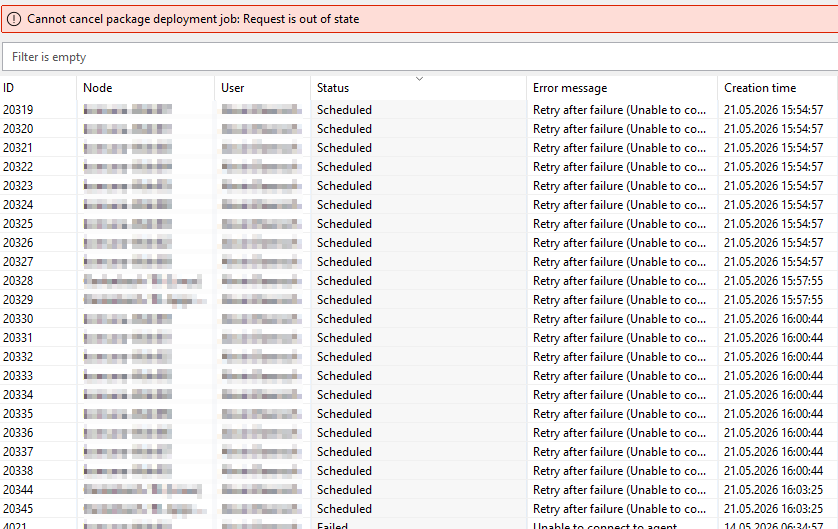
    i have pinned "Package Deployment Jobs" to the pinboard. In this view, the status of the scheduled jobs is not visible. However, if I access the "Package Deployment Jobs" directly through the configuration, the data is refreshed and suddenly all jobs are visible.

    If we now try to cancel the jobs, we get the error "Request is out of state"


    2026-05-21 16_06_35-rechennetz Desktop - Desktop Viewer.png


  • Cancel Package Deployment Jobs?
    A Alwin
    Support

    Update:
    We can see the active jobs for a short time about 10 minutes after they start, but they run so fast that there’s no way to cancle them before they disappear from the list again.


  • Cancel Package Deployment Jobs?
    A Alwin
    Support

    Hi Alex,

    Thank you for your detailed explanation.

    In our case, we cannot see the scheduled jobs and therefore cannot delete them either, as they do not appear in the list (Client 6.1.1).

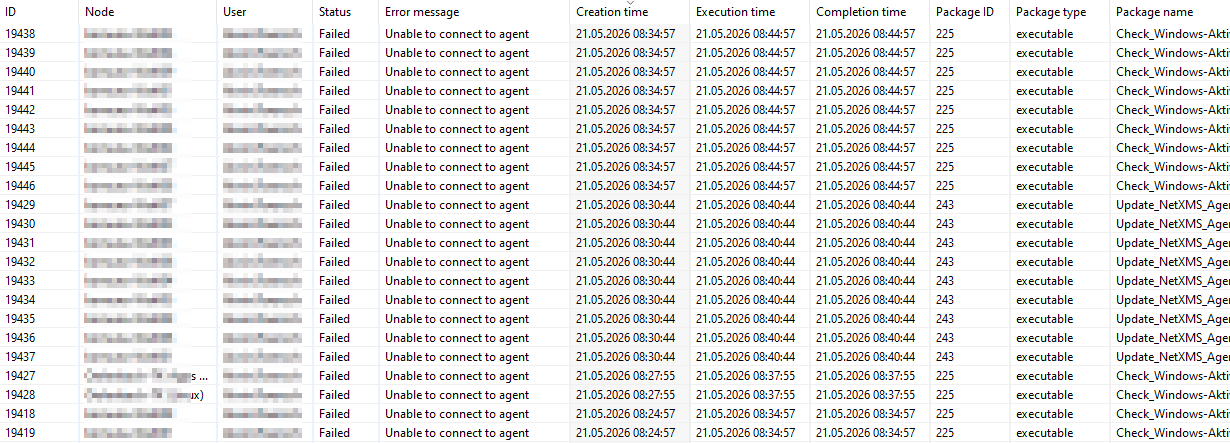
    As you suspected, the error is “Unable to connect to agent.” This situation arose because a package was deployed to a node that is monitored only via ICMP (Agent Communication Option - “Use ICMP ping on primary IP address to determine node status”). How can we prevent this? We regularly deploy packages to the cluster that consist of a mix of agent-based and ICMP-based monitoring.

    It would be very helpful if we could disable the automatic retry via a central configuration option.

    best regards,
    Alwin


    2026-05-21 08_46_04-rechennetz Desktop - Desktop Viewer.png


  • Cancel Package Deployment Jobs?
    A Alwin
    Support

    The new overview for package deployment jobs in version 6.x and later is generally great.
    However, we haven't yet found a way to stop jobs that are in the “Failed” status. The system keeps trying to run them over and over again. How can we delete these jobs? Right-clicking only allows us to hide all jobs.
    Does anyone have any ideas?


  • Repeated updates of the software inventory since version 6.0.0 of Win Agent
    A Alwin
    Support

    Hi Filipp,

    unfortunately, we cannot confirm that this fix works.
    We have been experiencing this behavior since updating the NetXMS Agent from 5.0.8 to 6.1.1. Is there a setting to disable these messages during user logins?

    We have also noticed that the system is now detecting more non-essential installed software, which is flooding our alarm browser.  For example:

    CapturePicker 10.0.17763.1 was installed
    Hello-Setup 10.0.19585.1001 was installed
    File Explorer 10.0.17763.1 was installed

    Is there perhaps also a way to hide specific notifications?

    Thanks for your help  🙂


  • Using SSH Login and Password in Object Tool
    A Alwin
    Support

    Hi Victor,

    has this feature been implemented yet? Or is there another way to save a password and pass it along?
    Unfortunately, I can't find anything on that. Thanks for your help.


  • combine custom schedules does not work?
    A Alwin
    Support

    Hi @all,

    we have configured two custom schedules for one parameter. 

    Every 15 Minutes, Monday through Friday
    */15 * * * 1-5

    Every 59 Minutes, Saturday through Sunday
    */59 * * * 6-7

    The second schedule for weekenk does not work. The parameter is not queried (we see this in the history).

    Can only one schedule be configured? 
    Have we possibly chosen the wrong format for the second schedule?

    Our NetXMS Version is 4.3.2

    Thanks for your help,

    best regards,
    Alwin


  • Windows Event Viewer warning - H_PdhObjectItems: PDH Error
    A Alwin
    Support

    Hi Victor, 
     
    H_PdhObjectItems: PDH Error C0000BB8 in call to PdhEnumObjectItems for {f3e82f6e-9df4-425d-a5d5-3a9832005b16} (Das angegebene Objekt wurde nicht auf dem Computer gefunden.)

    H_PdhObjectItems: PDH Error C0000BB8 in call to PdhEnumObjectItems for {7d937e49-cfd5-438f-af4f-b3047d90a5c3} (Das angegebene Objekt wurde nicht auf dem Computer gefunden.)

    H_PdhObjectItems: PDH Error C0000BB8 in call to PdhEnumObjectItems for {115b92b4-7191-491a-a9b5-93c8e9fb641b} (Das angegebene Objekt wurde nicht auf dem Computer gefunden.)

    best regards,
    Alwin


  • Windows Event Viewer warning - H_PdhObjectItems: PDH Error
    A Alwin
    Support

    Hi Victor, 

    we have the actual version installed but there are still many PDH errors on every node. 😞 We have now try to solve this problem, but there is know way for us to do that. Any news on the case yet?
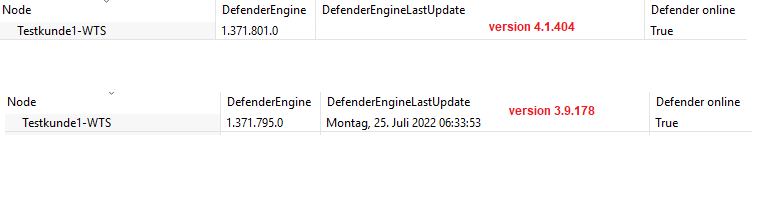
    Thanks for your help!

    best regards,
    Alwin


  • Move node between clusters?
    A Alwin
    Support

    Hi @all,

    it is possible to move nodes from Cluster-A to Cluster-B? We tried with "Drag n Drop" and "Object -> Bind to...".
    We would like to restructure our organizations but recreate each device takes too long.. 😞 

    best regards,
    Alwin


  • No values for external parameters since netxms agent 3.9.178
    A Alwin
    Support

    Hi Filipp,

    we have tried another command, which also generate an empty line in the first output line.

    Thanks for your workaround - it works great!

    It would be nice if the behaviour was the same as in the previous versions.

    best regards,
    Alwin


  • No values for external parameters since netxms agent 3.9.178
    A Alwin
    Support

    Hi Victor,

    the current Server an Agent version is: 4.1.404

    The command needs 34ms to execute. In the agent configuration we have also added the line "ExternalParameterProviderTimeout = 60"

    We try it with the following command (is this the correct syntax?)

    ExternalParameterShellExec = DefenderEngineLastUpdate:powershell -Command "& {Get-MpComputerStatus | Select -ExpandProperty AntivirusSignatureLastUpdated}"

    We added also the following parameters to the agent configuration file:

    SubAgent = wineventsync.nsm
    DebugTags=winsyncevent:6

    Now we have logs in the windows event log but no entrys for the executed external parameters.

    best regards,
    Alwin


  • No values for external parameters since netxms agent 3.9.178
    A Alwin
    Support

    Hi all,

    since NetXMS Agent Version 3.9.178 (last working version) we do not get values for the following external paramenter anymore

    ExternalParameter = DefenderEngineLastUpdate:powershell -Command "& {Get-MpComputerStatus | Select -ExpandProperty AntivirusSignatureLastUpdated}"

    If we run the powershell command directly on the node, it works without any problems.
    Other powershell paramenter are however correctly transmitted and displayed - for example:

    ExternalParameter = Defender:powershell -Command "& {Get-MpComputerStatus | Select -ExpandProperty RealTimeProtectionEnabled}"

    We have no idea anymore and suspect that there is a bug or changed syntax in netxms. Does anyone have the same problem?

    best regards,
    Alwin


    external_parameter_no_values.PNG

  • Login

  • Don't have an account? Register

  • Login or register to search.
Powered by NodeBB Contributors
  • First post
    Last post
0
  • Categories
  • Recent
  • Tags
  • Popular
  • Users
  • Groups