
stratum@HOU-L1-RPI-1:~$ lsb_release -a
No LSB modules are available.
Distributor ID: Ubuntu
Description:    Ubuntu 22.04.4 LTS
Release:        22.04
Codename:       jammy
Thanks!
stratum@HOU-L1-RPI-1:~$ lsb_release -a
No LSB modules are available.
Distributor ID: Ubuntu
Description: Ubuntu 22.04.4 LTS
Release: 22.04
Codename: jammy
Thanks!
Trying to do as the subject states.
Following the steps on the download page produces the errors below. What am I missing?
Thanks
stratum@stratum-desktop:~/Downloads$
stratum@stratum-desktop:~/Downloads$
stratum@stratum-desktop:~/Downloads$ wget https://packages.netxms.org/netxms-release-latest.deb
--2024-04-04 20:59:59--  https://packages.netxms.org/netxms-release-latest.deb
Resolving packages.netxms.org (packages.netxms.org)... 104.21.52.110, 172.67.198.50, 2606:4700:3031::6815:346e, ...
Connecting to packages.netxms.org (packages.netxms.org)|104.21.52.110|:443... connected.
HTTP request sent, awaiting response... 200 OK
Length: 5600 (5.5K) [application/octet-stream]
Saving to: ‘netxms-release-latest.deb’

netxms-release-latest.deb                  100%[=========================================================================================>]  5.47K  --.-KB/s    in 0.001s

2024-04-04 21:00:00 (4.03 MB/s) - ‘netxms-release-latest.deb’ saved [5600/5600]

stratum@stratum-desktop:~/Downloads$ sha256sum netxms-release-latest.deb
18db187d42946041ff5edfccd53982f309747420bf1374432713ace0029e34fa  netxms-release-latest.deb
stratum@stratum-desktop:~/Downloads$ sudo dpkg -i netxms-release-latest.deb
Selecting previously unselected package netxms-release.
(Reading database ... 151279 files and directories currently installed.)
Preparing to unpack netxms-release-latest.deb ...
Unpacking netxms-release (1.12) ...
Setting up netxms-release (1.12) ...
sed: can't read /etc/apt/sources.list.d/netxms.list: No such file or directory
sed: can't read /etc/apt/sources.list.d/netxms.list: No such file or directory
stratum@stratum-desktop:~/Downloads$
Hi Victor,
Has there been any progress on this?
I'm afraid to upgrade my Grafana for fear of losing the NetXMS abilities!
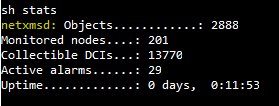
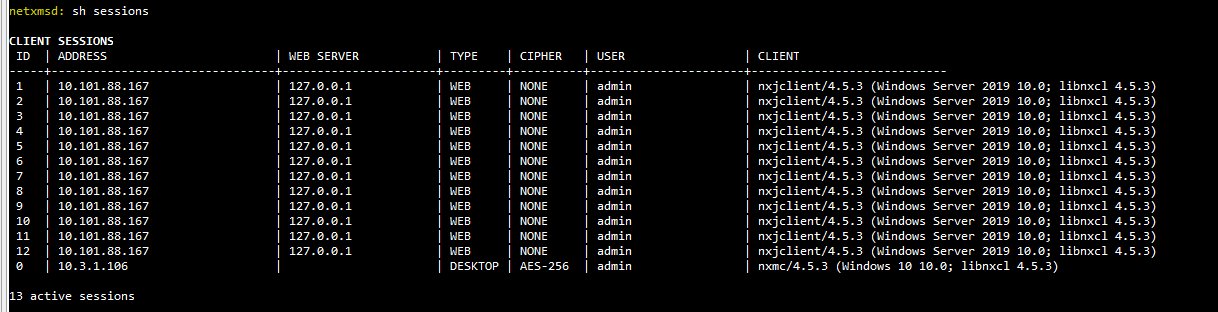
However, I've recently run into an issue where any queries from Grafana peg the CPU at 100%.
It seems to make at least 5 sessions for each refresh of the page!
As you can see, I don't have a very large installation and this has been fine up until very recently. Memory is only using about half of 16GB.
Thanks!
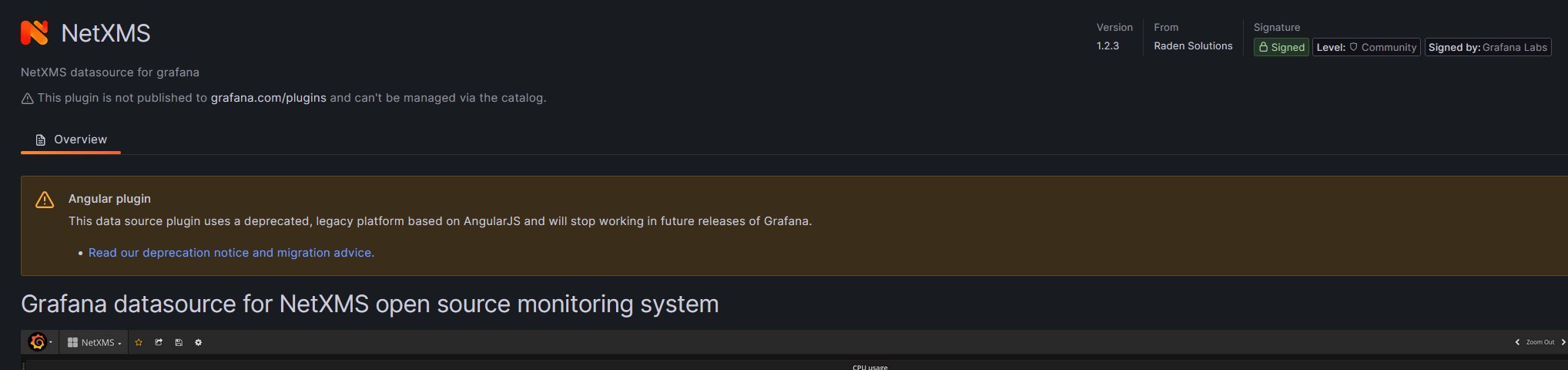
Can we please get a reply to this? The Grafana site says it will be removed completely in 2024.
https://grafana.com/docs/grafana/latest/developers/angular_deprecation/
When will Angular plugins stop working?
Our goal is to transfer all the remaining Angular code to the core of Grafana before Grafana 10 is released in Summer 2023. Once this is done, the option “angular_support_enabled” will be disabled by default for new Grafana Cloud users, resulting in the inability to use Angular plugins. In case you still rely on AngularJS-based plugins developed internally or by the community, you will need to enable this option to continue using them. Following the release of Grafana 10 we will be migrating Grafana Cloud users where possible and disabling Angular support when appropriate, we will also be introducing new features to help all users identify how they are impacted and to warn of the use of deprecated plugins within the Grafana UI.
When will we remove Angular support completely?
Our plan is to completely remove support for Angular plugins in version 11, which will be released in 2024. This means that all plugins that depend on Angular will stop working and the temporary option introduced in version 10 to enable Angular will be removed.
Thanks!
Can I please get some help with this?
Can I please get some help with this?
How do I make a connection to the database?
Is that a data adapter? What type / settings do I use?
Thank you.
I now have the reports in the console and can run the sample reports.
How do I create a new report?
How does Jaspersoft studio know what fields are available? Does it need to / can it connect to the database directly?
Or do I just have to build my own query, replacing this line and write the XML to display it?
<![CDATA[SELECT id, name, full_name, description, email, phone_number FROM users ORDER BY name]]>
My goal is to create a report to list the quantity of each type of device in the entire organization.
Thanks
@alk said in Report server - Windows:
Check this repo: https://github.com/netxms/sample-report
Thank you for the link. Can you let me know where this is in the documentation? Did I miss something?
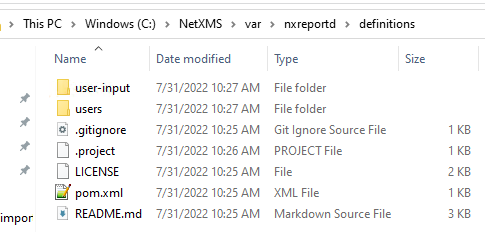
What do I do with it? I was able to get Maven to compile the .jar files. I placed them in what I think is the correct place, see photos below.
After restarting the core service along with the reporting service, I still have an empty report navigator window.
Thanks
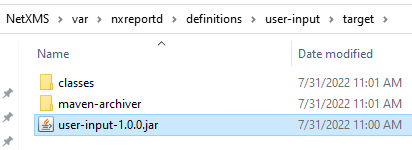
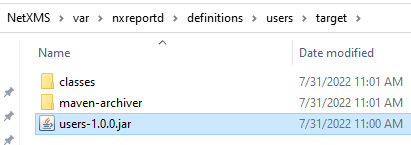
This is a continuation of this thread:
https://www.netxms.org/forum/general-support/install-report-server/15/
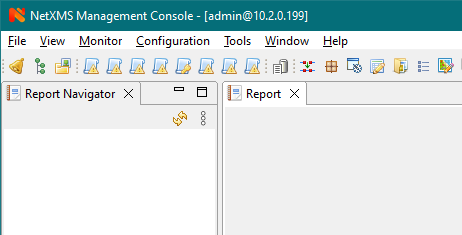
Based on what I can find, the report server is now included in the main NetXMS installation. I'm currently on 4.0.2157 and after reading one of the other threads (not the documentation), learned that I had to install Java 15 on the server itself. I now have a report navigator window (again, something I learned from a forum post, not the documentation) that looks like the attached image.
The last response on the thread linked above said I had to create the reports myself. I have no idea how to do that, or where to put the files (on Windows) that previous post is referencing to even begin to try and make my own.
The documentation that is available: https://www.netxms.org/documentation/adminguide/reporting.html, references using Jaspersoft Studio, although the documentation states "Simplest way to create jar files are using Maven, empty project is provided in samples archive.". Which is it?
Samples archive is not linked, where is this archive? The documentation only talks about the format of the file expected, and not how to create it.
I downloaded Jaspersoft Studio, and have no idea what do do from this point. Am I supposed to connect to the NetXMS DB with a data adapter?
Thanks
Thanks for the guidance!
I corrected that error, and found about 4 more, plus another line that was commented out that it required.
I passed all this info along to EnGenius so hopefully they can fix their MIB generator.
Having issues loading an MIB for EnGenius WiFi AP.
I've had these in the past with other devices, and I remove a few offending lines, and it seems to work. However, when I do that, it just keeps failing.
What am I missing?
Thanks!
C:\NetXMS\share\mibs\ENGENIUS-PRIVATE-MIB-EAP1300.mib.txt: WARNING 007: Object identifier started with uppercase letter in line 363
C:\NetXMS\share\mibs\ENGENIUS-PRIVATE-MIB-EAP1300.mib.txt: WARNING 007: Object identifier started with uppercase letter in line 527
C:\NetXMS\share\mibs\ENGENIUS-PRIVATE-MIB-EAP1300.mib.txt: ERROR 003: Parser error - syntax error, unexpected RIGHT_BRACE_SYM in line 1279
Thanks!
After moving to version 4 of NetXMS, the API no longer works connecting Grafana to NetXMS.
I've completely removed and reinstalled it according to the wiki page:
The windows installer puts all of the files in C:\NetXMS-WebUI.
The instructions weren't 100% specific, like what to do with the nxmc-4.0.2227.war file that is downloaded. I assume you rename it to webapi.war, as has been done in the past and noted in the jetty-web.xml file. If we can get the wiki updated with this information, that would be helpful.
I've got it working somewhat, and when I go to http://localhost:8080/webapi, it redirects to http://localhost:8080/webapi/nxmc-clarity and provides the web login page.
What am I missing?
Thanks!
Victor, that seems to have done it... not sure how it became empty, but it's all quiet now.
Thanks!
Thanks Victor, I'm sure I'm missing something simple.
See below!


Victor, thanks. That seems to have stopped them.
However, I expanded all the items in EPP and I have no items with SYS_IF_PEER_CHANGED except the one I created as you suggested and moved to the top.
I also kept getting similar messages about SYS_INCORRECT_NETMASK and I did the same thing you suggested and it stopped.
However, "Generate alarm when incorrect network mask detected on interface" is one of the out of the box rules, and I had that rule disabled, but the messages still kept coming.
Is there anything else I'm missing?
I am receiving constant (about every 2-3 minutes) email notifications about New peer for interface.
I see it as an event (SYS_IF_PEER_CHANGED), but don't see a way to turn off emails regarding this. There is no corresponding item in event processing policy.
I have Cisco Meraki switches / routers / APs.
I tried to delete that item in event configuration, and it said access denied. I found it in the database itself, but wanted to ask here before attempting to delete that entry in the database.
This started a few versions ago, I don't remember which one, I'm currently on 3.7.145.
Any help is appreciated!
@filipp-sudanov said in Display nodes on map at GPS coordinates:
Lat/lon of nodes are used on the map in View -> World map. It's using Open Street Map background from server configurable in Server Configuration (TileServerURL).
Awesome, thanks!
Is there a way to lock the items so they can't be moved around on a network map?
On each node there is a location section, allowing you to specify, the geographical location of the device.
I cannot find a way to make this display on a map where I set the background to a Geographic map.
I can add nodes any way I want, Layer2, topology, custom and they're on the map - but how do I get it to snap to the actual geographic location, or is this just not a feature?
If I right click a single node and select geolocation, it does drill it down right to where I specified, but how do I show all of them on a larger map, snapped to their location?
Also, is there a way to specify the map to be centered on the coordinates given, and not at the top left?
Thanks for a great product!
