
thanks, easy when you know how.
C
Carl Green
@Carl Green
Posts
-
DCI Retention -
DCI RetentionHi
How do I increase the maximum number of days to keep DCI collected data as Last Values only goes back 4 days. Ideally I would like to retain last 14 days.
Thanks
Carl
-
HTTP/REST API SetupAfter some trial and error got some json output from this command:
curl -k -u admin http://netxms:8080/webapi/alarms -X GET -d '{"alarm":"outstanding"}'
It is returning all alarms regardless of whether they are NORMAL, WARNING, CRITICAL but its a start.
-
HTTP/REST API SetupThanks that helped, I also upgraded to v3.7.144 at the same time, if I hit following in a web browser:
http://netxms:8080/webapi/I see:
{"description":"NetXMS web service API version 3.7.130","version":"3.7.130","build":"3.7-130-gc909bacd30"}However if I try to use the curl command I got from the netxms page here: https://wiki.netxms.org/wiki/Web_service_API
nothing is returned.curl -X POST --data '{"login":"admin","password":"xxxx"}' "http://netxms:8080/webapi"
Have you got any examples of correct command?
I am hoping to run a command that will return devices to get their status, ie: UP or DOWN
-
HTTP/REST API SetupHi
I have Windows installation of NetXMS v3.6.300 and would like to try REST API but when I run the following example curl command from https://wiki.netxms.org/wiki/Web_service_API it comes back with the following message:

The normal web interface is working fine.
Is there a guide on setting up REST API on Windows Version?
Thanks
Carl
-
Status of DCI 123 (Internal: PingTime) changed to UNSUPPORTED -
Status of DCI 123 (Internal: PingTime) changed to UNSUPPORTEDHi
I just upgraded from v2.2.17 to v3.6.300 and now all the PingTime monitoring that was working is not and all nodes have alarms being raised with the warning of:
Status of DCI 123 (Internal: PingTime) changed to UNSUPPORTED
Status of DCI 124 (Internal: PingTime) changed to UNSUPPORTED
etc etc...I have a template which I used to assign to nodes but this is now broken and even tried changing the Data Type from unassigned integer to Integer and then reapplying the template to one node but its still shown as Not Supported so have reverted the change.
Original Template

How do I get the PingTime monitoring to work again?
Thanks
Carl
-
Windows 2016 SNMP Network Card MonitoringIf I understand that correctly, the Windows server and the NetXMS server are on different networks.
CorrectHow is the NetXMS server connecting to the Windows server for SNMP polls?
NetXMS is polling WAN IP which is NAT'd on UDP 161 to remote Windows 2016 server firewall.Is there a route to allow direct SNMP polls, a port forward through a router/firewall or are you using a proxy?
CorrectIs SNMP Polling enabled for the Windows server? Is the SNMP service running and configured to allow the polls (I believe by default the service will only allow queries from 127.0.0.1)? Does a Configuration Poll confirm that the NetXMS server can poll SNMP on the server at all?
I added the WAN IP of the NetXMS server so it could connect to Windows 2016 box.
Also can poll SNMP from NetXMS Server full configuration OK so I know SNMP is working.
Just can't get the DCI collection on bandwidth to work, guessing its using OID that Windows 2016 does not recognize.If I could get the NetXMS Agent installed and working over WAN link that might also work, but reading the documentation it looks like a lot of work on certificates and got a bit lost if I am being truthful.
-
Windows 2016 SNMP Network Card MonitoringHi
I have a remote Windows 2016 Server sitting on a different WAN connection to that of the NetXMS Server and thought the easiest option for monitoring the Network traffic was to setup SNMP service on the remote Windows 2016 server and then use NetXMS Data Collection to get the following values:
Inbound traffic on ethernet (bytes/sec)
Outbound traffic on ethernet (bytes/sec)But on clicking OK the alarm browser records this event twice and then the ethernet interface shows a red icon in the console:
Status of DCI 335 (SNMP: .1.3.6.1.2.1.31.1.1.1.10.2) changed to UNSUPPORTED
Status of DCI 334 (SNMP: .1.3.6.1.2.1.31.1.1.1.6.2) changed to UNSUPPORTEDCurrently running on v2.2.10 and know I am a few versions out of date.
The same setup on a hardware firewall works fine.
Any pointers in where I am going wrong?
Thanks
Carl
-
SMTP Authenticationthanks will check it out.
-
SMTP AuthenticationIs there any plans to support SMTP Authentication?
TLS over 587 for example. -
Server Configuration Wizard WindowHi
Can the NetXMS Server Configuration Window be shown in the task bar when it loads as I did a silent upgrade yesterday to v2.2.10 and the installation stopped because the window was loaded but hidden somewhere on one of my 3 screens behind one of the many applications I had loaded. I then proceeded to show Desktop which minimized it, at this point I had no idea how to maximize the window or it was hidden anyway because I was in SILENT setup mode.
If you open nxconfig.exe manually and then click Show Desktop there is no way to maximize the window again so have to end the task.
Thanks
Carl
-
Node Down Alarm & Email Notification not raisedHi
All my devices are setup on ICMP monitoring only and this morning I had 4 devices showing as down in the console so I forced a poll on each and they were still down but I got no Alarm or a notification to say they were down on email.
I have a couple of Scheduled tasks that runs nightly which puts all devices into Maintenance mode at 7pm and then leaves Maintenance mode at 8:15am daily. During the hours of 11pm-8:00am my NetXMS server is sent into Windows Hibernation mode as not used during these hours.
When my pc came up this morning at 8am I could see the devices were still in maintenance mode and for the devices that were down they had a red cross next to them but even forcing the poll resulted in no Alarm or email notification.
I exited maintenance mode and forced a poll but still didn't get a notification email or Alarm that the device was down.
When the devices did come back online I got the email notification of node up.
It looks to me like if the devices are offline in maintenance mode they report in failed state and when you exit maintenance mode and they are still in failed state no alarm or email node down is raised?
Is this a known issue and is there a way to force a Alarm to be raised which would in turn send the email node down notification?
Regards
Carl
-
Containers in error stateUpgraded to 2.2.4 didn't help.
What I found though is if I rename the container and then press enter it fixes the issue.
Also noticed that if I select Help \ About in nxmc.exe window it reports version 2.2.3 but on the splash screen at login it reports 2.2.4
-
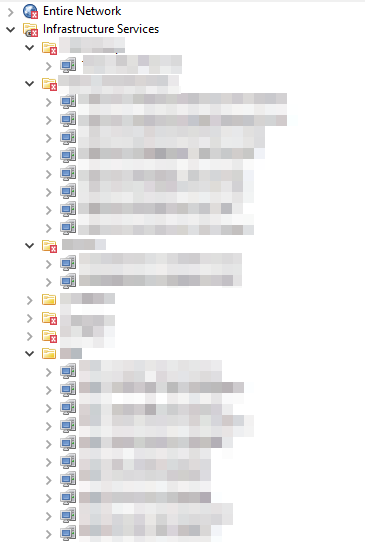
Containers in error stateHi
Why are my containers in error state but the devices below them are not?
Have attached screen shot of issue.
I cleared and terminated all alarms which normally fixes this issue, on this occasion it hasn't helped.Running on version 2.2.3
Can see 2.2.4 was released yesterday, is this a issue fixed in the newer version?
Thanks
Carl
-
Locked by serverHow do I stop this error from occurring?
I was using the SQLLite Database but now on full MSSQL which wouldn't of thought would suffer from the same issue as its a true client/server database model.
NetXMS Database Manager Version 2.2.3 Build 9505 (2.2.3) (UNICODE)
Checking database (excluding collected data):
Database is locked by server 1.1.1.1 [COMPUTER Windows 8 Build 9200]
Do you wish to force database unlock? (Yes/No) -
Upgrade FailedOpted to start again with fresh database under MSSQL instead of using the SQLLite database.
-
Upgrade FailedRan this command instead to ignore SQL errors on upgrade, its working on 2.2.1 so will see how things go.
C:\NetXMS\bin>nxdbmgr.exe upgrade -t -X
NetXMS Database Manager Version 2.2.1 Build 9502 (2.2.1) (UNICODE)Upgrading database...
Upgrading from version 21.4 to 21.5
>>> ALTER TABLE nodes ADD rack_orientation integer
>>> ALTER TABLE chassis ADD rack_orientation integer
>>> UPDATE nodes SET rack_orientation=0
>>> UPDATE chassis SET rack_orientation=0
Unable to set not null constraint.
Unable to set not null constraint.
>>> UPDATE metadata SET var_value='5' WHERE var_name='SchemaVersionMinor'
Upgrading from version 21.5 to 22.0
>>> INSERT INTO metadata (var_name,var_value) VALUES ('SchemaVersionLevel.21','5')
>>> UPDATE metadata SET var_value='22' WHERE var_name='SchemaVersionMajor'
>>> UPDATE metadata SET var_value='0' WHERE var_name='SchemaVersionMinor'
Upgrading from version 22.0 to 22.1
>>> SELECT var_value FROM config WHERE var_name='NumberOfDataCollectors'
>>> INSERT INTO config (var_name,var_value,default_value,is_visible,need_server_restart,is_public,data_type,description) VALUES ('DataCollector.ThreadPool.BaseSize','10','10',1,1,'N','I','Base size for data collector thread pool.')
>>> INSERT INTO config (var_name,var_value,default_value,is_visible,need_server_restart,is_public,data_type,description) VALUES ('DataCollector.ThreadPool.MaxSize','250','250',1,1,'N','I','Maximum size for data collector thread pool.')
>>> UPDATE config SET default_value='250' WHERE var_name='DataCollector.ThreadPool.MaxSize'
>>> DELETE FROM config WHERE var_name='NumberOfDataCollectors'
>>> UPDATE metadata SET var_value='1' WHERE var_name='SchemaVersionMinor'
Upgrading from version 22.1 to 22.2
>>> INSERT INTO config (var_name,var_value,default_value,is_visible,need_server_restart,is_public,data_type,description) VALUES ('DBWriter.MaxRecordsPerTransaction','1000','1000',1,1,'N','I','Maximum number of records per one transaction for delayed database writes.')
>>> UPDATE metadata SET var_value='2' WHERE var_name='SchemaVersionMinor'
Upgrading from version 22.2 to 22.3
>>> CREATE TABLE dci_access ( dci_id integer not null, user_id integer not null, PRIMARY KEY(dci_id,user_id))
>>> UPDATE metadata SET var_value='3' WHERE var_name='SchemaVersionMinor'
Upgrading from version 22.3 to 22.4
>>> SELECT var_value FROM metadata WHERE var_name='SchemaVersionLevel.21'
>>> UPDATE metadata SET var_value='4' WHERE var_name='SchemaVersionMinor'
Upgrading from version 22.4 to 22.5
>>> ALTER TABLE items ADD instance_retention_time integer
>>> ALTER TABLE dc_tables ADD instance_retention_time integer
>>> UPDATE items SET instance_retention_time=-1
>>> UPDATE dc_tables SET instance_retention_time=-1
>>> INSERT INTO config (var_name,var_value,default_value,is_visible,need_server_restart,is_public,data_type,description) VALUES ('InstanceRetentionTime','0','0',1,1,'Y','I','Default retention time (in days) for missing DCI instances')
Unable to set not null constraint.
Unable to set not null constraint.
>>> UPDATE metadata SET var_value='5' WHERE var_name='SchemaVersionMinor'
Database upgrade succeeded -
Upgrade FailedHi
I have migrated from x86 to x64 netxms system on v2.1.2 on SQLLite database successfully so had a go at upgrading to v2.2.1 but hitting issue of:
C:\NetXMS\bin>nxdbmgr.exe upgrade -t
NetXMS Database Manager Version 2.2.1 Build 9502 (2.2.1) (UNICODE)Upgrading database...
Upgrading from version 21.4 to 21.5
>>> ALTER TABLE nodes ADD rack_orientation integer
>>> ALTER TABLE chassis ADD rack_orientation integer
>>> UPDATE nodes SET rack_orientation=0
>>> UPDATE chassis SET rack_orientation=0
Unable to set not null constraint.
Rolling back last stage due to upgrade errors...
Database upgrade failedAny pointers to fix this?
I might have to bite the bullet reconfigure the system from scratch as my plan was to migrate over to MSSQL database but as I can't get the migrate to work either looking like this might be my only option.
Thanks
Carl
-
Migrating SQLLite to MSSQLopted to restore from backup.
system back up and running again on v2.1.2