cmatthews
Posts
-
Event Log Reports -
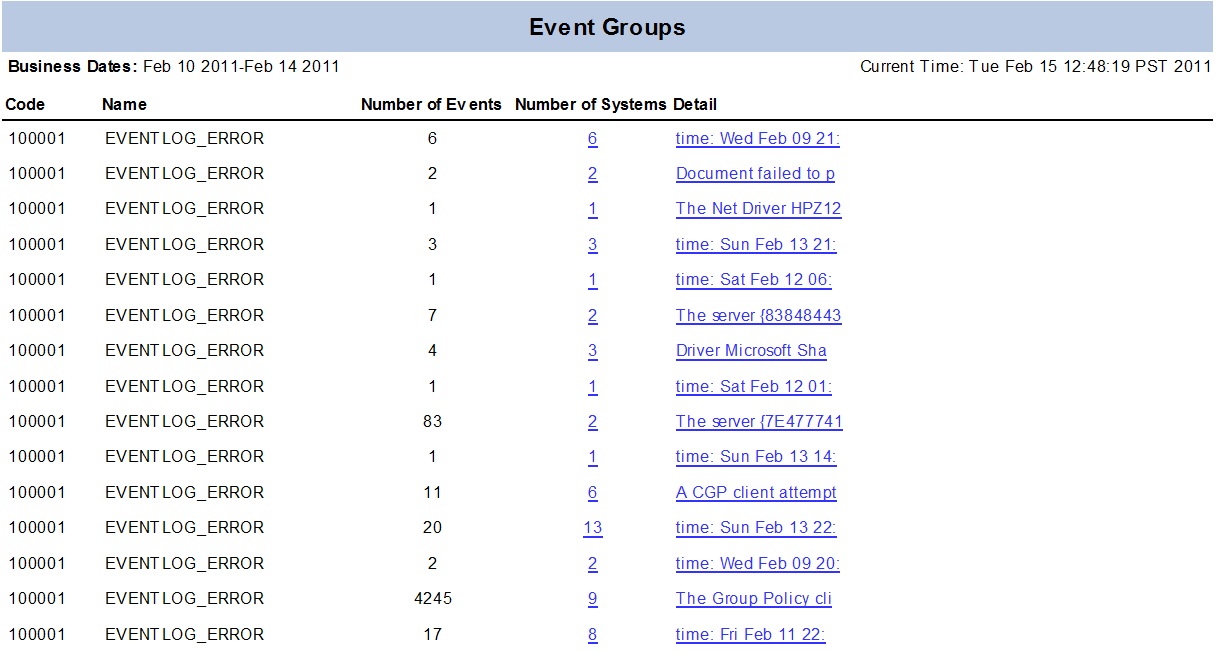
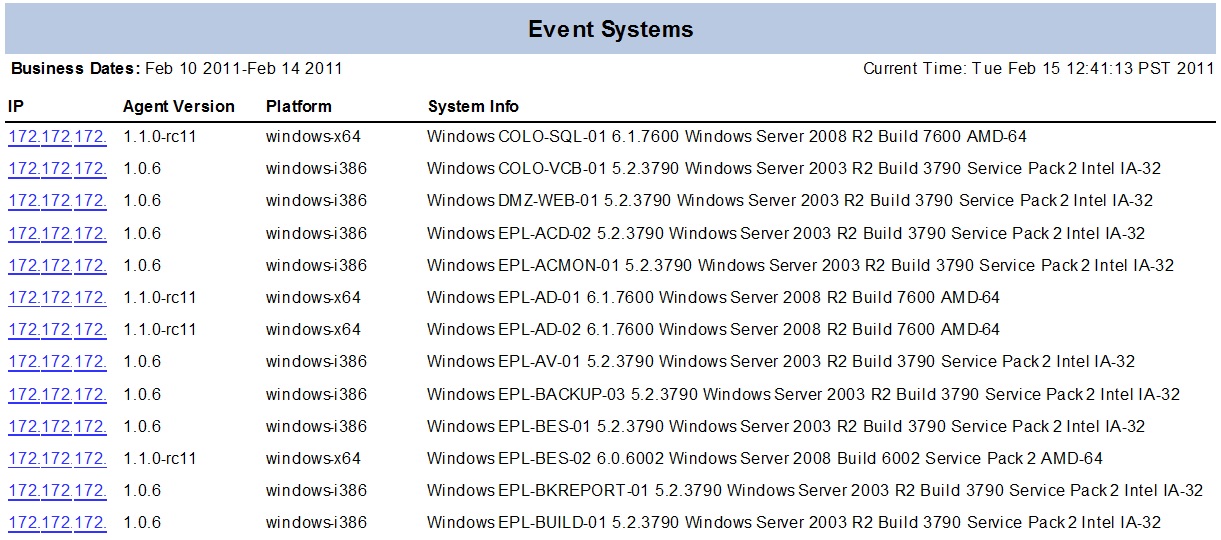
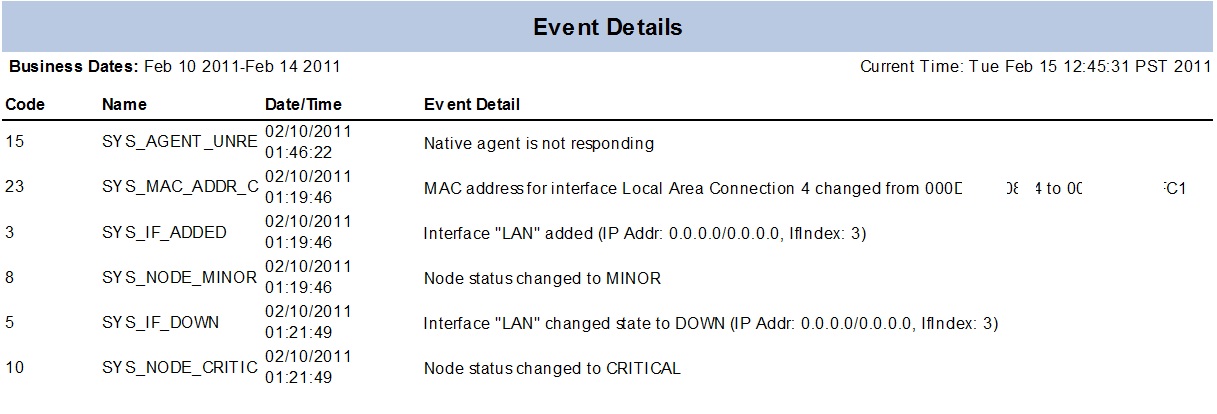
Event Log ReportsFor PCI and systems management I made a few jasperReports that people may find useful. The reports in our report runner wrapper are drillable web reports but I'm sure others can find ways to make the reports useful.
I am attaching some samples of how the reports results look and the queries involved so people can either use it or improve upon it. I also have some other views of drill down data that summarizes events in different ways. The NetXMS tool is valuable in a variery of ways to my organization, so I wanted to share so of what I am doing with it.
For the "Event Systems" report.
SELECT
	id,
	primary_ip,
	agent_version,
	platform_name,
	uname
FROM
	NETXMS.netxms.NODES WITH (NOLOCK)
WHERE
	platform_name like 'windows%'
ORDER BY
	uname
For the "Event groups"
DECLARE @startDate INT
DECLARE @endDate INT

SET @startDate = (SELECT dbo.F_DATETIME_TO_UNIX_TIME('2011/02/01'))
SET @endDate = (SELECT dbo.F_DATETIME_TO_UNIX_TIME('2011/02/03'))

SELECT TOP 1500
	eventCfg.event_code,
	eventCfg.event_name,
	LEFT(event_message,20) as eventMessage,
	COUNT(*) as eventCount,
	COUNT(DISTINCT event_source) as nodeCount
FROM (
	SELECT
		*
	FROM
		NETXMS.netxms.EVENT_LOG WITH (nolock)
	WHERE
		event_timestamp BETWEEN @startDate and @endDate
	) eventDtl
	JOIN NETXMS.netxms.event_cfg eventCfg
		ON eventDtl.event_code = eventCfg.event_code
GROUP BY
	eventCfg.event_code,
	eventCfg.event_name,
	LEFT(event_message,20)
ORDER BY
	event_name
For the Event Details by System (Drill down)
SELECT
	event_id,
	eventCfg.event_code,
	eventCfg.event_name,
	dbo.F_UNIX_TIME_TO_DATETIME(event_timestamp) as event_datetime,
	event_message
FROM (
	SELECT
		*
	FROM
		NETXMS.netxms.EVENT_LOG WITH (nolock)
	WHERE
		event_source = $P!{eventSource}
	) eventDtl
	JOIN NETXMS.netxms.event_cfg eventCfg
		ON eventDtl.event_code = eventCfg.event_code
WHERE
	dbo.F_UNIX_TIME_TO_DATE(event_timestamp) BETWEEN '2011/01/01' AND '2011/01/31'
ORDER BY
	event_timestamp
Regards,
Clark
-
Handy reporting functions (sqlserver)I made some web based drillable jasperReports against the event_log tables and found these functions to be handy for date logic. I didn't write them (found them) but since they are useful for netxms table reporting thought I'd share.
CREATE function [dbo].[ufn_DATETIME_TO_UNIX_TIME]
( @DAY datetime )
returns int
as
/*
Function: ufn_DATETIME_TO_UNIX_TIMEFinds UNIX time as the difference in seconds between
1970-01-01 00:00:00 and input parameter @DAY after
rounding @DAY to the neareast whoie second.Valid datetime range is 1901-12-13 20:45:51.500 through
2038-01-19 03:14:07.497. This range is limited to the smallest
through the largest possible integer.Datetimes outside this range will return null.
*/
begin
declare @wkdt datetime-- Return null if outside of valid UNIX Time range
if @DAY < '1901-12-13 20:45:51.500' or @DAY > '2038-01-19 03:14:07.497'
return null-- Round off datetime to nearest whole second
select @wkdt = dateadd(ms,round(datepart(ms,@DAY),-3)-datepart(ms,@DAY),@DAY)-- If date GE 1901-12-14
if @wkdt >= 712 return datediff(ss,25567,@wkdt)-- Handles time GE '1901-12-13 20:45:52.000 and LT 1901-12-14
return -2147472000-datediff(ss,@wkdt,712)end
CREATE function [dbo].[ufn_UNIX_TIME_TO_DATETIME]
( @UNIX_TIME int )
returns datetime
as
/*
Function: ufn_UNIX_TIME_TO_DATETIMEConverts UNIX time represented as the difference
in seconds between 1970-01-01 00:00:00 to a datetime.Any valid integer -2,147,483,648 through 2,147,483,647
can be converted to datetime.
*/
beginreturn dateadd(ss,@UNIX_TIME,'1969-12-31 16:00:00')
end
-
Generating Service AlertsThe problem is I have the polling interval set to run at 4PM everyday using the custom schedule,
0 16 * * *
Should the repeat value be equal to the number of seconds in a day?
-
Generating Service AlertsThreshold is setup to generate an alert when the service state is not zero.
DCI is schedule to run once per day at 4pm.
Each time it runs and the value tests as "zero" we would like to get the event fired and an email generated. It seems that it works but not sure why it seems that if the situation is not resolved or occurs again the system does not generate the true alarm again?
Does this have to do with the "Repeat Event" and where do I change the "Use default settings" on this to always re-fire the event/email whenever the threshold condition is true even if it is true a number of times in a row.
Thanks