Skip to content
  • Categories
  • Recent
  • Tags
  • Popular
  • Users
  • Groups
Skins
  • Light
  • Brite
  • Cerulean
  • Cosmo
  • Flatly
  • Journal
  • Litera
  • Lumen
  • Lux
  • Materia
  • Minty
  • Morph
  • Pulse
  • Sandstone
  • Simplex
  • Sketchy
  • Spacelab
  • United
  • Yeti
  • Zephyr
  • Dark
  • Cyborg
  • Darkly
  • Quartz
  • Slate
  • Solar
  • Superhero
  • Vapor

  • Default (Flatly)
  • No Skin
Collapse
Brand Logo

NetXMS Forum

C

commando

@commando
Unfollow Follow
About
Posts
18
Topics
5
Shares
0
Groups
0
Followers
0
Following
0

Posts

Recent Best Controversial

  • Public Access for a map
    C commando
    Support

    Hi Filipp,
    We had difficult let the WebUI work during last few day, we did not use tomcat before.
    Anyway, from your words, I understand why the map could not share to other user in desktop app - did not grant read permission to the object.
    Appreciate your kindly explaination!

    Br,
    Mika


  • Public Access for a map
    C commando
    Support

    Hello Filipp,
    Sorry about my question, I thought answer could be in the configuration, not in the installation section.

    Thanks for help!

    Br,
    Mika Chu


  • Public Access for a map
    C commando
    Support

    Good day!
    I have newest netxms server running on an Ubuntu server, and using postgre background DB.
    I just find the interesting feature in the netxms management client, I can enable the public access to others, I have interesting use it.
    I have few questions,
    what else software packages do I need to install? Except netxms-server, I did not try/install others before.
    Could these software be installed on other server, not the same netxms one?

    Thanks for help!

    Br,
    Mika Chu


    Snipaste_2025-01-21_11-17-23.jpg


  • switch connections
    C commando
    Support

    I read this post then fix my problem, but it takes some time. Hope new feature added in new release.
    https://www.netxms.org/forum/general-support/l2-topology-not-updating/msg31619/#msg31619

    Thanks.


  • switch connections
    C commando
    Support

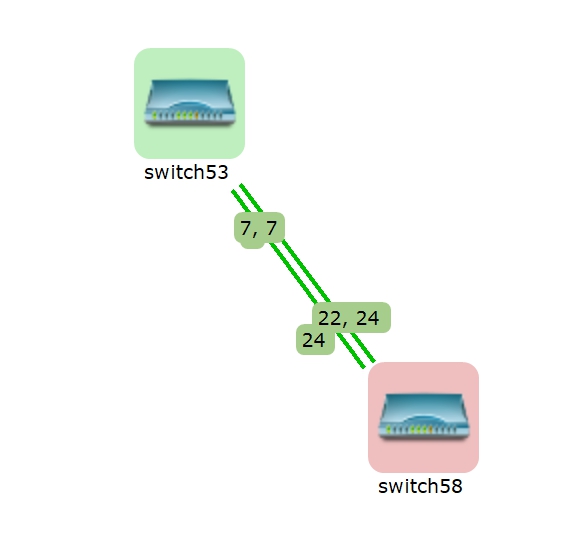
    more info, I switched the cable from port 24 to 2, back to my workstation and run the manual topology poll 3 times, then I find this.
    note, there is only one cable on the switch, port 2.

    [8/15/22, 2:41:31 PM] **** Poll request sent to server ****
    [8/15/22, 2:41:31 PM] Poll request accepted, waiting for outstanding polling requests to complete...
    [8/15/22, 2:41:31 PM] Starting topology poll of node switch58
    [8/15/22, 2:41:31 PM] VLAN list successfully retrieved from node
    [8/15/22, 2:41:33 PM] Switch forwarding database retrieved
    [8/15/22, 2:41:33 PM] Link layer topology retrieved (2 connections found)
    [8/15/22, 2:41:33 PM] Updating peer information on interfaces
    [8/15/22, 2:41:33 PM]    Local interface 2 linked to remote interface switch53:7
    [8/15/22, 2:41:33 PM]    Local interface 24 linked to remote interface switch53:7
    [8/15/22, 2:41:33 PM] Link layer topology processed
    [8/15/22, 2:41:33 PM] Finished topology poll of node switch58
    [8/15/22, 2:41:33 PM] **** Poll completed successfully ****

    [8/15/22, 2:41:44 PM] **** Poll request sent to server ****
    [8/15/22, 2:41:44 PM] Poll request accepted, waiting for outstanding polling requests to complete...
    [8/15/22, 2:41:44 PM] Starting topology poll of node switch58
    [8/15/22, 2:41:44 PM] VLAN list successfully retrieved from node
    [8/15/22, 2:41:46 PM] Switch forwarding database retrieved
    [8/15/22, 2:41:46 PM] Link layer topology retrieved (2 connections found)
    [8/15/22, 2:41:46 PM] Updating peer information on interfaces
    [8/15/22, 2:41:46 PM]    Local interface 2 linked to remote interface switch53:7
    [8/15/22, 2:41:46 PM]    Local interface 24 linked to remote interface switch53:7
    [8/15/22, 2:41:46 PM] Link layer topology processed
    [8/15/22, 2:41:46 PM] Finished topology poll of node switch58
    [8/15/22, 2:41:46 PM] **** Poll completed successfully ****

    [8/15/22, 2:43:52 PM] **** Poll request sent to server ****
    [8/15/22, 2:43:52 PM] Poll request accepted, waiting for outstanding polling requests to complete...
    [8/15/22, 2:43:52 PM] Starting topology poll of node switch58
    [8/15/22, 2:43:52 PM] VLAN list successfully retrieved from node
    [8/15/22, 2:43:54 PM] Switch forwarding database retrieved
    [8/15/22, 2:43:54 PM] Link layer topology retrieved (2 connections found)
    [8/15/22, 2:43:54 PM] Updating peer information on interfaces
    [8/15/22, 2:43:54 PM]    Local interface 2 linked to remote interface switch53:7
    [8/15/22, 2:43:54 PM] Link layer topology processed
    [8/15/22, 2:43:54 PM] Finished topology poll of node switch58
    [8/15/22, 2:43:54 PM] **** Poll completed successfully ****


  • switch connections
    C commando
    Support

    At last, delete switch58 in the map, after few secs, switch58 appears again, and connection is correct.

    My question is, is it possible let the map update itself automatically? In our production environment, switches changes always happens, my production network map becomes mass now.
    And during the connection changes, is it possible somewhere I can check the history? for example  uppon post, I can see the connection on switch58, connection changed from port 24, 22 to 18.

    Thanks for helping!


    Snipaste_2022-08-15_12-19-22.jpg


  • switch connections
    C commando
    Support

    @commando said in switch connections:

    Hello,
    I installed newest NetXMS server yesterday, Version 4.1.420
    Added 2 switches into manage, switch53 & switch58.
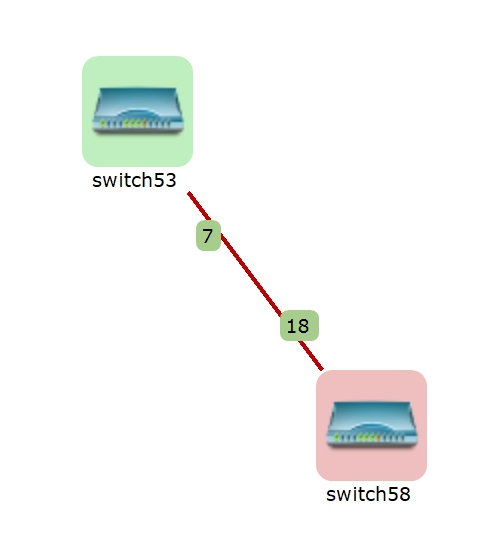
    I connected the cable to switch58 port 24 first, then changed to port 22. Map shows like this.

    After a while, I changed the connection to switch58 port 18, but map not updated. Manual poll to both switches are correct.

    [8/15/22, 12:15:16 PM] Updating peer information on interfaces
    [8/15/22, 12:15:16 PM]    Local interface 18 linked to remote interface switch53:7
    [8/15/22, 12:15:16 PM] Link layer topology processed
    [8/15/22, 12:15:16 PM] Finished topology poll of node switch58

    [8/15/22, 12:15:23 PM] Updating peer information on interfaces
    [8/15/22, 12:15:23 PM]    Local interface 7 linked to remote interface switch58:18
    [8/15/22, 12:15:23 PM] Link layer topology processed
    [8/15/22, 12:15:23 PM] Finished topology poll of node switch53


  • switch connections
    C commando
    Support

    Hello,
    I installed newest NetXMS server yesterday, Version 4.1.420
    Added 2 switches into manage, switch53 & switch58.
    I connected the cable to switch58 port 24 first, then changed to port 22. Map shows like this.


    Snipaste_2022-08-15_12-12-53.jpg


  • switch connections
    C commando
    Support

    add screenshots here.

    Any comment appreciated. This strange problem makes my NetXMS mass these days  ;D
    Thanks!


    Snipaste_2022-08-07_14-23-47.jpg

    Snipaste_2022-08-07_14-25-54.jpg


  • switch connections
    C commando
    Support

    @victor said in switch connections:

    So it shows something connected on interface "6", but this interface not connected to anything?

    Please run topology poll on that switch manually, and show the output. Also, please show screenshot or export of interfaces table (I'm mostly interested in peer information columns).

    Best regards,
    Victor

    Dear,
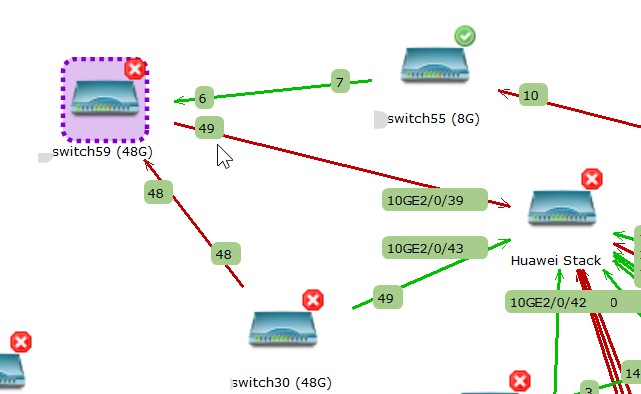
    I moved my switch59 into production, port 1~48 should connected computer devices only, port 49 is the fiber uplink to our central switch.
    But the NetXMS map is not correct.
    from the switch59 management WebUI, the port 48 is down now.
    from the switch30 management WebUI, the port 48 is down now. I am quite I did not connect them.
    from the switch55 management WebUI, the port 7 is down now. switch55 in my office, the connection could be established when I configured switch59.
    manually poll the topology to these 3 switches again here,

    ===
    [2022/08/07 14:15:50] **** Poll request sent to server ****
    [2022/08/07 14:15:50] Poll request accepted, waiting for outstanding polling requests to complete...
    [2022/08/07 14:15:50] Starting topology poll of node switch30 (48G)
    [2022/08/07 14:15:50] VLAN list successfully retrieved from node
    [2022/08/07 14:15:57] Switch forwarding database retrieved
    [2022/08/07 14:15:57] Link layer topology retrieved (2 connections found)
    [2022/08/07 14:15:57] Updating peer information on interfaces
    [2022/08/07 14:15:57]    Local interface 49 linked to remote interface Huawei Stack:10GE2/0/43
    [2022/08/07 14:15:57] Link layer topology processed
    [2022/08/07 14:15:57] Finished topology poll of node switch30 (48G)
    [2022/08/07 14:15:57] **** Poll completed successfully ****
    ===

    ===
    [2022/08/07 14:17:54] **** Poll request sent to server ****
    [2022/08/07 14:17:54] Poll request accepted, waiting for outstanding polling requests to complete...
    [2022/08/07 14:17:54] Starting topology poll of node switch55 (8G)
    [2022/08/07 14:17:54] VLAN list successfully retrieved from node
    [2022/08/07 14:17:58] Switch forwarding database retrieved
    [2022/08/07 14:17:58] Link layer topology retrieved (2 connections found)
    [2022/08/07 14:17:58] Updating peer information on interfaces
    [2022/08/07 14:17:58]    Local interface 10 linked to remote interface switch37 (48G):37
    [2022/08/07 14:17:58] Link layer topology processed
    [2022/08/07 14:17:58] Finished topology poll of node switch55 (8G)
    [2022/08/07 14:17:58] **** Poll completed successfully ****
    ===

    ===
    [2022/08/07 14:18:37] **** Poll request sent to server ****
    [2022/08/07 14:18:37] Poll request accepted, waiting for outstanding polling requests to complete...
    [2022/08/07 14:18:37] Starting topology poll of node switch59 (48G)
    [2022/08/07 14:18:37] VLAN list successfully retrieved from node
    [2022/08/07 14:18:39] Switch forwarding database retrieved
    [2022/08/07 14:18:39] Link layer topology retrieved (3 connections found)
    [2022/08/07 14:18:39] Updating peer information on interfaces
    [2022/08/07 14:18:39]    Local interface 49 linked to remote interface Huawei Stack:10GE2/0/39
    [2022/08/07 14:18:39] Link layer topology processed
    [2022/08/07 14:18:39] Finished topology poll of node switch59 (48G)
    [2022/08/07 14:18:39] **** Poll completed successfully ****
    ===

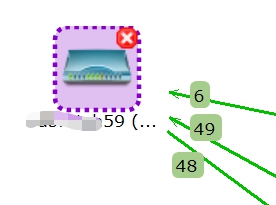
    add more screenshots for switch59, include the 3 strange port neighbours.


    Snipaste_2022-08-07_14-12-17.jpg


  • switch connections
    C commando
    Support

    Thanks for replying my question.

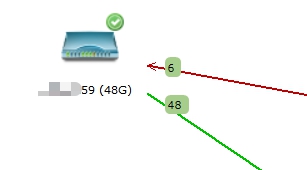
    I am sure I only connected interface "6" when I configured the switch, it was new and  in front of my office desk. Also I mentioned I had this problem for some period, I noticed something like NetXMS remembered the connection history. Manually poll doesn't help at all.
    This afternoon I moved the switch twice, look the attached picture.
    The switch is OFF now, I can power it on tomorrow, and share some info to you.

    Please tell me how to export the interfaces table? I did not use it, I think it is different than the MAC address table?
    Sorry, now I know where is it, in the switch object properties. I will export it tomorrow. 🙂

    Thanks again!


    Snipaste_2022-08-05_19-51-25.jpg


  • switch connections
    C commando
    Support

    Today I am installing a new switch, named XXX59, it is an Aruba 2540-48G one. I am quite sure I only connected it with one cable.
    Added it into NetXMS, then map shows like the attachment.

    And here is the event log for developer debug.

    This problem not exits in all of my Aruba 2530/2540 switches. How can I prevent this?

    Thanks.

    "id": 2133249,
      "rootId": 0,
      "code": 71,
      "name": "SYS_IF_PEER_CHANGED",
      "timestamp": 1659665242,
      "originTimestamp": 1659665242,
      "origin": 0,
      "source": 5157,
      "zone": 0,
      "dci": 0,
      "severity": 0,
      "message": "New peer for interface 48 is XXX30 (48G) interface 48 (38:10:F0:AE:42:90)",
      "lastAlarmKey": "",
      "lastAlarmMessage": "",
      "tags": null,
      "parameters": [
          {
            "name": "localIfId",
            "value": "5205"
          },
          {
            "name": "localIfIndex",
            "value": "48"
          },
          {
            "name": "localIfName",
            "value": "48"
          },
          {
            "name": "localIfIP",
            "value": "UNSPEC"
          },
          {
            "name": "localIfMAC",
            "value": "90:20:C2:B7:4C:D0"
          },
          {
            "name": "remoteNodeId",
            "value": "2035"
          },
          {
            "name": "remoteNodeName",
            "value": "XXX30 (48G)"
          },
          {
            "name": "remoteIfId",
            "value": "2084"
          },
          {
            "name": "remoteIfIndex",
            "value": "48"
          },
          {
            "name": "remoteIfName",
            "value": "48"
          },
          {
            "name": "remoteIfIP",
            "value": "UNSPEC"
          },
          {
            "name": "remoteIfMAC",
            "value": "38:10:F0:AE:42:90"
          },
          {
            "name": "protocol",
            "value": "3"
          }
      ]


    Snipaste_2022-08-05_10-57-46.jpg


  • switch connections
    C commando
    Support

    Did some testing today,
    when I change the link between switches, NetXMS still can remember the older one. I can delete the old connection in map, but it will appear after a while.
    Still have to delete the node, re-create them can fix the problem.
    How does the map update the connections automatically?
    Thanks.


  • switch connections
    C commando
    Support

    Dear,
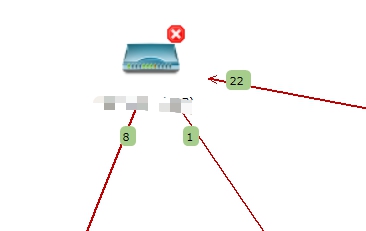
    These days I find some switches connections not correct in my layer 2 topology map like the attachment.
    When I run the topology poll, only shows the interface 8 linked to another switch. There is device connected port 1, but nothing on port 22.
    I also had the experience when I changed the cable connections between switches, NetXMS could have them in map.
    I find only solution clean the redundant connections between switches is, delete the node first, create them again.

    Is it correct? Is it possible change some configuration can avoid this happen again?

    Thanks in advance.


    Snipaste_2022-08-02_16-53-09.jpg


  • How to modify built in Event template?
    C commando
    Support

    Hi all,
    I just start to use NetXMS for few weeks. I can see there are already some built in Event Configuration there, but now I want to modify something now.
    Question are,
    1, how to modify built in Event template? Where are they defined?
    2, I want to modify "SYS_IF_UP", and if possible, could someone tell me how to add the device MAC there? My idea is add the device MAC info into event log, when it is UP or DOWN.
    3, I want to know how to add more event template there.

    Thanks in advanced.


  • connection history change
    C commando
    Support

    Hello all,
    Is it possible I can find out a device connection history? I only know the device MAC, and I want to find out the connection history. For example it connected a switch port, then changed to another switch port. At this moment I only manage the switches here, not client device.
    Thanks in advanced.


  • Network Maps not updated?
    C commando
    Support

    I did some testing that can work.
    Delete the switch , or delete the cable itself. After next topology poll, the port number on the cable then updated.

    In the EventLog, there is something can show connection changed, but in map itself, it doesn't update automatically. We will change the switches location in production periodically, that can give us trouble.

    Please advice. Thanks!


  • Network Maps not updated?
    C commando
    Support

    Dear,
    Thanks for NetXMS, I started using this from 2 months ago and manage switches in our company. Network map is very important for my daily job.
    I find this, but don't know if it doesn't support, or something.
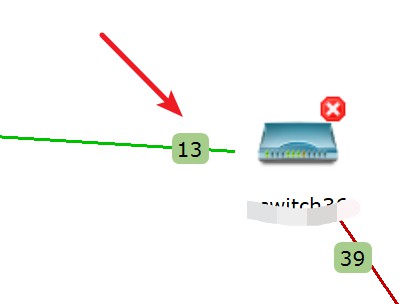
    When I changed the switch uplink cable from port 13 > port 1 on a switch, the map still showing port 13 is the uplink one, even I poll everything, or wait for enough time, map doesn't updated.
    I created the 2nd Layer 2 map, it easily shows the correct port.
    From the event log, everything is fine, show the correct info. Only the port number in the network maps not updated.
    I wonder if it can update itself? Or need manual update?

    I am using version 3.9.298 on Ubuntu 20.04LTS.

    Appreciate your help/comment.


    Snipaste_2021-10-08_21-50-40.jpg

  • Login

  • Don't have an account? Register

  • Login or register to search.
Powered by NodeBB Contributors
  • First post
    Last post
0
  • Categories
  • Recent
  • Tags
  • Popular
  • Users
  • Groups