Skip to content
  • Categories
  • Recent
  • Tags
  • Popular
  • Users
  • Groups
Skins
  • Light
  • Brite
  • Cerulean
  • Cosmo
  • Flatly
  • Journal
  • Litera
  • Lumen
  • Lux
  • Materia
  • Minty
  • Morph
  • Pulse
  • Sandstone
  • Simplex
  • Sketchy
  • Spacelab
  • United
  • Yeti
  • Zephyr
  • Dark
  • Cyborg
  • Darkly
  • Quartz
  • Slate
  • Solar
  • Superhero
  • Vapor

  • Default (Flatly)
  • No Skin
Collapse
Brand Logo

NetXMS Forum

C

curruscanis

@curruscanis
Unfollow Follow
About
Posts
48
Topics
22
Shares
0
Groups
0
Followers
0
Following
0

Posts

Recent Best Controversial

  • NetXMS Core server will not start after upgrade to 7.*
    C curruscanis
    Support

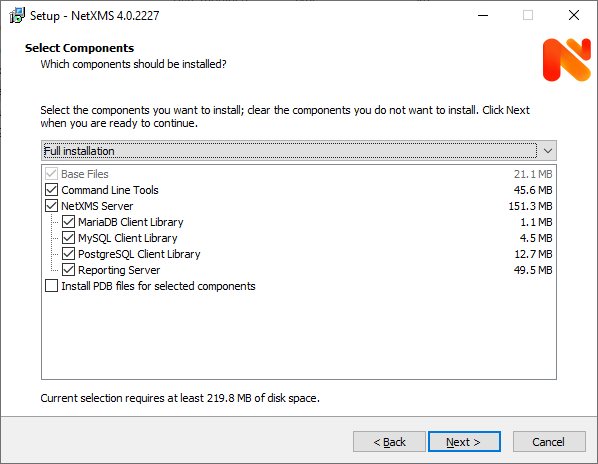
    Thank you for the information, in this case the server uses a Postgre database, I presume because that database was already on that server.  The config file does call out the appropriate database driver, and is shown below.  I stopped the reporting service for now, and the prunsrv.exe error did go away, however when I attempt to login via the local client I get a "Connection refused getsockopt" error...  I don't know of any conflicts where can I look to find info on this if you don't know the answer?  Most googling only refers to Minecraft serving...

    #
    # Configuration file generated on Wed Nov  5 11:42:51 2025
    #

    DBDriver=pgsql.ddr
    DBServer=localhost
    DBName=netxms_db
    DBLogin=techdept
    DBPassword=…
    LogFile=C:\NetXMS\log\netxmsd.log

  • NetXMS Core server will not start after upgrade to 7.*
    C curruscanis
    Support

    I have a windows server that has been running NetXMS 5.02 fine for some time, and I attempted an install ( upgrade ) to 7.0.2, and once upgraded the core services will not start.  Can someone please assist me in getting this running again, I have restored from backup and tried several times with the same results.

    I receive a error in the windows log below:

    Log Name:      Application
    Source:        Application Error
    Date:          11/4/2026 7:03:26 AM
    Event ID:      1000
    Task Category: (100)
    Level:        Error
    Keywords:      Classic
    User:          N/A
    Computer:      SERVER-MONITOR2.arapahoe.internal
    Description:
    Faulting application name: prunsrv.exe, version: 1.3.1.0, time stamp: 0x6271349d
    Faulting module name: prunsrv.exe, version: 1.3.1.0, time stamp: 0x6271349d
    Exception code: 0xc0000005
    Fault offset: 0x0000000000007130
    Faulting process id: 0xe14
    Faulting application start time: 0x01dd6c6542bc4ed1
    Faulting application path: C:\NetXMS\bin\prunsrv.exe
    Faulting module path: C:\NetXMS\bin\prunsrv.exe
    Report Id: 81fdebe0-80ec-4cc5-ba52-857bed319fc8
    Faulting package full name:
    Faulting package-relative application ID:
    Event Xml:
    <Event xmlns="http://schemas.microsoft.com/win/2004/08/events/event">
      <System>
        <Provider Name="Application Error" />
        <EventID Qualifiers="0">1000</EventID>
        <Level>2</Level>
        <Task>100</Task>
        <Keywords>0x80000000000000</Keywords>
        <TimeCreated SystemTime="2026-11-04T14:03:26.571015700Z" />
        <EventRecordID>12128</EventRecordID>
        <Channel>Application</Channel>
        <Computer>SERVER-MONITOR2.arapahoe.internal</Computer>
        <Security />
      </System>
      <EventData>
        <Data>prunsrv.exe</Data>
        <Data>1.3.1.0</Data>
        <Data>6271349d</Data>
        <Data>prunsrv.exe</Data>
        <Data>1.3.1.0</Data>
        <Data>6271349d</Data>
        <Data>c0000005</Data>
        <Data>0000000000007130</Data>
        <Data>e14</Data>
        <Data>01dd6c6542bc4ed1</Data>
        <Data>C:\NetXMS\bin\prunsrv.exe</Data>
        <Data>C:\NetXMS\bin\prunsrv.exe</Data>
        <Data>81fdebe0-80ec-4cc5-ba52-857bed319fc8</Data>
        <Data>
        </Data>
        <Data>
        </Data>
      </EventData>
    </Event>


  • slack configuration
    C curruscanis
    Support

    Thank you for pointing me in the right direction, I had not created the webhook correctly.


  • slack configuration
    C curruscanis
    Support

    I have installed a new NetXMS system on an Ubuntu server to test the newest release and some new ideas for our existing install.

    Previously we had used email for our alerting platform, but it has some issues, and we would like to attempt to use Slack as a possible alterantive, however when I configure the Notification Channel for Slack I am not getting anywhere and the error on the Notification Channel setup is Status: failure, Error Message: Driver Error

    It is a brand new base install of NetXMS with the WebGui added... and a few nodes monitored.

    I have configured a webhook for slack, and added the following configuration in the Notification Channel setup for Slack:

    username=monitor
    url=[https://hooks.slack.com/services/***** private info here *****]

    I am not sure what I am doing wrong?

    Thank you.


  • Web console issues
    C curruscanis
    Support

    Thank you very much for pointing out my error, however, I have attempted the download of the .war file that you gave the link for and I also have done it for 
    https://netxms.com/download/releases/5.0/nxmc-5.0.8.war, which is the version of NETMXS that my server is running... 

    But in either case I now get a 404 not found error, but I am not sure how to troubleshoot why I am not getting the web console.


  • Web console issues
    C curruscanis
    Support

    I have been upgrading my NetXMS system, and I back fighting the web console that I gave up on a while ago.

    Current system is a Ubuntu 18.04 server, running NetXMS 5.0.8, system works fine with a management console from a windows PC.

    I have run the gambit of install / reinstall / remove various web systems, and followed the instructions from :

    Link Preview Image
    Installation — NetXMS Administrator Guide (7.0.0)

    favicon

    (netxms.org)

    I upgraded Java from 11 to 17, here is the info on the JAVA on the server:
    openjdk version "17.0.7" 2023-04-18
    OpenJDK Runtime Environment (build 17.0.7+7-Ubuntu-0ubuntu118.04)
    OpenJDK 64-Bit Server VM (build 17.0.7+7-Ubuntu-0ubuntu118.04, mixed mode, sharing)

    Currently, I have attempted both Tomcat 9, and Jetty, running Java version 17, and with either web platform I get the following page when I go the site that should display the web console:

    [color=#000000]{"description":"NetXMS web service API version 5.0.8","version":"5.0.8","build":"5.0-1066-g6c885ac8ec"}[/color]
    

    I don't know where to look now or what I am doing wrong... the .war file appears to be correct and in the correct place.

    Please let me know if you all have any suggestions... Thank you!


  • scripting ping from a router / firewall to test endpoint
    C curruscanis
    Support

    Update, for anyone trying to do anything similar, I believe I have a working solution.  I was able create a polled DCI parameter from a Windows Agent using the SSH.nsm subagent to access a router / firewall and then run a script from that device ( in my case Edgerouter ).  Below is how I setup the DCI properties on the Windows Agent System:

    Data - Parameter:
    SSH.Command(192.168.239.1,username, password,sudo /config/scripts/polling_script.sh)

    Origin:
    NetXMS Agent 
      ( this differs from information online that says it should be "SSH", I could not get this to work )

    Data Type:
    String

    Source Node:
    Pointing at the Same windows Agent

    I run a script that is found on the remote router / firewall that consist of a ping command that is parsed for information on if the ping is successful and returns either "OK" or "Failed"

    my script is similar to this:
    if ping -q -c 1 10.200.200.112 2>&1 > /dev/null ; then
        echo "Ok"
    else
        echo "Fail"
    fi

    Thank you all for your help, this will allow me to confirm the status of VPN's that I do not control any remote devices, that only allow certain IP's to ping them.


  • scripting ping from a router / firewall to test endpoint
    C curruscanis
    Support

    Thank you for your input Zebbie, I figured once I got any info other than <<error>> on the DCI parameter then I would begin the process of parsing the data as you recommend.


  • scripting ping from a router / firewall to test endpoint
    C curruscanis
    Support

    Ok, I beleive I am making progress.

    I have created a DCI parameter on a test PC - windows 10 running NetXMS agent with SSH.nsm subagent.

    I have created a DCI parameter as follows:
    Parameter:
      SSH.Command(192.168.239.1,username,password,ping 192.168.240.1)

    Origin:
      NetXMS agent

    Data Type:
      String

    I have tried using the origin of SSH but I never get anything back. 

    With the above settings I now see this in the log:

    2021.02.15 08:51:45.001 *D* [comm.cs.2          ] Requesting parameter "SSH.Command(192.168.239.1,username,password,ping 192.168.240.1)"
    2021.02.15 08:51:46.157 *D* [                  ] SSH: created new session [email protected]:22/2

    So I am presumably getting a return of "created new session..."

    How can I use this to SSH into my device, and ping another device and return the result of "successful" or "failed"?????

    Thank you all for your assistance.


  • scripting ping from a router / firewall to test endpoint
    C curruscanis
    Support

    I have continued testing with the log verbose setting to 6.  In the Agent log, that is a windows 10 system that I am attempting to use an ssh DCI parameter, the agent log does say that the SSH sub agent is loaded successfully, however the DCI parameter is never mentioned in the log.  I have other custom DCI parameters on this test machine and they do show up in the log.


  • scripting ping from a router / firewall to test endpoint
    C curruscanis
    Support

    Thank you Victor, I will do that and review, but if you could explain to me in simple terms exactly where these items should be configured.  I presume the DCI parameter should be created on the agent PC node, not the router in question?  I am confused as to where each of these items should actually be created.


  • scripting ping from a router / firewall to test endpoint
    C curruscanis
    Support

    I have attempted to create a DCI for a given node using only the "uname -a" under the DCI parameter.  I have the Origin set to SSH, and the Data Type to String. This is to attempt to get anything back in the DCI value.

    I have attempted entering the NetXMS server and a windows 10 system running with NetXMS agent with the ssh.nsm enabled.  I have also attempted setting the windows 10 system as the SSH proxy, nether of these configurations work.

    The only information that I get is an <<error>> in the value of the DCI when I force a DCI poll or just wait.

    Obviously I am missing something or doing something wrong, can you assist further?


  • scripting ping from a router / firewall to test endpoint
    C curruscanis
    Support

    I have been reading up on scripting with SSH and NETXMS and various items about NXSL without much success.

    I believe what I want to do is fairly simple but I don't understand how to implement it in NetXMS.

    I monitor many Unifi Edgerouters with NetXMS, some of these firewalls have VPN's to remote subnets / devices that I would like to confirm the state of the VPN as up or down.  One way to do this is to ping a device on the other end of the VPN that also has the benefit of causing traffic to keep the VPN's up.  Since the Edgerouters do not have a NetXMS agent installed I don't know how to implement a script from the device like I do with other agents.  I believe it should be just an SSH script but I don't know how to get NetXMS to fire the script and record the output.

    Basically I want to be able to run an SSH script on a non agent device to ping or other functions and return information.  I would also like to do this on a schedule if possible or during polling.

    Any ideas on how to implement this?


  • Monitor a remote "policy based" VPN status
    C curruscanis
    Support

    Hello all, I am hoping someone can assist me with a issue that I would like to solve.  I am using NetXMS to monitor various devices and networks.  One network has an EdgeRouter Pro router / firewall that I am monitoring.  This firewall has a VPN to a remote network that I would like to alert on if the VPN is not up.  However, since it is a policy based VPN there is no interface to monitor.

    The Edgerouter is basically a linux box that I can SSH into, so is there a way to run a script that I could run CLI commands via SSH to parse information to see if the tunnel is up, or possibly even force a ping / or initiate the vpn to retry?  I have not done any scripting with NetXMS so I am not familiar with where to start.

    Thank you all for your assistance on this matter.


  • Agent for Raspberry Pi ( Buster )
    C curruscanis
    Feature Requests

    I tried this, and after a bit of messing with it still no luck.  I was able to get through the "sudo make install" but the files under the folder:

    pi@pi4:~/NetXMS/netxms-3.0.2258/contrib/startup/systemd $ ls
    Makefile  Makefile.am  Makefile.in  netxmsd.in  nxagentd.in  README

    do not include the build service file after the make.


  • Agent for Raspberry Pi ( Buster )
    C curruscanis
    Feature Requests

    It it possible to have an ARMF capable agent install for the raspberry pi 3?

    I am building various systems that use raspberry pi's to interact with physical environments and would like to be able to monitor them.

    I should mention I have attempted to install the deb package that was created a while back but the prerequisites of that install conflict with my modern versions.


  • upgrade to 3.0 - from 2.2.10
    C curruscanis
    Support

    I think I got it I had a bad entry in my sources list with the NetXMS repository.


  • upgrade to 3.0 - from 2.2.10
    C curruscanis
    Support

    Thank you for that insight Victor, however this is the error that I get when I attempt the following:

    apt-get update

    ..................
    Reading package lists... Done
    W: The repository 'http://packages.netxms.org/debian xenial Release' does not have a Release file.
    N: Data from such a repository can't be authenticated and is therefore potentially dangerous to use.
    N: See apt-secure(8) manpage for repository creation and user configuration details.
    E: Failed to fetch http://packages.netxms.org/debian/dists/xenial/main/binary-amd64/Packages  404  Not Found
    E: Some index files failed to download. They have been ignored, or old ones used instead.

    .....................

    Do you have any further advice?


  • upgrade to 3.0 - from 2.2.10
    C curruscanis
    Support

    Hello, I am attempting to upgrade my Ubuntu linux ( Ubuntu 16.04.6 LTS ) based NetXMS system from 2.2.10 to 3.0 

    I have followed the upgrade instructions on the wiki, although it is out of date.

    I have attempted the following...

    Downloaded the new release and extracted it:
    wget https://netxms.org/download/releases/3.0/netxms-3.0.2258.tar.gz

    I then attempted to run the shell program:
    sh ./configure --with-server --with-mysql

    I get the following error:

    ....................

    checking for sensors/sensors.h... no
    checking curl/curl.h usability... no
    checking curl/curl.h presence... no
    checking for curl/curl.h... no
    configure: error: libcurl is required. Check that it is installed or use --without-curl option


    I do use the --without-curl option I get an error about SSL
    .............
    checking for sensors/sensors.h... no
    checking libssh/libssh.h usability... no
    checking libssh/libssh.h presence... no
    checking for libssh/libssh.h... no
    configure: error: libssh is required for SSH support. Check that it is installed or use --disable-ssh option

    I do have Curl installed as well as SSH, I have confirmed this and dont' know why the install script is giving me these errors.

    Please let me know if anyone has any advice...


  • Dashboard display of DCI information
    C curruscanis
    Support

    I am attempting to display the status of a DCI poll that I have created for a windows agent process object.  I would like to display a simple Green / Red Dot for good / bad status if the process is running or not. 

    The closest I have gotten is to use a gauge - pie graph as only chart objects seem to display DCI values on the dashboards.  This does provide me a green dot if I customize the color and my process count is a value greater than zero.  However if it is zero it is just "blank" no value.

    Is there a way to display a DCI value as a good / bad color indicator on a dashboard that I am missing?

  • Login

  • Don't have an account? Register

  • Login or register to search.
Powered by NodeBB Contributors
  • First post
    Last post
0
  • Categories
  • Recent
  • Tags
  • Popular
  • Users
  • Groups