
Hi Filipp,
that patch solved the problem. Everything is now in the same language!
Thanks!
Detlev
Hi Filipp,
that patch solved the problem. Everything is now in the same language!
Thanks!
Detlev
it's the desktop client...
Hi after upgrading the client to 6.1.1 the diplay language is mixed.
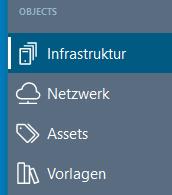
the attached pictures are made with language set to "english". Some parts are in German (language of OS).
switching to german language makes everything to german, returning to englisch shows the mix again.
unistall / Install did not help...
How to fix this? even as a german citizen, I prefer the english language on computer ysytems...
Thanks.
Detlev

Thanks for the explanations. Now I understand...
best...
Detlev
Hi,
I'm a little bit "lost in space" 
A "collector" object has two Data Collection tabs. On one I can create normal DCIs. The second one looks like I can link DCIs from other objects to the collector. I looked around in the Mangement client but did not find any way to get a DCI in there.
The documentation at https://netxms.org/documentation/adminguide doesn't list the collector object at all...
What's the correct way to link DCIs to this object? Or am I on the completely wrong way?
Thanks in advance for any help.
best...
Detlev
Hello,
I have uploaded a walk from .1 (.txt) and the mib-files (.zip):
C9800-L-universalk9_wlc.17.12.05.SPA.bin-v2.zip
wlc-C9800-L-F-K9-walk.txt
I have edited the walk to remove company name and domains.
the data is from 2-Unit-Failover environment with currently 40 active AP. Also showing 86 rogue access points from the neighborhood.
Please keep the data confidential. Thanks.
best...
Detlev
Hello,
whatever I try to get the subagent running - I'm getting rthe same result:
2022.08.09 14:34:44.243 *E* [db.drv ] Unable to load database driver module "mysql.ddr": Das angegebene Modul wurde nicht gefunden.
2022.08.09 14:34:44.243 *E* [ ] MYSQL: failed to load database driver
2022.08.09 14:34:44.243 *E* [subagents ] Initialization of subagent "MYSQL" (mysql.nsm) failed
The German language part of the error translates to "the specified module was not found"
mysql.ddr is available in the agent's bin-directory.
Agent is 4.1.420 on Windows Server 2016. Mysql Server 8.0.13 is running on the same machine.
Any help is highly appreciated 
Regards
Detlev
Works fine for mysql... Thanks for the quick update
Regards
Detlev
Hi, same Problem with mysql.ddr...
Regards
Detlev
@victor said in Problem creating tunnel between server and agent:
What is debug level? You should see lines like "Adding CA certificate ..." on level 3 and more on level 5.
I have started a clean new attempt in DebugLevel 5 with SSLTrace switched on.
The agent sees the certificate of the server, and receives new certificates from server...
I have attached the agent log for your reference. It shows the "clean" start until the bind to node fails and a restart of agent after that...
Regards
Detlev
@victor said in Problem creating tunnel between server and agent:
Is it typo when copying here or actual typo in your config, or correct configuration (v: and c:)?
ServerCACertificate = v:\netxms\etc\ca.cer
ServerCertificate = c:\netxms\etc\cert.cer
Also, are there any messages about certificate loading on server startup?
Hi Victor,
the drive letter is just a typo... I have disabled copy function between vm console and my desktop, so I quickly typed it in.
The server's log is showing:
2020.06.22 05:54:54.459 *I* [ ] Crypto library initialized (OpenSSL 1.1.1g 21 Apr 2020)
2020.06.22 05:54:54.459 *D* [ ] Server certificate loaded
2020.06.22 05:54:54.459 *D* [ ] Using server certificate key
and the agent receives it correctly when establishing the unbound tunnel
*D* [tunnel ] 192.168.10.6: Server certificate subject is /C=DE/ST=NW/.....
*D* [tunnel ] 192.168.10.6: Server certificate issuer is /DC=de/DC=.....
Best...
Detlev
@victor said in Problem creating tunnel between server and agent:
Did you provide root CA certificate and all intermediate CA certificates in server configuration?
Hi Victor,
yes - I have and hopefully in the correct way..:
ServerCACertificate = v:\netxms\etc\ca.cer (contains the domain's root certificate "CAROOT")
ServerCertificate = c:\netxms\etc\cert.cer (contains the netxms server's certificate, issued by "CAROOT")
ServerCertificateKey = c:\netxms\etc\netxms.key (contains the private key for the server's certificate)
there's no intermediate CA in our system...
Best...
Detlev
@victor said in Problem creating tunnel between server and agent:
How server side log looks like for that tunnel? Also, please try this agent version: https://netxms.org/download/releases/3.3/nxagent-3.3.350-x64.exe - it fixes incorrect error code display in "SSL read error" message so we could see actual socket error code that could provide some clue.
Another thought - could it be that you have some kind of DPI device between agent and server that detects SSL handshake and blocks connection for some reason?
Hi Victor,
I have updated the agent to 3.3.350 and tried again with Debuglevel 7 on both, agent side and server.
Please refer to attached logs for the errors.
The NetXMS server has 4 network cards (one for each monitored subnet) to prevent passing the firewall. The simple network routing is: Agent-PC -> HPE/Aruba-Switch -> ESXi Host -> Server VM.
I also tried to bind a tunnel between the agent on the server vm and the netxms server. So data is not leaving the vm at all. In this configuration I see a second error in the agent log:
SSL_write_error (bytes=-1 ssl_err=5 errno=2)
TlsMessageReceiver: SSL_read error (ssl_err=5 errno=0)
Thanks & regards
Detlev
Hi Victor,
I have created a new certificate containing the BasicConstaint:
X509v3 extensions:
X509v3 Basic Constraints: critical
CA:TRUE
But the result is still the same when I try to bind the tunnel.
Excerpt from agent.log:
2020.06.05 06:02:02.529 *D* [tunnel ] 192.168.10.6: Resetting tunnel
2020.06.05 06:02:02.532 *D* [tunnel ] 192.168.10.6: Certificate and private key loaded
2020.06.05 06:02:02.532 *D* [ssl ] SSL handshake start (before SSL initialization)
2020.06.05 06:02:02.532 *D* [ssl ] SSL_connect: before SSL initialization
2020.06.05 06:02:02.532 *D* [ssl ] SSL_connect: SSLv3/TLS write client hello
2020.06.05 06:02:02.532 *D* [ssl ] SSL_connect: error in SSLv3/TLS write client hello
2020.06.05 06:02:02.534 *D* [ssl ] SSL_connect: SSLv3/TLS write client hello
2020.06.05 06:02:02.534 *D* [ssl ] SSL_connect: SSLv3/TLS read server hello
2020.06.05 06:02:02.534 *D* [ssl ] SSL_connect: TLSv1.3 read encrypted extensions
2020.06.05 06:02:02.534 *D* [ssl ] SSL_connect: SSLv3/TLS read server certificate request
2020.06.05 06:02:02.534 *D* [ssl ] SSL_connect: SSLv3/TLS read server certificate
2020.06.05 06:02:02.534 *D* [ssl ] SSL_connect: TLSv1.3 read server certificate verify
2020.06.05 06:02:02.534 *D* [ssl ] SSL_connect: SSLv3/TLS read finished
2020.06.05 06:02:02.534 *D* [ssl ] SSL_connect: SSLv3/TLS write change cipher spec
2020.06.05 06:02:02.534 *D* [ssl ] SSL_connect: SSLv3/TLS write client certificate
2020.06.05 06:02:02.536 *D* [ssl ] SSL_connect: SSLv3/TLS write certificate verify
2020.06.05 06:02:02.536 *D* [ssl ] SSL_connect: SSLv3/TLS write finished
2020.06.05 06:02:02.536 *D* [ssl ] SSL handshake done (SSL negotiation finished successfully)
2020.06.05 06:02:02.536 *D* [tunnel ] 192.168.10.6: Server certificate subject is /C=DE/ST=NW/L=Bornheim/O=TILS GmbH/OU=IT/CN=netxms.tilsnet.de
2020.06.05 06:02:02.536 *D* [tunnel ] 192.168.10.6: Server certificate issuer is /DC=de/DC=tilsnet/CN=tilsnet-CAROOT
2020.06.05 06:02:02.537 *D* [ ] TlsMessageReceiver: SSL_read error (ssl_err=5 errno=0)
2020.06.05 06:02:02.537 *D* [tunnel ] 192.168.10.6: Receiver thread stopped (MSGRECV_COMM_FAILURE)
2020.06.05 06:02:02.537 *D* [comm.vs.8 ] Requesting parameter "System.PlatformName"
2020.06.05 06:02:02.537 *W* [ ] Tunnel with 192.168.10.6 closed
2020.06.05 06:02:02.537 *D* [comm.vs.8 ] GetParameterValue(): result is 0 (SUCCESS)
2020.06.05 06:02:02.537 *D* [comm.vs.8 ] Requesting parameter "System.UName"
2020.06.05 06:02:02.537 *D* [comm.vs.8 ] GetParameterValue(): result is 0 (SUCCESS)
2020.06.05 06:02:12.537 *D* [tunnel ] 192.168.10.6: Cannot configure tunnel (request timeout)
Do you have any further ideas ?
Thanks & regards
Detlev
@victor said in Problem creating tunnel between server and agent:
Please check that your server certificate has CA constraint set to TRUE. You can do that by printing certificate in text form with command like this:
openssl x509 -text -noout -in server.crtand look for "X509v3 Basic Constraints" section. For example, my test server's certificate looks like this (only relevant part of the output):
        X509v3 extensions:
            X509v3 Basic Constraints:
                CA:TRUE
Hi Victor,
there's no "X509v3 Basic Contraints" section in my certificate at all...
I will try to make a new cert during the next days and try again.
Best...
Detlev
@victor said in NetXMS 3.3 released:
yes, Ubuntu 20 packages will be available shortly.
Hi Victor,
any news about this package ?
Thanks & regards
Detlev
@victor said in Problem creating tunnel between server and agent:
2020.06.02 06:04:06.788 *D* [tunnel ] 192.168.10.6: SSL_write error (bytes=-1 ssl_err=5 errno=2)
SSL error 5 means underlying socket error, which is strange because SSL negotiation seems to be completed successfully. Are you using server version 3.3.x as well? Can you check what was logged in server log during that attempt?
Hi,
yes, server is latest 3.3 version.
I ran same procedure again with debuglevel 7 on server. I have cut beginning and end of the log, but it still contains a lot of waste.
I think the most relevant line is at time 12:19:10.069 - handshake failed.
I have attached a zip file containing the server log.
Regards
Detlev
@filipp-sudanov said in Problem creating tunnel between server and agent:
Please try the most recent nxagent-3.3.330 version, adding EnableSSLTrace=yes to agent configuration file and setting DebugLevel=7. Please share agent log for the time when the situation occurs.
Hi Filipp,
I have updated the agent as requested and started a clean attempt. Same result as before.
Please find attached agent log
Regards
Detlev
@victor said in Problem creating tunnel between server and agent:
What agent versions you are using, and on what platform? We've seen such issue with Windows agents and it was solved by rebuilding agent with newer OpenSSL.
Hi Victor,
I tried the 3.3.314 windows x64 agent on both Win7-x64 and server2019-x64
Regards
Detlev
Thanks for your reply...
@tfines said in Problem creating tunnel between server and agent:
Please post your agent config file.
ServerConnection = 192.168.10.6
ConfigIncludeDir = C:\NetXMS\etc\nxagentd.conf.d
LogFile = {syslog}
FileStore = C:\NetXMS\var
SubAgent = filemgr.nsm
SubAgent = ping.nsm
SubAgent = logwatch.nsm
SubAgent = wmi.nsm
DebugLevel = 6
LogFile = c:\netxms\log\agent.log
What setting did you select on the server for how it handles new nodes?
New nodes need to be added manually. I have tried with manually added node and bind as well as with "create node and bind". AgentTunnel.NewNodesContainer is left empty. The node appears in the root folder.
Best...
Detlev