Skip to content
  • Categories
  • Recent
  • Tags
  • Popular
  • Users
  • Groups
Skins
  • Light
  • Brite
  • Cerulean
  • Cosmo
  • Flatly
  • Journal
  • Litera
  • Lumen
  • Lux
  • Materia
  • Minty
  • Morph
  • Pulse
  • Sandstone
  • Simplex
  • Sketchy
  • Spacelab
  • United
  • Yeti
  • Zephyr
  • Dark
  • Cyborg
  • Darkly
  • Quartz
  • Slate
  • Solar
  • Superhero
  • Vapor

  • Default (Flatly)
  • No Skin
Collapse
Brand Logo

NetXMS Forum

E

eliassal

@eliassal
Unfollow Follow
About
Posts
16
Topics
4
Shares
0
Groups
0
Followers
0
Following
0

Posts

Recent Best Controversial

  • Cannot connect to NetXMS agent (Internal error)
    E eliassal
    Support

    Hi Filipp, not sure I understnad what I should do but here ios the config for nxagentd.conf

    MasterServers = 127.0.0.1,::1
    ConfigIncludeDir = C:\NetXMS\etc\nxagentd.conf.d
    LogFile = C:\NetXMS\log\nxagentd.log
    FileStore = C:\NetXMS\var
    SubAgent = portcheck.nsm
    SubAgent = ssh.nsm
    SubAgent = winperf.nsm
    SubAgent = wmi.nsm

    should I change this to something else? for example change 127.0.0.1 to the ip of the NetXMS server?


  • Network monitoring
    E eliassal
    Support

    By Traffic monitoring I mean "Anything going out / getting in" through the router, yes you are correct I want to gather stats from router. My router is Vigor 2926 from Draytek


  • Nic icon flagged with "Unknown"
    E eliassal
    Support

     I have a fresh new setup, updated network configuration to do "Passive and Active." discovery, all servers and devices are discovered except a D-Link switch.
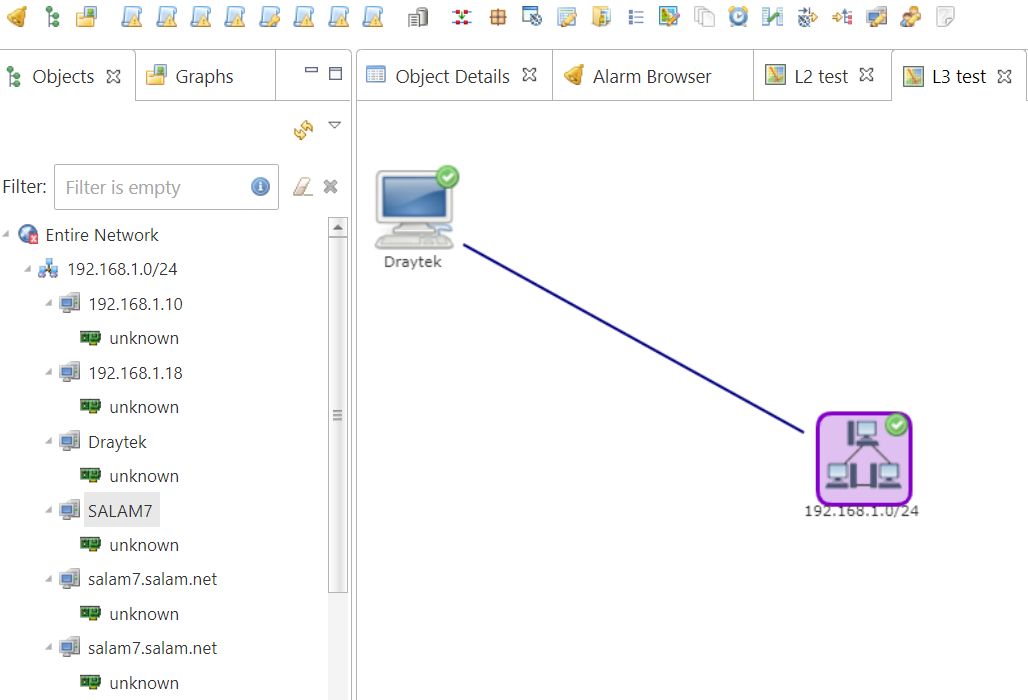
     First of all, I have a 2 or 3 machines who have 2 or 3 NIcs, in the "entire network" list, those machines are repeated in the list as the same number of Nics.
    2nd, under all discovered machines, there is Nic icon flagged with "Unknown" as you can notice in the attached snapshot.

    When I try for example doing a map layer2, my router as seed, I get only 2 nodes, one for the router, second for the subnet nothing else. I expect to see a map of all servers connected to router!!!


    NetXMSUnknown.jpg


  • Network monitoring
    E eliassal
    Support

    Yes, correct but what I am looking for is monitoring all traffic on my router, in the video "Basics 8: Data collection (DCIs)", he shows how to collect devices temperatures which not what I am interested in. Any idea?


  • Network monitoring
    E eliassal
    Support

    Thanks, those videos are out-of-date. I am not sure I see in any video network monitoring topic!


  • Network monitoring
    E eliassal
    Support

    Hi, I setup NetXMS because I understood that it is one of the best 10 tools to monitor a network. Can you please let me know how can I activate*start monitoring my network traffic in NetXMS? Thanks


  • Cannot connect to NetXMS agent (Internal error)
    E eliassal
    Support

    I am following the video "NetXMS client and basic server settings" at https://wiki.netxms.org/wiki/NetXMS_Video_Tutorial_Series which are a little bit out-of-date, when I try to do poll > configuration
    I always get

    [29.10.2021 11:14:26] Starting configuration poll for node WIN10-NETXMS
    [29.10.2021 11:14:26] Checking node's capabilities...
    [29.10.2021 11:14:26]    Checking NetXMS agent...
    [29.10.2021 11:14:26]    Cannot connect to NetXMS agent (Internal error)

    in spite of the fact that the NetXMS agent service is up and running. NetXMS is running on windows 10


  • Setup not going through with SQL Server
    E eliassal
    Support

    I installed teh web-ui and was able to login, updated network configuration to do "Passive...". First of all, I have a 2 or 3 machines who have 2 or 3 NIcs, in the "entire network" list, those machines are repeated as the same number of Nics.
    2nd, under all discovered machines, there is Nic icon flagged with "Unknown".
    Also, I have a D-Link switch which was not discovered.

    So my last query is about "Network Monitoring" for which I was interested to test NetXMS. Can you please let me know where I can monitor network traffic?

    Thanks


  • Setup not going through with SQL Server
    E eliassal
    Support

    Correct Victor, and thanks I downloaded and installed SQL native client and setup went through without issue. But when I clicked on "Finish", nothing happened, no message....no wizard again and not sure how to continue


  • Setup not going through with SQL Server
    E eliassal
    Support

    No Sir, it is not indicated in the prerequisites. I thought the setup takes care of everhthing


  • Setup not going through with SQL Server
    E eliassal
    Support

    Can you please tell me what versions of sql server are compatible (2019, 2016, 2014.........)., Mine is
    Microsoft SQL Server 2016 (SP2-CU15)


  • Setup not going through with SQL Server
    E eliassal
    Support

    Filipp, I have just tried all possibilities with the command, default instance DB host name , IP, named instance ip/named instance

    nxdbmgr check

    I get the same exact error as you can notice for the 4 tests

    NetXMS Database Manager Version 3.9.298 Build 3.9-298-g2adbdd51e5 (UNICODE)

    Unable to connect to database NetXMS@SQL2K12\SC2K12 as netxms ([Microsoft][ODBC Driver Manager] Data source name not found and no default driver specified)

    C:\NetXMS\bin>nxdbmgr check
    NetXMS Database Manager Version 3.9.298 Build 3.9-298-g2adbdd51e5 (UNICODE)

    Unable to connect to database NetXMS@SQL2K12 as netxms ([Microsoft][ODBC Driver Manager] Data source name not found and no default driver specified)

    C:\NetXMS\bin>nxdbmgr check
    NetXMS Database Manager Version 3.9.298 Build 3.9-298-g2adbdd51e5 (UNICODE)

    Unable to connect to database [email protected]\SC2K12 as netxms ([Microsoft][ODBC Driver Manager] Data source name not found and no default driver specified)

    C:\NetXMS\bin>nxdbmgr check
    NetXMS Database Manager Version 3.9.298 Build 3.9-298-g2adbdd51e5 (UNICODE)

    Unable to connect to database [email protected] as netxms ([Microsoft][ODBC Driver Manager] Data source name not found and no default driver specified)

    And here you can see that pining the sql server works fine

    Pinging sql2k12.salam.net [192.168.1.69] with 32 bytes of data:
    Reply from 192.168.1.69: bytes=32 time<1ms TTL=128
    Reply from 192.168.1.69: bytes=32 time<1ms TTL=128
    Reply from 192.168.1.69: bytes=32 time=1ms TTL=128
    Reply from 192.168.1.69: bytes=32 time=1ms TTL=128

    Ping statistics for 192.168.1.69:
        Packets: Sent = 4, Received = 4, Lost = 0 (0% loss),
    Approximate round trip times in milli-seconds:
        Minimum = 0ms, Maximum = 1ms, Average = 0ms


  • Setup not going through with SQL Server
    E eliassal
    Support

    Hi Filipp, I already tried with another sql server default installation, not a named instance (without the /), same issue happened


  • Setup not going through with SQL Server
    E eliassal
    Support

    I can ping the host and connect to the default and named instance from anywhere in my network. NeyXNS is setup on a new brand fresh win 10 VM, in case you mean SSMS on this VM no It is not setup and I think that NetMXS setup will install necessary libraries to access SQL default or named instance


  • Setup not going through with SQL Server
    E eliassal
    Support

    Yes of course, it is a remote named instance sql server (as you can notice in the text where I indicated the name of SQL server

    Unable to connect .... server SQL2K12\SC2K12,

    not on the machine where I am installing netxms, even I created manullay NetMXS DB and a user and granted it dbcreator privileges


  • Setup not going through with SQL Server
    E eliassal
    Support

    Hi, I downloaded netxms-server-3.9.298-x64 on a win 10 64 machine, I chose MS SQL server, I enter correct information for the DB server (which is a named or default instance), correct logins or * but always getting an error

    NetXMS Database Manager Version 3.9.298 Build 3.9-298-g2adbdd51e5 (UNICODE)
    Unable to connect to database server SQL2K12\SC2K12 as sa ([Microsoft][ODBC Driver Manager] Data source name not found and no default driver specified)
    ***** PRESS ANY KEY TO CONTINUE *****
    or when using * as my login has all privileges on the DB server, get same thing

    Whatever I choose I get "Data source name not found and no default driver specified"

    Thanks for your help

  • Login

  • Don't have an account? Register

  • Login or register to search.
Powered by NodeBB Contributors
  • First post
    Last post
0
  • Categories
  • Recent
  • Tags
  • Popular
  • Users
  • Groups