Skip to content
  • Categories
  • Recent
  • Tags
  • Popular
  • Users
  • Groups
Skins
  • Light
  • Brite
  • Cerulean
  • Cosmo
  • Flatly
  • Journal
  • Litera
  • Lumen
  • Lux
  • Materia
  • Minty
  • Morph
  • Pulse
  • Sandstone
  • Simplex
  • Sketchy
  • Spacelab
  • United
  • Yeti
  • Zephyr
  • Dark
  • Cyborg
  • Darkly
  • Quartz
  • Slate
  • Solar
  • Superhero
  • Vapor

  • Default (Flatly)
  • No Skin
Collapse
Brand Logo

NetXMS Forum

G

gn_cyborg

@gn_cyborg
Unfollow Follow
About
Posts
6
Topics
2
Shares
0
Groups
0
Followers
0
Following
0

Posts

Recent Best Controversial

  • Handles Open customer Parameter
    G gn_cyborg
    Support

    Hi Filipp,

    The monitoring for this custom parameter is very inconsistent. Changing the AgentCommandTimeout value to 4000ms got the monitoring to work initially but it seems to randomly stop monitoring. I'll have to look into this further. Thanks for your help so far.


  • Handles Open customer Parameter
    G gn_cyborg
    Support

    Hi Filipp Sudanov, many thanks for your quick reply again. Currently the Server Configuration has it's AgentCommandTimeout value as 2000ms so I would have though this is OK. ExecTimeout and ExternalParameterProviderTimeout are not defined so default values apply. I'll play around with these settings and see how it goes. I may not reply until Monday but again, thanks for this.


  • Handles Open customer Parameter
    G gn_cyborg
    Support

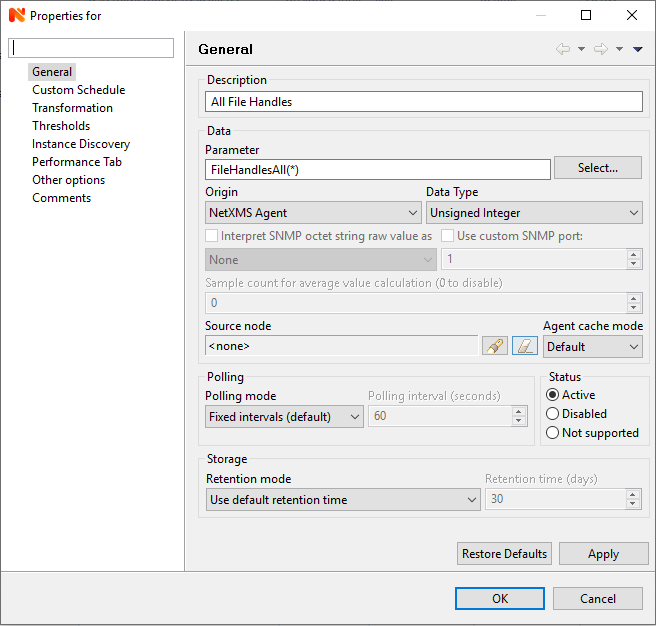
    Many thanks for that! It worked. I am now however experiencing another issue. It's been at least 5 minutes since I added the customer parameter (please see attached screenshot) but nothing at all is showing up on the line chart. The command I specified in the config file was lsof| wc -l. When I run this command manually on the box it takes around 10-15 seconds to execute. This shouldn't be too long for the parameter to capture right?


    FileHandles.PNG


  • Disabled ports having the circle symbol
    G gn_cyborg
    Support

    HI Victor,

    Many thanks for your answer. I am so sorry, I found the solution for this and forgot all about this forum. I ended up setting the interface to not be monitored.

    Kind Regards,


  • Handles Open customer Parameter
    G gn_cyborg
    Support

    Hi Guys,

    First of all please excuse me, I am not that experienced with NetXMS. Long and boring story short I want to create a custom parameter that enables NetXMS to monitor the amount of file handles open. A senior colleague of mine informed me I need to add the below to the nxagentd.conf file:

    ExternalParameterShellExec=FileHandlesAll(*):Command to be executed

    After this I need to add a new parameter however when I click the Select... button next to Parameter FileHandlesAll doesn't appear there. Are we doing anything wrong?

    Many thanks in advance.


  • Disabled ports having the circle symbol
    G gn_cyborg
    Support

    Hi guys,

    First of all, apologies as I am a complete and utter newbie to NetXMS and only just started using this at work.

    We have a lot of manually and intentionally disabled ports in our networks and I am finding it a little bit inconvenient that these are flagging up as the switch icon has the red x. The ports are set to 'Expected state' DOWN, the ports 'Administrative State' and Oprtational State are both down and 'Status' as disabled but it still shows a rec circle with the line though (please see attached picture). If this an intended feature or by selecting other settings can I have this red circle to disappear and make it looks like a 'Normal' port?

    One little observation I noticed is that when I right click on the interface, select 'Change interface expected status...' and change it to DOWN, the red circle disappears for about a minute, a question mark appears but then the red circle appears again. When I go back to 'Change interface expected status...' it's set as UP again, not DOWN which I changed previously. Is this normal?

    Many thanks in advance!


    DisabledPorts.PNG

  • Login

  • Don't have an account? Register

  • Login or register to search.
Powered by NodeBB Contributors
  • First post
    Last post
0
  • Categories
  • Recent
  • Tags
  • Popular
  • Users
  • Groups