Skip to content
  • Categories
  • Recent
  • Tags
  • Popular
  • Users
  • Groups
Skins
  • Light
  • Brite
  • Cerulean
  • Cosmo
  • Flatly
  • Journal
  • Litera
  • Lumen
  • Lux
  • Materia
  • Minty
  • Morph
  • Pulse
  • Sandstone
  • Simplex
  • Sketchy
  • Spacelab
  • United
  • Yeti
  • Zephyr
  • Dark
  • Cyborg
  • Darkly
  • Quartz
  • Slate
  • Solar
  • Superhero
  • Vapor

  • Default (Flatly)
  • No Skin
Collapse
Brand Logo

NetXMS Forum

J

jdesousa

@jdesousa
Unfollow Follow
About
Posts
6
Topics
4
Shares
0
Groups
0
Followers
0
Following
0

Posts

Recent Best Controversial

  • Changing/Renaming Node Interface Object Description
    J jdesousa
    Support

    Hi Guys I would be grateful for your assistance,
    How can I change a nodes interface description under the following conditions,
    using a script under the status poll hook::

    1. Node and its interface state is operational....admin/oper state/exp state== UP/UP/UP and Normal
    2. Node has NO SNMP Capability
      3, Node has Only One Interface Shown
    3. Node is Pingable

    Interface Description== "unknown" and would like to change this to the primary ip address=="x.x.x.x.x"

    Thanks

  • Templates - Operating Systems>Windows, Not Saving Edited DCI Threshold Value.
    J jdesousa
    Support

    Using v 2.2.4 on windows 10.


  • Templates - Operating Systems>Windows, Not Saving Edited DCI Threshold Value.
    J jdesousa
    Support

    Hi, i have edited this parameter [FileSystem.FreePerc({instance})] template threshold value to = last(1) < 10.
    But it is not saved after a server restart or reboot.
    I have to re-edit each time to the new threshold alarm value of the node object
    It Defaults back the default assigned value?
    Default Threshold:
    Threshold           Event
    last(1) < 20       FS_LOW_Free_SPACE

    Thanks for your help.


  • Default snmp version 2c
    J jdesousa
    Feature Requests

    Thank You So Much Sir.


  • Default snmp version 2c
    J jdesousa
    Feature Requests

    Please set the default snmp version to 2c. (node properties--->communications-->snmp-->version (1 2c 3)
    Respective versions 1 and 2c are bidirectionally compatible, no reason it should be V1.


  • show (graph) on performance tab checkmark
    J jdesousa
    Feature Requests

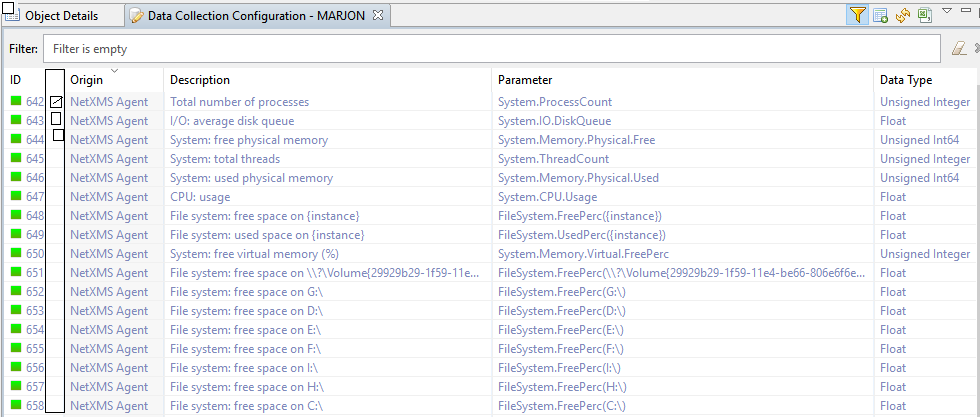
    Currently to show and enable graphing for any DCI is accessible and visible from DCI config tab and clicking(double click) on any of the available DCI listing and selecting Performance Tab and clicking "show on performance tab".
    Navigation to this function/Feature can become cumbersome, particularly if there are multiple graphs.
    In addition, once you view the performance graphs again there may be multiple DCI graphs on display and having to find/interpret
    the appropriate  DCI parameter Listing  for editing/reviewing/updating can be time consuming. A simple implementation of this function and feature can be improved by adding a performance column  with checkmarks to enable/show performance graphs directly from the
    the perfoamce tab of recspective nodes.


    dci config.PNG

  • Login

  • Don't have an account? Register

  • Login or register to search.
Powered by NodeBB Contributors
  • First post
    Last post
0
  • Categories
  • Recent
  • Tags
  • Popular
  • Users
  • Groups