Skip to content
  • Categories
  • Recent
  • Tags
  • Popular
  • Users
  • Groups
Skins
  • Light
  • Brite
  • Cerulean
  • Cosmo
  • Flatly
  • Journal
  • Litera
  • Lumen
  • Lux
  • Materia
  • Minty
  • Morph
  • Pulse
  • Sandstone
  • Simplex
  • Sketchy
  • Spacelab
  • United
  • Yeti
  • Zephyr
  • Dark
  • Cyborg
  • Darkly
  • Quartz
  • Slate
  • Solar
  • Superhero
  • Vapor

  • Default (Flatly)
  • No Skin
Collapse
Brand Logo

NetXMS Forum

K

KarlMCS

@KarlMCS
Unfollow Follow
About
Posts
6
Topics
2
Shares
0
Groups
0
Followers
0
Following
0

Posts

Recent Best Controversial

  • Undocumented operators?
    K KarlMCS
    Support

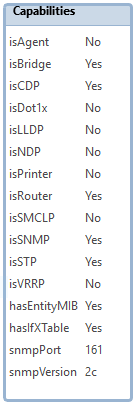
    Okay, thanks for that info.  I can see from https://wiki.netxms.org/wiki/NXSL:Node that isRouter is a node attribute, but isSTP is not...  I put that in based on what I saw in the below image.  I see most of those things are available attributes, but not isSTP.  I'll have to try another approach.

    I can probably accomplish what I need to do for the moment based on the driver or sysDescription attributes, but for future reference, can I pull SNMP values from the newly discovered node like this and use it to filter them?  https://wiki.netxms.org/wiki/Script_Example:_Read_SNMP_Value_From_Node


    NetXMS_isSTP.png


  • Undocumented operators?
    K KarlMCS
    Support

    Good evening,

    I have noticed these two operators which aren't in the documentation and would like some clarification on their use.

    One of them is a single dot.  Based on usage, it appears to be used to concatenate strings?  From the Wiki page Script Example: Read SNMP Value From Node:

    value = SNMPGetValue(transport, ".1.3.6.1.2.1.1.1.0");
    if (value == null)
    {
        println "Failed to issue SNMP GET request";
        return 2;
    }
    else
    {
        println "System description: " . value; // This dot
        return 0;
    }
    

    The other one is this which I've seen in a number of places, including the built-in scripts: ->  Example from Filter::AgentOrSNMP:

    return $1->isAgent || $1->isSNMP;
    

    I can see that it's referencing the capabilities of the node, but when I try to do this, the script fails, and NetXMS logs an event with description "error 15 in line 5: uknown object's attribute."  On this one, I'm trying to filter out some printers and a few other devices with SNMP that I don't want it to discover.  What I was going for on the line causing the error is return true for a device that has SNMP, and also is either running spanning-tree or is a router.  Maybe there's a better way to do this.  It's my first attempt.

    As best I can figure, $1->isSNMP returns true if the discovered node $1 has that capability, but I couldn't find this -> operator in the documentation.

    // Select any device running the NetXMS agent,
    // or any node with SNMP that matches criteria.
    
    if ($1->isAgent) {exit 1;}
    if ($1->isSNMP && ($1->isSTP || $1->isRouter)) {exit 1;}
    exit 0;
    

    Thanks


  • Can't get management consoles to work
    K KarlMCS
    Support

    Okay, I got it working, but it seems a bit strange.  What I did was I switched to openjdk-8-jre (from jessie-backports) and tomcat8. 

    When I go to ipaddress:8080/nxmc, I get an odd error from Firefox about the page redirecting in a way that will never complete.  I suspect it's redirecting to /nxmc.  So just for kicks, I went to ipaddress:8080/nxmc/nxmc, and it actually works.  I guess that'll do.  I hope this info is useful to someone.


  • Can't get management consoles to work
    K KarlMCS
    Support

    I fixed the issue with the Windows management console.  I didn't realize it was going to be all Java.  I downloaded the 64-bit version, but I only have 32-bit Java installed.  I downloaded the 32-bit console and was able to log into NetXMS.  Seems the server is up and ready to go.

    I would really like to get the web management console working if we can figure that out.

    Also, I mistakenly said I was using Firefox Quantum.  I'm actually using Firefox ESR 52.6.0 32-bit which was why I had 32-bit Java.


  • Can't get management consoles to work
    K KarlMCS
    Support

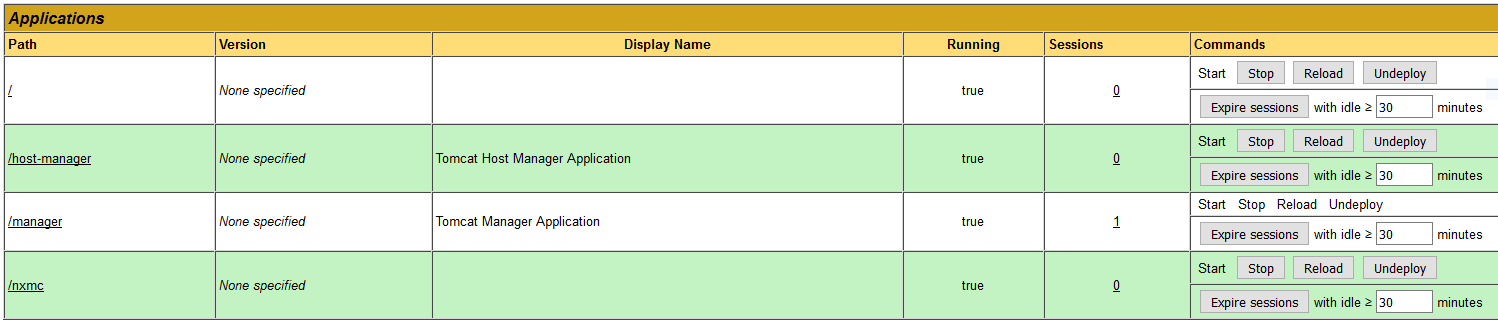
    Some related logs.  Directory listing of tomcat7/webapps and dpkg --get-selections attached.

    root@core:/var/log/tomcat7# grep nxmc localhost_access_log.2018-01-25.txt
    10.31.248.11 - - [25/Jan/2018:14:52:06 +0000] "GET /nxmc/ HTTP/1.1" 404 997
    10.31.248.11 - - [25/Jan/2018:14:53:29 +0000] "GET /nxmc/ HTTP/1.1" 404 997
    
    root@core:/var/log/tomcat7# tail catalina.out
    Jan 25, 2018 2:42:55 PM org.apache.catalina.startup.HostConfig deployDirectory
    INFO: Deployment of web application directory /var/lib/tomcat7/webapps/ROOT has finished in 428 ms
    Jan 25, 2018 2:42:55 PM org.apache.coyote.AbstractProtocol start
    INFO: Starting ProtocolHandler ["http-bio-8080"]
    Jan 25, 2018 2:42:55 PM org.apache.catalina.startup.Catalina start
    INFO: Server startup in 1132 ms
    Jan 25, 2018 2:51:47 PM org.apache.catalina.startup.HostConfig deployWAR
    INFO: Deploying web application archive /var/lib/tomcat7/webapps/nxmc.war
    Jan 25, 2018 2:51:53 PM org.apache.catalina.startup.HostConfig deployWAR
    INFO: Deployment of web application archive /var/lib/tomcat7/webapps/nxmc.war has finished in 5,999 ms
    
    root@core:/var/log# cat netxmsd
    2018.01.25 14:31:20.159 Log file opened (rotation policy 2, max size 16777216)
    2018.01.25 14:31:20.163 *I* Platform subagent "/usr/lib/x86_64-linux-gnu/netxms/linux.nsm" successfully loaded
    2018.01.25 14:31:20.163 *E* Unable to load database driver module "": /usr/lib/x86_64-linux-gnu/netxms/dbdrv/: cannot read file data: Is a directory
    
    2018.01.25 14:33:44.404 Log file opened (rotation policy 2, max size 16777216)
    2018.01.25 14:33:44.407 *I* Platform subagent "/usr/lib/x86_64-linux-gnu/netxms/linux.nsm" successfully loaded
    2018.01.25 14:33:44.413 *I* Database driver "pgsql.ddr" loaded and initialized successfully
    2018.01.25 14:33:44.618 *I* Server ID 2D34F56479DE1BDB
    2018.01.25 14:33:44.687 *I* Server certificate not set
    2018.01.25 14:33:45.240 *I* Network device driver "CATALYST-2900XL" loaded successfully
    2018.01.25 14:33:45.241 *I* Network device driver "ERS8000" loaded successfully
    2018.01.25 14:33:45.241 *I* Network device driver "JUNIPER" loaded successfully
    2018.01.25 14:33:45.241 *I* Network device driver "QTECH-OLT" loaded successfully
    2018.01.25 14:33:45.242 *I* Network device driver "BAYSTACK" loaded successfully
    2018.01.25 14:33:45.242 *I* Network device driver "CISCO-SB" loaded successfully
    2018.01.25 14:33:45.242 *I* Network device driver "NETONIX" loaded successfully
    2018.01.25 14:33:45.243 *I* Network device driver "NET-SNMP" loaded successfully
    2018.01.25 14:33:45.243 *I* Network device driver "AIRESPACE" loaded successfully
    2018.01.25 14:33:45.244 *I* Network device driver "MIKROTIK" loaded successfully
    2018.01.25 14:33:45.244 *I* Network device driver "DLINK" loaded successfully
    2018.01.25 14:33:45.244 *I* Network device driver "PING3" loaded successfully
    2018.01.25 14:33:45.245 *I* Network device driver "UBNT" loaded successfully
    2018.01.25 14:33:45.245 *I* Network device driver "SYMBOL-WS" loaded successfully
    2018.01.25 14:33:45.245 *I* Network device driver "AT" loaded successfully
    2018.01.25 14:33:45.246 *I* Network device driver "PROCURVE" loaded successfully
    2018.01.25 14:33:45.246 *I* Network device driver "H3C" loaded successfully
    2018.01.25 14:33:45.246 *I* Network device driver "CISCO-ESW" loaded successfully
    2018.01.25 14:33:45.247 *I* Network device driver "NETSCREEN" loaded successfully
    2018.01.25 14:33:45.247 *I* Network device driver "CATALYST-GENERIC" loaded successfully
    2018.01.25 14:33:45.247 *I* Network device driver "IGNITENET" loaded successfully
    2018.01.25 14:33:45.248 *I* Network device driver "HPSW" loaded successfully
    2018.01.25 14:33:45.248 *I* Network device driver "NTWS" loaded successfully
    2018.01.25 14:33:45.249 *I* Network device driver "RITTAL" loaded successfully
    2018.01.25 14:33:45.249 *I* Network device driver "TB" loaded successfully
    2018.01.25 14:33:45.249 *I* Network device driver "DELL-PWC" loaded successfully
    2018.01.25 14:33:45.250 *I* Network device driver "EXTREME" loaded successfully
    2018.01.25 14:33:54.480 *I* Listening for SNMP traps on UDP socket 0.0.0.0:162
    2018.01.25 14:33:54.480 *I* Listening for SNMP traps on UDP socket [::]:162
    2018.01.25 14:33:54.495 *I* SocketListener/Clients: listening on 0.0.0.0:4701
    2018.01.25 14:33:54.495 *I* SocketListener/MobileDevices: listening on 0.0.0.0:4747
    2018.01.25 14:33:54.495 *I* SocketListener/MobileDevices: listening on [0.0.0.0]:4747
    2018.01.25 14:33:54.495 *I* SocketListener/Clients: listening on [0.0.0.0]:4701
    2018.01.25 14:33:54.496 *I* SocketListener/AgentTunnels: listening on 0.0.0.0:4703
    2018.01.25 14:33:54.496 *I* SocketListener/AgentTunnels: listening on [0.0.0.0]:4703
    2018.01.25 14:33:54.497 *I* NetXMS Server started
    

    webapps-ls.txt

    dpkg-selections.txt

    tomcat-manager.png


  • Can't get management consoles to work
    K KarlMCS
    Support

    I'm new to NetXMS (coming from Opsview and Zabbix) so please excuse me if I've made a rookie mistake.  A little background... I'm trying to run NetXMS 2.2.2 on Turnkey Core 14.2 (Debian Jessie).  I have installed tomcat7, tomcat7-admin, default-jre (openjdk-7-jre), postgresql (postgresql-9.4), netxms-server, netxms-dbdrv-pgsql.  I have set everything up according to NetXMS Administrator Guide, and as far as I can tell, the NetXMS server is up and running.  However, I can't get the Windows or web management consoles to work.

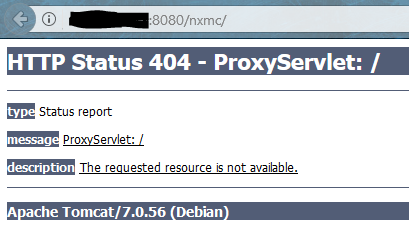
    My preference is to use the web console, so I tried that first.  I renamed nxmc-2.2.2.war to nxmc.war and put it in /var/lib/tomcat7/webapps.  It seems to deploy, but I get a 404 error when I try to open ipaddress:8080/nxmc.  Error attached below.  I have also tried deploying it with the tomcat web manager and had the same result.  The tomcat web manager says nxmc is deployed and running.  I am using Firefox Quantum for this.  I also tried it in Edge, but all it says is "Hmmm...can’t reach this page."  Very helpful...

    On this release, I can alternatively install openjdk-8-jre, postgresql-9.6, and tomcat8.  I tried that briefly but still seemed to have the same problem.  I did also try this briefly on Ubuntu Server LTS 16.04.3 but again had the same problem with the web console.

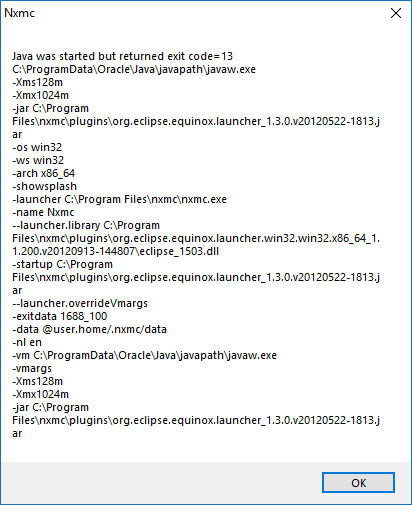
    Now, I have also tried the Windows x64 management console on Windows 10.  I extracted the nxmc folder to Program Files and ran nxmc.exe.  It churns for a couple seconds and then gives me the below error.  Not sure where to go with that either.

    Any help is much appreciated...


    tomcat-404.png

    nxmc-java-error.png

  • Login

  • Don't have an account? Register

  • Login or register to search.
Powered by NodeBB Contributors
  • First post
    Last post
0
  • Categories
  • Recent
  • Tags
  • Popular
  • Users
  • Groups