
We have a customer who would like to be able to develop and save syslog queries (filters). At the moment they are having to re-enter them every time they wish to use them.
Is there a way to do this?
We have a customer who would like to be able to develop and save syslog queries (filters). At the moment they are having to re-enter them every time they wish to use them.
Is there a way to do this?
So the issue I have is when a user connects to a vpn these interfaces are created and then the monitoring starts, which is fine.
The issue is that when the user disconnects from the vpn these interfaces become in a unknown start until they drop off. Thats fine as well, but when they move into the unknown state they produce an alarm (thats what I want to stop happening).
One of the options I have have put to me is to stop monitoring tunnel interfaces in the EPP all together, the issue with this approach is that I have a number of tunnel interfaces that I do want to monitor, its just the dynamic tunnel interfaces that I don't want to monitor.
The dynamic interfaces are identified by the following OID's
.1.3.6.1.2.1.31.1.1.1.6.[greater than 1000] and .1.3.6.1.2.1.31.1.1.1.10.[greater than 1000]
So my thought to to create some type of script to look for these OID's and tell netXMS not to alert on the interface going to a unknown state.
I hope that makes it clearer 
With thanks
The more I use this the more I'm getting frustrated with it!
how do you tell netXMS to ignore the sub-net address?
I use 172.16.X.X with a /24 which seems to cause NetXMS to alarm. I have looked in the EPP rules and cant see anything? How to I turn this off please?
With thanks
Hey all,
I'm a little lost, I need to write e EPP script to filter an OID Address.
The address range I want to filter is:
.1.3.6.1.2.1.31.1.1.1.6.[filter < 1000] and .1.3.6.1.2.1.31.1.1.1.10.[filter < 1000]
Can anyone help me with this please?
With thanks
Alan Scott
Hey all,
I'm looking to want to do a EPP filter script based on a OID.
So my base OID = .1.3.6.1.2.1.31.1.1.1.10.XX
Where XX > 15000000
Any ideas?
With thanks
Hey Guys,
I have a router that I'm NATing SNMP to multiple devices inside a customers network. I have used PAT change the SNMP Port for the different devices. The issue I have is when I try to configure a second Node to the same IP address (with a different port), NetXMS tells me I'm not allowed to do this 
How do you do this?
With thanks
What I'm after is to change the output from these two columns to be the result * 8 and Average delta per second.
This transform only to effect "bytes-in" and "bytes-out" columns in the table.
Hey all,
I'm trying to get a transform script working on my interface table (I'm not very good at scripting).
This is what I have at the moment:
idxbin = $1->getColumnIndex("bytes-in");
idxbout = $1->getColumnIndex("bytes-out");

for (i=0;i<rowCount;i++)
{
  $1->set(i,idxbin,$1->get(i,idxbin * 8);
  $1->set(i,idxbout,$1->get(i,idxbout * 8);
}
My columns are "bytes-in" and "bytes-out" and are in octets. Is this correct and also how do I set the transform script to be Delta per second?
A little lost and any help would be gratefully accepted...
How do I get rid of them god dam stupid faces!!!
Hey Team,
I'm a bit of a newbie but wanting a steer in the right direction, please. I started using manual single DCI's but soon came to the realisation there had to be a better way!
I then found DCI Tables (Very cool!), but are having issues making them behave as expected.
How do you execute a transformation based only of a single column of data? (Example I have a table called "interfaces" one for the columns is in Bytes-in (Octets), I need to transform to get bytes * 8?
When I create a single DCI interface for reading, Netxms nicely seems to list the correct multiplier (either K on M) it seems that when using a table this is not done. How to do you get the table to display as the single DCI would do?
with thanks
Thanks Victor,
I have deleted that reconfigured the Node in NetXMS with the same issue. I have searched the router (MikroTik) and have no /2 subnets and networks so are a little lost

Ok, I think I'm making progress......
Our NetXMS server is in our datacentre and I have found it seems to have no problem with connecting to a agent in the DC. Our offices are remote to the DC and connected via a VPN. When I pole a machine in my offices the log shows the following error;
19-Oct-2017 07:40:36.117] [INFO ] NetXMS Agent started
[19-Oct-2017 07:42:35.820] [DEBUG] Incoming connection from 14.1.61.XX
[19-Oct-2017 07:42:35.820] [DEBUG] Connection from 14.1.61.XX rejected
[19-Oct-2017 07:43:29.173] [DEBUG] Incoming connection from 14.1.61.XX
[19-Oct-2017 07:43:29.173] [DEBUG] Connection from 14.1.61.XX rejected
So 14.1.61.XX is my offices external IP address. I would say there is some type of IP filtering on the agent that I need to allow the NetXMS server in?
How do I do this?
With thanks (By the way Fantastic product!!!) - would love to do some training on NetXMS
Update: Fixed by adding MasterServers = 14.1.61.XX in my agent config file
Further to my post.
I have worked out it is connecting, just not getting any details.
[18.10.2017 14:11:16] **** Poll request sent to server ****
[18.10.2017 14:11:16] Poll request accepted
[18.10.2017 14:11:17] Starting interface names poll for node Alan-PC
[18.10.2017 14:11:17] Unable to get interface list from node
[18.10.2017 14:11:17] Finished interface names poll for node Alan-PC
[18.10.2017 14:11:17] **** Poll completed successfully ****
Here is another server with the same issue I have a agent installed on;
[18.10.2017 14:15:53] **** Poll request sent to server ****
[18.10.2017 14:15:53] Poll request accepted
[18.10.2017 14:15:53] Starting configuration poll for node LSD-Test
[18.10.2017 14:15:53] Checking node's capabilities...
[18.10.2017 14:15:53] Checking NetXMS agent...
[18.10.2017 14:15:58] Capability check finished
[18.10.2017 14:15:58] Checking interface configuration...
[18.10.2017 14:15:58] Unable to get interface list from node
[18.10.2017 14:15:58] Interface configuration check finished
[18.10.2017 14:15:58] Checking node name
[18.10.2017 14:15:58] Node name is OK
[18.10.2017 14:15:58] Finished configuration poll for node LSD-Test
[18.10.2017 14:15:58] Node configuration was not changed after poll
[18.10.2017 14:15:58] **** Poll completed successfully ****
What would cause this to fail? It's almost like the NetXMS server cannot get any details from the agent service?
Hey All,
Firstly I'm a newbee to NetXMS.
I'm having issues making the agents work. I have installed the agents on 2 x Windows boxes (64bit version). When I add the Node, it does add the Node by comes up with NIC as unknown and looks like the NetXMS cannot communicate to the agents. From the NetXMS server I can ping the machines with the Agents installed no problem.
What am I missing???
Thanks
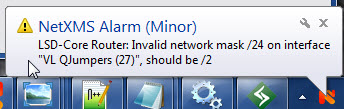
I have a problem where I get error reports that state my network should be a /2 rather than a /24 (which is correct).
What do I do to resolve this please?
With thanks
Hey all,
I have a Mikrotik router when I configure the node, I get an error on one of the VLANS.
"Invalid network mask /24 on interface xyzVALN, should be /2"
little lost as the netmask is actually /24 and that is correct - what causes this?
With thanks
Hey so the complete Windows server install, will it install a database server as well?
If so which one?
If not what are most installing?
With thanks