
Jep - After seeing, that there was a problem, I've updated two of those Windows-Agents (the one from my deep-dive into Logs is one of them) to 6.0.4, but still doesn't work...
M
Manuel Schneider
@Manuel Schneider
Posts
-
NetXMS Windows-Agent-to-Server Connection broken after Upgrade from 5.2.7 to 6 -
NetXMS Windows-Agent-to-Server Connection broken after Upgrade from 5.2.7 to 6Hi all,
I've encountered a strange issue after upgrading from 5.2.7 (if I'm not mistaken) to version 6.
All my Windows-Agent-Proxy-Nodes cannot connect anymore - the tunnel just comes up as unbound and I cannot bind the tunnel to the Node, I cannot bind the tunnel to a new node either.
Is there currently any known issue for windows with the tunnels?
Mar 09 18:01:27 netxms.domain.tld netxmsd[6645]: [crypto.cert        ] IssueCertificate: new certificate request (CN override: 2913bfd4-6a5c-4ab5-abaa-17354a97cdab, OU override: f0acdbf0-7240-4699-9ed2-f50e7e5a3ef4)
Mar 09 18:01:27 netxms.domain.tld  netxmsd[6645]: [crypto.cert        ] IssueCertificate: certificate request verification failed
Mar 09 18:01:27 netxms.domain.tld  netxmsd[6645]: [agent.tunnel.11    ] Cannot issue certificate
Mar 09 18:01:27 netxms.domain.tld  netxmsd[6645]: [agent.tunnel.11    ] Certificate cannot be issued: agent error 923 (Encryption error)
ServerConnection = netxms.domain.tld TrustedRootCertificate = C:\NetXMS\NetXMS-CA.crt VerifyServerCertificate = yes ZoneUIN = 4711 MasterServers = netxms.domain.tld ConfigIncludeDir = C:\NetXMS\etc\nxagentd.conf.d LogFile = {syslog} FileStore = C:\NetXMS\var SubAgent = winperf.nsm EnableProxy = yes EnableModbusProxy = yes EnableSNMPProxy = yes EnableSNMPTrapProxy = yes EnableSyslogProxy = yes EnableTCPProxy = yes EnableWebServiceProxy = yes SubAgent = ping.nsmAny help is highly appreciated

Thanks and best wishes,
Manuel -
NetXMS REST-APIHi Tatjana,
many thanks for your explanation!
With your Info, I've got it working
Best Wishes,
Manuel -
NetXMS REST-APIHi,
I'm trying to build dynamic Dashboards in Grafana using the integrated Web-API, but unfortunately with limited success...
First Question: Is the integrated Web-API complete with all NetXMS-API-Endpoints, or is the integrated one (enabled by including `Module = webapi` in netxmsd.conf) only a lighter version, in which case I should probably switch to the Full-API (netxms-websvc-VERSION.war)?
Second Question: Is there a Bug in the API with user-provided query values?
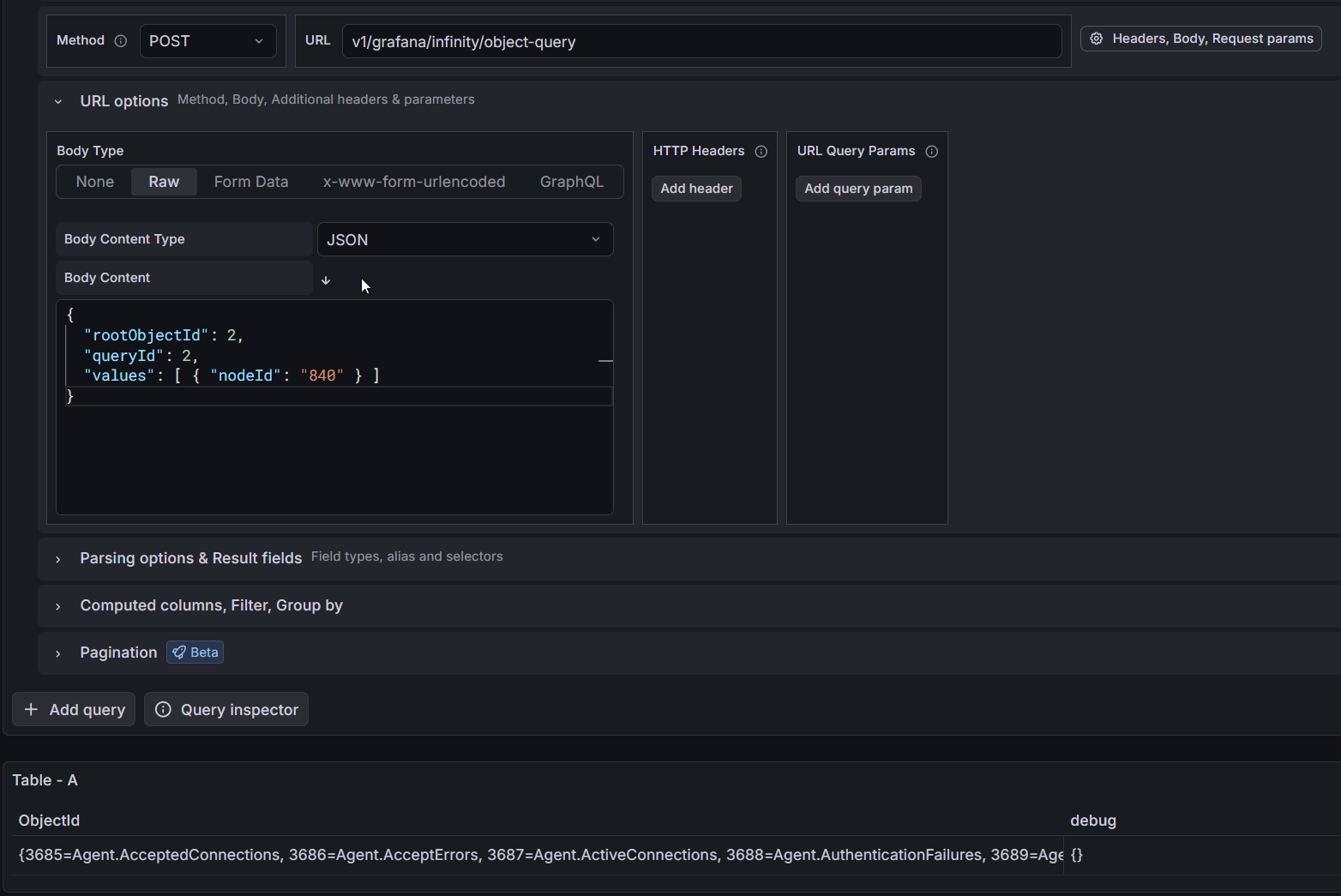
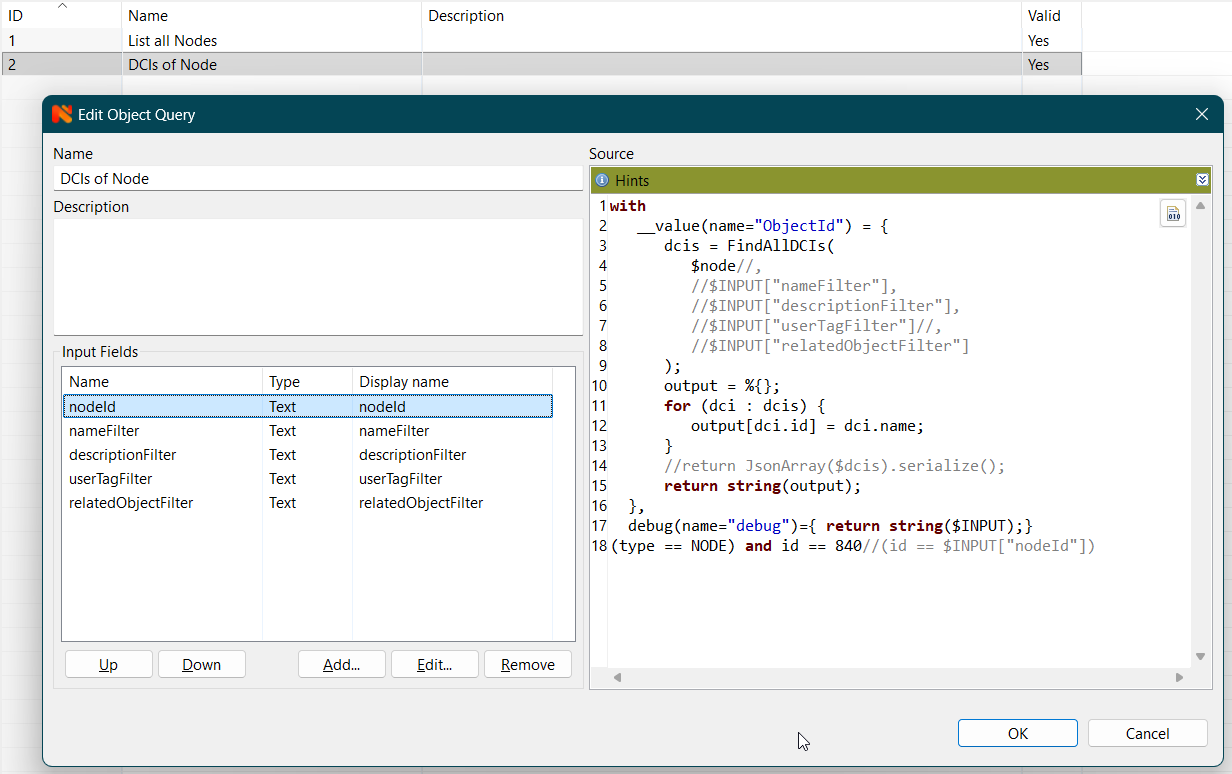
When querying the Endpoint '/v1/grafana/infinity/object-query' and providing query values, those user-provided query values are not used within object-query.
I've modified my Object-Query to output a debug-column with a serialization of the `$INPUT`-Hashmap, when querying via the NetXMS-Client, I see my Input, but when querying via the API, there is no Input to be seen (see Example in Attachments).Best regards and Merry Christmas,
Manuel

-
[Windows] NetXMS Core won't startHi,
I just installed a fresh Microsoft SQL Express 2017 Server, created the database "NetXMS" and a correspondign user "NetXMS". Then I installed the NetXMS Server Core (Version 2.2.1) and run the Server Configuration Wizard, which finished succesfully.
After that I tried to start the "NetXMS Core" Service, which failed.
In the Logs I can see a failed SQL-Query "SELECT snmp_oid,description,flags FROM snmp_trap_pmap WHERE trap_id=? ORDER BY parameter"...
...when I execute this Query against the Database through the SQL Server Management Studio (logged in as user "NetXMS"), I get the following error:Meldung 102, Ebene 15, Status 1, Zeile 1
Falsche Syntax in der Nähe von "?".Translation: Wrong Systax near "?"
I did the installation on a freshly installed Windows 10 PC (Drivers are up-to-date, Windows Updates are installed).
I've got no idea whats going wrong in my setup...
...any ideas?Best regards,
Manuel Schneider -
server crash while saving event processing policyHi,
I had same problem, but with NetXMS Server Version 2.0.8 (on Windows). The "NetXMS Core"-Service (the NetXMS Server) crashed everytime at one specific line in an event processing policy rule I created. The line looked:
s = FindSituation("ICMP_Timeout_Special", $I);So, now I know it's a syntax error, but the server still crashes...
Best regards,
ManuelPS.: I wonder if I missed out some WebPage where users can submit NetXMS Issues...
-
"Maintenance" mode permissionsHi Victor,
do you plan to implement an acces right for just entering/leaving maintenance mode? As, for example, for a device-operator?
Best regards,
Manuel