
You are absolutely correct, thank you for enlighten me.
M
mashedpotatorocket
@mashedpotatorocket
Posts
-
F2 to Execute log query -
Zoom in line graphs - Improvements desiredHello.
The Zoom function when viewing line graphs needs some improvements. When clicking Zoom in the toolbar, the horizontal scale changes and middle point stays the same, makes sense but not really useful. When right-clicking on an interesting section and selecting Zoom in from the context menu I'd assume the zoom would center where I clicked, it does not.
In the Legacy client, which I haven't used in a year or so, I remember I could draw a rectangle to zoom. That was quite useful, however most time I need to zoom it's to a point in time, and my rectangle would easily change the Y axis if I wasn't drawing it across the entire graph height.
I'd like an easy way to select a time span to zoom, preferrably by clicking and dragging from my desired start point to the end point in the graph view.
And, when zoomed in it would be lovely to be able to easily scroll backwards and forwards in time.
Another detail which bothers me is that the top pixels in the Y axis top value label gets cut. If I need to share an image of a CPU graph I always set the Y axis to manual range and specify 101 as the top value.
And yet another detail when I'm already at it..

When viewing a graph a week or a month back, it's not really useful to have minute-exact timestamps in the X axis. I'd rather have the grid lines at even hours or at midnight, which makes it easier to read and orientate. And the timestamps isn't matching the regional settings set in the client, which is yyyy-MM-dd HH:mm.Thanks for an otherwise wonderful product, and keep up the good work.
Best regards
-
F2 to Execute log queryIn the Legacy Console client I could press F2 to Execute a query in the Log tab. This shortcut seems to have gotten lost in the new client, at least on Windows.
And if I recall correctly, F9 was a shortcut for "Get more data".
I'd like those back, if possible

-
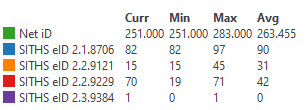
Display format all %d in dashboard gives weird values in LegendI have a dashboard with a Line chart element, with 5 Data Sources. The data values are all integer and I don't need any decimals in the Legend, so I put %d in Display format. I've left the topmost DCI Display format empty, and all others have %d, this is the correct values (Dashboard1.png):
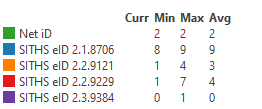
The problem occurs when I put %d in *all* Data sources (Dashboard2.png). As you can see, Curr is missing values and the other columns only show the first digit.
NetXMS Server 5.2.6
-
Zip Package is not extracted, deployment process not shownAh, there is a clue:
2025.11.10 11:33:54.355 *D* [installer ] Starting package installation using command line unzip 'C:\NetXMS\var\Utils.zip' -d 'C:\Windows' 2025.11.10 11:33:54.355 *D* [procexec.7 ] ProcessExecutor::executeWithOutput(): process "CMD.EXE /C unzip 'C:\NetXMS\var\Utils.zip' -d 'C:\Windows'" started (PID=5104) 2025.11.10 11:33:54.386 *D* [installer ] Installer output: 'unzip' is not recognized as an internal or external command, operable program or batch file. 2025.11.10 11:33:54.386 *D* [procexec.7 ] ProcessExecutor::readOutput(): stopped on GetOverlappedResult (The pipe has been ended.) 2025.11.10 11:33:54.386 *I* [installer ] Package installer successfully completed, command = unzip 'C:\NetXMS\var\Utils.zip' -d 'C:\Windows' 2025.11.10 11:33:54.386 *D* [comm.cs.2 ] Sending message CMD_REQUEST_COMPLETED (ID 6; size 32; uncompressed) -
Zip Package is not extracted, deployment process not shownI've uploaded Utils.zip to Packages, containing procexp.exe and some other utilities, and specified C:\Windows as the desired destination folder in the Command field. When deploying to Windows Server the log says:
Package installer successfully completed, command = unzip 'C:\NetXMS\var\Utils.zip' -d 'C:\Windows'I can see Utils.zip in var, but the extracted files are nowhere to be found. I also tried C:\Temp as destination, same result.
Another thing I noticed is that the Package deployment process isn't shown in a new tab on the node anymore. This worked in 5.1.3 at least.
NetXMS Server: 5.2.6
NetXMS Agent: Tested 5.2.6 and 5.2.7 -
Graph colors reset when doubleclicking in Performance viewIn the Legacy client when I doubleclick on a graph in the Performance view, it opens up a larger view of the graph with the exact same color settings.
When I do the same thing in the new client, the graph colors are set to default.
And zooming in graphs by drawing a box with the mouse is a function in the legacy client I miss in the new client. The zoom in button isn't really useful, I think.
Also, I wish the timespan in the newly opened larger graph was the same as what is shown in the Performance view.
Otherwise, thanks for a great piece of software.
-
Web Service XML with node attributes generates ERRORWe upgraded to 4.5.3 today and had a new look on my Web Services. XPath is working perfectly. Thank you!
-
Web Service XML with node attributes generates ERRORHello.
I'm trying to collect data from a web service. The xml data has this format:
<?xml version="1.0" encoding="UTF-8"?>
<Result>
<UserStatus Status="2" StatusFrom="230904080005" ClientType="13,16" Device="tel:0123456789" TerminalCapabilities="1" DeviceStatusFrom="231204092543" OfficeDeviceStatusFrom="230918121327" MobileDeviceStatusFrom="231204092543" ServerTime="231204155632" DisplayName="Full Name">[email protected]</UserStatus>
</Result>When using DCI parameter WebService1:/Result/UserStatus, I get [email protected] returned.
When trying to collect the value of an attribute, for example WebService1:/Result/UserStatus/Status, I get <<ERROR>> instead of the value 2.Is the XML parser in NetXMS compliant with the XML standard?
When testing on xmlvalidation.com it says No errors were found, and this PowerShell oneliner demonstrates it should work:([xml]'<Result><UserStatus Status="2"/></Result>').Result.UserStatus.Status
Thanks in advance.
-
Access Denied using Microsoft AD certificate authWe recently tried enabling user certificate login with a simple openssl-generated self-signed CA, it worked like a charm. But when changing the TrustedCertificate to our Microsoft Windows Server Issuing CA and using Group Policy-enrolled user certificates we only get Access Denied.
I notice two odd things in netxmsd.log with debuglevel 3:
- The full Subject is not displayed
- There's no log entry saying "validation failed"
In more detail, the Subject of my openssl cert is:
C=SE,ST=X,L=City,O=Company,OU=OrgUnit,CN=My NameWhen trying to logon with the TrustedCertificate set to Microsoft CA, this is what is logged:
2023.03.29 18:06:41.788 *D* [crypto.cert        ] Validating certificate "C=SE,ST=X,L=City,O=Company,OU=OrgUnit,CN=My Name" for user user1
2023.03.29 18:06:41.788 *D* [crypto.cert        ] Certificate "C=SE,ST=X,L=City,O=Company,OU=OrgUnit,CN=My Name" for user user1 - validation failed
which seems alright.
The subject of my Microsoft cert is:
DC=se,DC=companyname,DC=companydomain,OU=OrgUnit1,OU=OrgUnit2,CN=My Name,[email protected]This is the only thing that gets logged:
2023.03.29 18:04:10.242 *D* [crypto.cert ] Validating certificate "OU=OrgUnit1,CN=My Name" for user user1No log entry saying "validation failed", and the subject string is both cropped and showing the OU part in the wrong place.
This makes me think that there's something failing when parsing the subject string from the Microsoft certificate. There's no funny characters in the subject.
I have tried lot's of variants on certificate mapping methods, no difference.
Is there any way to get this working?Best regards.
-
SQL Login failed: Attempting to use an NT account with SQL Server AuthenticationI'm trying to connect to an MS SQL Server for some application monitoring. This is my agent conf:
SubAgent = dbquery.nsm

*DBQUERY
Database = id=db1;driver=mssql.ddr;server=SQLSERVER;dbname=master;login=DOMAIN\Svc_User;password=secretpassword
Query = ProcessMemory:db1:600:SELECT physical_memory_in_use_kb*1024 AS sql_physical_memory_in_use_MB FROM sys.dm_os_process_memory
This is the error I get in agent log:
DBQUERY: cannot connect to database db1 ([Microsoft][SQL Server Native Client 11.0][SQL Server]Login failed for user 'DOMAIN\Svc_User'.)And this is the error I see in the SQL Server log:
Login failed for user 'DOMAIN\Svc_User'. Reason: Attempting to use an NT account name with SQL Server Authentication. [CLIENT: <local machine>]The SQL Server is set to "SQL Server and Windows Authentication mode", but I get the feeling nxagent tries to connect using an SQL account rather than an AD account.
Is it possible to connect with a domain user or do I have to use a local sql account?
(Using nxagent 4.2.461)
-
Generic HTTP Notification ChannelThat turned out to work quite well actually. I added som debug outputs to see the responses.
Command=curl.exe -vs -o C:\Temp\pixieresponse_${recipient}.txt -G "https://pixie.se/sendsms?account=123&pwd=456&receivers=${recipient}&sender=Company" --data-urlencode "message=${text}" 2>C:\Temp\pixiedebug_${recipient}.txtThanks for your help.
-
Generic HTTP Notification ChannelHello.
My SMS provider is not listed among the available Notification Channels in NetXMS. They have a very simple http API, the documentation gives this HTTP GET example:
https://smsprovider/sms.php?
username=myusername&password=mypassword&destination=00447920110000&type=text&charset=UTF8&text=Testing123&originatortype=alpha&originator=mycompanyWould it be possible to include a generic HTTP Notification Channel in NetXMS where I can specify an URL with some custom variables/macros in the DriverConfiguration?
Best regards,
-
Store previous value with Save only changed values enabledHello.
I'd like to share an observation on the new DCI setting Save only changed values.
Let's say we track the size of a database file, polling once a day. It is 10 GB, and it doesn't change from day to day, so only the first value is stored. The DCI timestamp is updated each day (this is important).
One month later the file size suddenly increases from 10 to 30 GB. The new DCI value is stored. Let's take a look att the historical values:
Day 1: 10 GB
Day 30: 30 GBNow, imagine we plot a graph. It would be a straight line increasing each day, even though we know that the file size is 10 GB up until day 30. What I would like to see is the same graph we would have if we polled each day with "Save only changed values" disabled, a graph that shows that the file size was 10 GB on day 29 and 30 GB on day 30.
I suppose it could be done this way:
On day 30, when we detect that the file size is different from the previous poll, store *both* the old value (10 GB) with the last timestamp (Day 29), and the new value (30 GB) with the current timestamp (Day 30). The historic values would look like this:Day 1: 10 GB
Day 29: 10 GB
Day 30: 30 GBWhen plotting a graph, if would correctly show that the file size is constant up until day 30.
-
NetXMS 4.2: DCI Table missing history valuesOk, thanks.
Would it be possible to say if it's just in the UI, or if my historical values are wiped, either from day 0 or from the day I upgraded to 4.2?
-
NetXMS 4.2: DCI Table missing history valuesHi there.
It seems that after upgrading from 4.1 to 4.2 we no longer have historical values on DCI Table values.
When right clicking on a value and selecting History all historical values are either blank (for strings) or 0 (for integers).
The key column is still in bold.Is this a known issue or has something else happened in our installation?
Best regards
-
Windows event parser stopped working@filipp-sudanov said in Windows event parser stopped working:
Meanwhile you can put * character in source, it should work that way.
Yes, it did work. Thank you.
-
WebUI 4.2: HTTP ERROR 404. Problem accessing /.And it works like a charm. Thank you for solving this so quickly!
-
Parse log file without trailing newlineAh, ok. Thank you very much!
-
Windows event parser stopped workingWindows event parser suddenly stopped parsing my rules. I even tried to wipe all rules and just create the most simple rule (below), but no NetXMS Events are created. I still see the log entries in Windows Event Log (in NetXMS).
What might have happened, or how can I debug this to find a resolution?
Using NetXMS 4.2.395.
Best regards
<parser name="ParserNEW">
  <macros/>
  <rules>
      <rule name="">
        <match repeatInterval="0" reset="false">.*</match>
        <event>TEST_EVENT</event>
        <agentAction action=""></agentAction>
      </rule>
  </rules>
</parser>