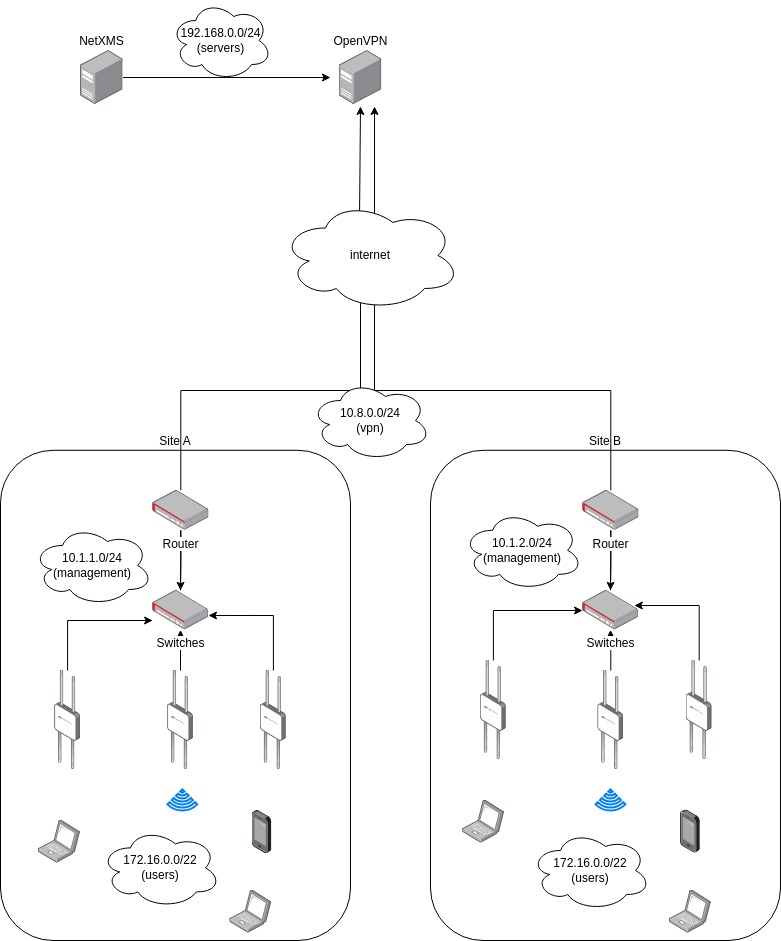
Hi,
It doesn't work. I tried with two different accounts to be sure the password was not involved. I had sensu on the same machine and I can send email with the same smtp account and credentials. Here's the command output:
* Connected to pro1.mail.ovh.net (79.137.0.66) port 587 (#0)
< 220 pro1.mail.ovh.net Microsoft ESMTP MAIL Service ready at Wed, 11 Oct 2023 10:26:50 +0200
> EHLO mail.txt
< 250-pro1.mail.ovh.net Hello [176.191.46.127]
< 250-SIZE 104857600
< 250-PIPELINING
< 250-DSN
< 250-ENHANCEDSTATUSCODES
< 250-STARTTLS
< 250-AUTH GSSAPI NTLM
< 250-8BITMIME
< 250-BINARYMIME
< 250 CHUNKING
> STARTTLS
< 220 2.0.0 SMTP server ready
*  CAfile: /etc/ssl/certs/ca-certificates.crt
*  CApath: /etc/ssl/certs
* TLSv1.0 (OUT), TLS header, Certificate Status (22):
} [5 bytes data]
* TLSv1.3 (OUT), TLS handshake, Client hello (1):
} [512 bytes data]
* TLSv1.2 (IN), TLS header, Certificate Status (22):
{ [5 bytes data]
* TLSv1.3 (IN), TLS handshake, Server hello (2):
{ [85 bytes data]
* TLSv1.2 (IN), TLS handshake, Certificate (11):
{ [3433 bytes data]
* TLSv1.2 (IN), TLS handshake, Server key exchange (12):
{ [657 bytes data]
* TLSv1.2 (IN), TLS handshake, Server finished (14):
{ [4 bytes data]
* TLSv1.2 (OUT), TLS header, Certificate Status (22):
} [5 bytes data]
* TLSv1.2 (OUT), TLS handshake, Client key exchange (16):
} [138 bytes data]
* TLSv1.2 (OUT), TLS header, Finished (20):
} [5 bytes data]
* TLSv1.2 (OUT), TLS change cipher, Change cipher spec (1):
} [1 bytes data]
* TLSv1.2 (OUT), TLS header, Certificate Status (22):
} [5 bytes data]
* TLSv1.2 (OUT), TLS handshake, Finished (20):
} [16 bytes data]
* TLSv1.2 (IN), TLS header, Finished (20):
{ [5 bytes data]
* TLSv1.2 (IN), TLS header, Certificate Status (22):
{ [5 bytes data]
* TLSv1.2 (IN), TLS handshake, Finished (20):
{ [16 bytes data]
* SSL connection using TLSv1.2 / ECDHE-RSA-AES256-SHA384
* Server certificate:
*  subject: CN=pro1.mail.ovh.net
*  start date: Jun  7 00:00:00 2023 GMT
*  expire date: Jun  6 23:59:59 2024 GMT
*  subjectAltName: host "pro1.mail.ovh.net" matched cert's "pro1.mail.ovh.net"
*  issuer: C=GB; ST=Greater Manchester; L=Salford; O=Sectigo Limited; CN=Sectigo RSA Domain Validation Secure Server CA
*  SSL certificate verify ok.
* TLSv1.2 (OUT), TLS header, Supplemental data (23):
} [5 bytes data]
> EHLO mail.txt
* TLSv1.2 (IN), TLS header, Supplemental data (23):
{ [5 bytes data]
< 250-pro1.mail.ovh.net Hello [176.191.46.127]
< 250-SIZE 104857600
< 250-PIPELINING
< 250-DSN
< 250-ENHANCEDSTATUSCODES
< 250-AUTH GSSAPI NTLM LOGIN
< 250-8BITMIME
< 250-BINARYMIME
< 250 CHUNKING
* TLSv1.2 (OUT), TLS header, Supplemental data (23):
} [5 bytes data]
> AUTH GSSAPI
* TLSv1.2 (IN), TLS header, Supplemental data (23):
{ [5 bytes data]
< 334 GSSAPI supported
* gss_init_sec_context() failed: No credentials were supplied, or the credentials were unavailable or inaccessible. No Kerberos credentials available (default cache: FILE:/tmp/krb5cc_1000).
  0     0    0     0    0     0      0      0 --:--:-- --:--:-- --:--:--     0
* Closing connection 0
* TLSv1.2 (OUT), TLS header, Unknown (21):
} [5 bytes data]
* TLSv1.2 (OUT), TLS alert, close notify (256):
} [2 bytes data]
curl: (94) An authentication function returned an error
I don't understand because I pass the --user '[email protected]:mypassword'. I even tried to remove the password from the command line, so curl prompt for it, but I have the same error message then...