Skip to content
  • Categories
  • Recent
  • Tags
  • Popular
  • Users
  • Groups
Skins
  • Light
  • Brite
  • Cerulean
  • Cosmo
  • Flatly
  • Journal
  • Litera
  • Lumen
  • Lux
  • Materia
  • Minty
  • Morph
  • Pulse
  • Sandstone
  • Simplex
  • Sketchy
  • Spacelab
  • United
  • Yeti
  • Zephyr
  • Dark
  • Cyborg
  • Darkly
  • Quartz
  • Slate
  • Solar
  • Superhero
  • Vapor

  • Default (Flatly)
  • No Skin
Collapse
Brand Logo

NetXMS Forum

N

Focus

@negron
Unfollow Follow
About
Posts
6
Topics
3
Shares
0
Groups
0
Followers
0
Following
0

Posts

Recent Best Controversial

  • Do nxapush values get prepared?
    N Focus
    Support

    Hello

    I have the following scenario:

    An nxagent sends a value to the server via nxapush.exe.
    A threshold is defined at the DCI, this threshold executes an NXSL script.

    Now my question is whether an injection can take place here or whether the script runs a kind of "prepared statement"?
    Or is there a function I need to include to protect the server from this?

    I could not perform an injection myself, I may have made a mistake. Hence my question as to whether such a scenario was taken into account in the programming.


  • Reporting Module | Subreport not found
    N Focus
    Support

    Hi, I am currently trying to implement reporting on my NetXMS.

    I have finally managed to create a suitable report template using JasperSoft Studio which works fine when generated in the software. But after creating a .jar package using Maven and deploying it in the "Definitions" folder, I get an error message that the subreport cannot be found.

    The main.jrxml and subreport.jrxml are in the same folder.

    The Subreport is referenced by:

    <subreportExpression><![CDATA["Subreport.jasper"]]></subreportExpression>
    

    What am I missing?


  • Reporting Module not working 4.1.420
    N Focus
    Support

    In the netxmsd.conf the parameter DBServer=127.0.0.1 was entered.

    I have now entered the IP of the main server.
    Afterwards I created a new user for the reporting server with read-only permission on the SQL-DB and now the reporting module is running.

    So now there are the following DB users:
    <user>@<main-netxms>
    <user>@<netxms-reporting>

    Thanks for your help


  • Reporting Module not working 4.1.420
    N Focus
    Support

    Thanks, the connection seems to work with that.

    Now I have another problem unfortunately

    I used the instructions from How To: NetXMS Reports in 2021 and used the sample file as a test. The report is correctly displayed to me on the main NetXMS, but the report cannot be generated. When clicking on "execute now" a pop-up appears with the message "Sample Report - Users execution started successfully" and then the status in the results shows Error.

    journalctl -axeu netxms-reporting.service throws the error
    "java.sql.SQLException: Access denied for user '<user>'@'localhost' (using password: YES)".

    As I understand it, the reporting server gets the SQL credentials from the main netxms. How should this work, since the main netxms accesses SQL via <user>@localhost, but the reporting server has to access via <user>@<reporting-server-ip>?


  • Reporting Module not working 4.1.420
    N Focus
    Support

    Thank you for your quick reply.

    At first the "daemon-reload" did nothing,
    because for unknown reasons there was no "netxms-reporting.service" but a "nxreport.service".

    I just renamed the services under "/etc/systemd/system/" as well as "/lib/systemd/system/". Then the service could start successfully.

    Attached is a snapshot of "journalctl -u netxms-reporting.service", does this work correctly?

    where can I define the IP and port on which the reporting service listens? Currently it is bound to 127.0.0.1:4710


    Journal_snippet.png


  • Reporting Module not working 4.1.420
    N Focus
    Support

    I've installed NetXMS-Server 4.1.420, WebGUI: nxmc-legacy-4.1.420 , WebServer: Jetty 9.4.45 all on the same Ubuntu 22.04 machine

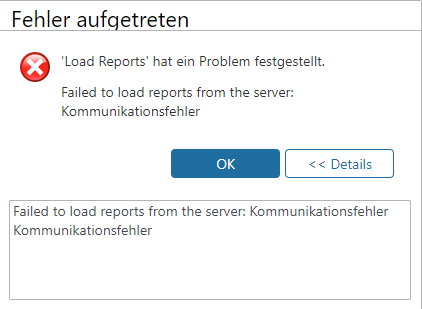
    After I installed the netxms-reporting (4.1.420) Module I get the attached error in the WebGUI when I open the Reports-Tab.

    I'm using the default Port and Hostname 127.0.0.1:4710

    Also I didn't see any option to change the listening Port for the netxms-reporting Modul.
    Is this Modul only locally on the same machine usable?


    CLI_error.png

    WebGUI_error.png

  • Login

  • Don't have an account? Register

  • Login or register to search.
Powered by NodeBB Contributors
  • First post
    Last post
0
  • Categories
  • Recent
  • Tags
  • Popular
  • Users
  • Groups