
$subnet = InetAddress("x.y.z.0")
$mask = 24
if ($node.ipAddress.isInSubnet($subnet, $mask)) {
return 1; // match
} else {
return 0; // no match
}
I got this, but it’s not working. Can you please modify it?
$subnet = InetAddress("x.y.z.0")
$mask = 24
if ($node.ipAddress.isInSubnet($subnet, $mask)) {
return 1; // match
} else {
return 0; // no match
}
I got this, but it’s not working. Can you please modify it?
SSH -> cmd /c "ssh %(username)@%u || pause" -Windows
Hi
I’m currently using the following condition to collect all MikroTik devices:
return $node->vendor == "MikroTik";
Is there any way to perform this per IP address instead?
I think I’ve figured it out. Disregard this
Hi Team,
I’m monitoring several CPE devices and have added the ICMP.PacketLoss job to track their status.
I noticed an interesting situation: some of the CPEs have public IP addresses, while others use local IPs (VPN-Mngm).
For the CPEs with public IP addresses, the ICMP.PacketLoss check does not appear to work. However, for the ones with local IP addresses, the monitoring works as expected.
Does anyone have any idea why this behavior might be occurring?
Thanks
Nikola S.
Victor - this has been resolved.
1.Just to clarify - you mean you have created VPN or VLAN interface on Mikrotik device, and it is not visible in "Interfaces" view?
YES
The goal is to include all interfaces — such as VPN, VLAN, and PPPoE — in the data collections. I am currently using Template.InterfaceTraffic on the customer attribute, which allows me to see all physical interfaces in the data collections. However, I need a solution to also include virtual interfaces. Additionally, I would like an easy way to add monitoring for CPU, temperature, voltage, and other hardware metrics.
I'm aware of that.
i have one more query.
I have a MikroTik device running OSPF, however it does not appear in the overview and is showing OSPF = No.
Additionally, I have a router running CAPsMAN, but it is showing Wireless Controller=No
When im adding node ive added user-name PS and SSH port.
what i want is access to the same note via SSH
too -> Connect -> SSH.
Once i put the user name im gettign the above
Hi,
Have you noticed that SSH is not working on v6.0.2?
I’ve configured the same SSH port on both sites (including the default port), but I’m still getting the following error:
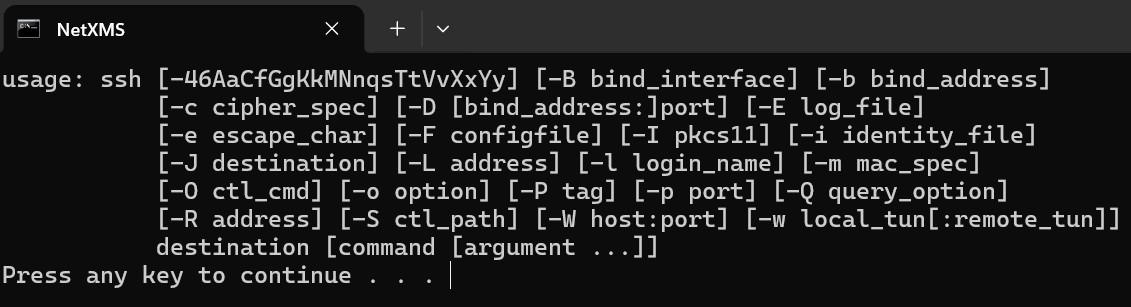
I’m running into some issues. For some reason, I’m not able to see the devices when running network discovery. I have set everything up properly, including the network credentials. Can anyone please help me see the devices after scanning?
Just a quick update on this. I’m currently using MikroTik devices, and I can see the physical interfaces in NetXMS without any issues.
Physical interfaces are working correctly; however, virtual interfaces such as VLANs, PPPoE interfaces, VPN interfaces, etc., are not appearing.
Could you please advise what might be causing this or what I should check to ensure these interfaces are discovered properly?
Filip
about Create Data Collection Items:
this is what im doing:
Navigate to Infrastructure Services in the object tree.
Right-click on Infrastructure Services and select Properties.
Go to the Custom Attributes tab.
ADD:
Name: Template.InterfaceTraffic
Value: YES
tick the “Inheritable” box.
Pull->configuration
is not working
can you pleas advice
Hi Filipp - let me know about the first one when u get a chance. thx
when we login from android, i tried
ip-address:8000
ip-address:4701
ip-address.
No of them are working im getting error 500 and 525
For the first one, I’m not completely sure if it’s correct, but this is what worked for me:
I created a new template called CPU, then under Data Collection I added the OID. Finally, I applied the template to all devices.
With the second one, I didn’t have any luck. I’ll need to look into it further.
Hi Filipp
Could you please elaborate further?
Understood. I need to create a new parameter in Templates → Interface Traffic and apply it to the routers where I want to create Data Collection Items.
Hi,
I’m new to NetXMS and I’m planning to use it for monitoring purposes. I’ve come across a few issues that I’m not sure how to resolve on my own, so I’d appreciate your guidance.
Here are my questions:
SNMP is properly configured on all devices, and I’m receiving most of the data from them. However, I’m not getting CPU temperature or device health information. Do I need to manually obtain the OIDs for each device and add them individually?
For more detailed information on specific interfaces, I can retrieve it by clicking “Create Data Collection Items.” However, I would like this to be enabled automatically for all interfaces, since it wouldn’t be practical to configure each interface manually across 50 devices.
Thank you in advance for your help.
emailed already
btw do u have tutorial of how to instal netxms on windows?
I can see that there's tutorial of how to install on Ubuntu, how about win?
do we have that option , greate. Whenever you're ready - Thanks