
Thank You very much. I really appreciate the comprehensive explanation.
S
stoffmann
@stoffmann
Posts
-
Issue with monitoring Azure AVD with FSLogix profiles -
Issue with monitoring Azure AVD with FSLogix profilesHi,
maybe someone can give me some advice for this problem.
I have several Azure AVDs I' monitoring with NetXMS, which in general is working fine.
We use FSLogiix to manage the user profiles, which is Microsoft's recommended way.
FSLogix stores the profile in VHDX file (Hard drive image) which is then mounted when the user logs on
and dismounted on logoff. And here is my problem.NetXMS recognizes when a drive gets mounted or dismounted, which in general is a good thing.
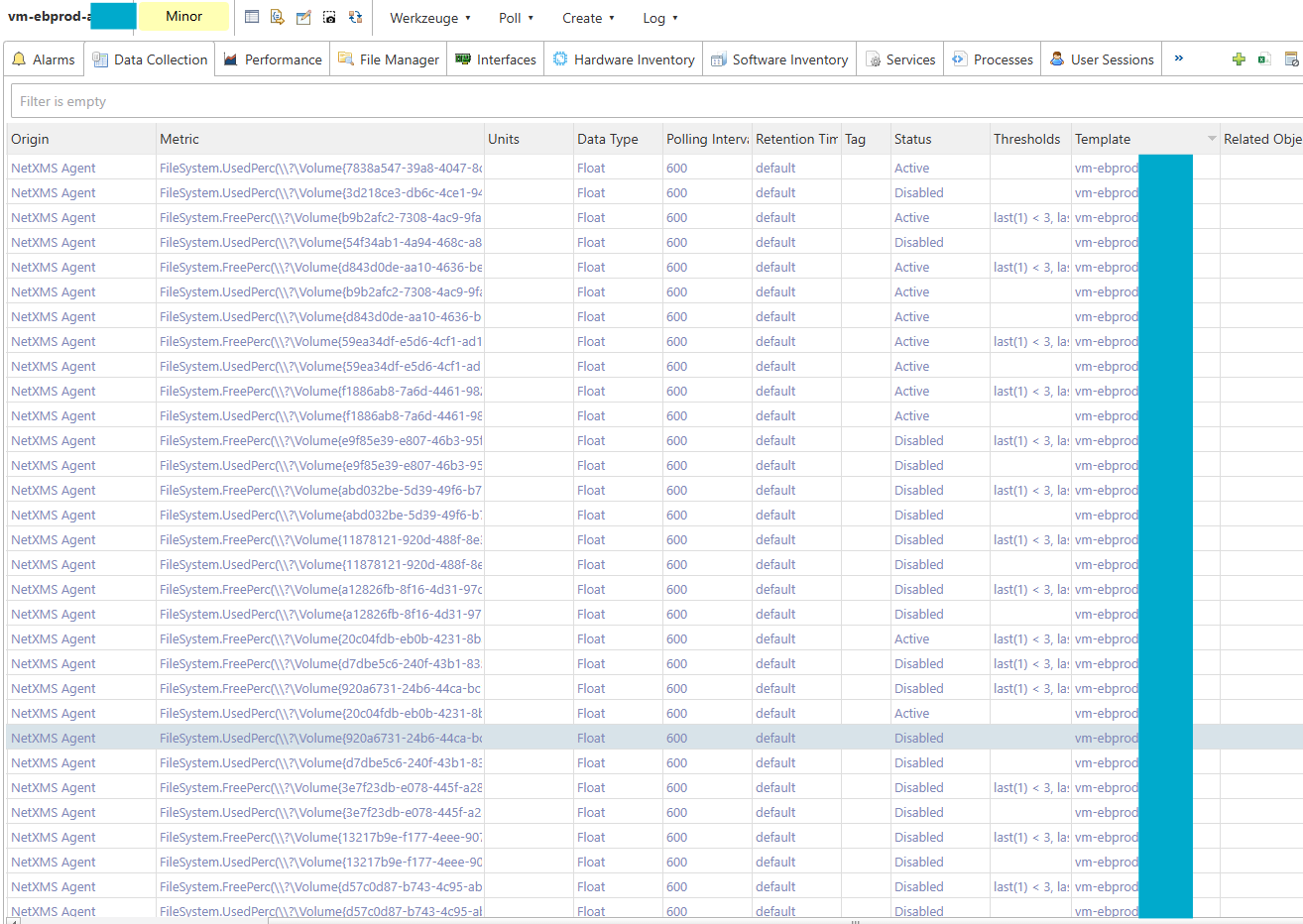
I my case it results in a crazy high number of DCIs (see screenshot), some active some disabled.Is there a way to avoid this? I only want to monitor the fixed drives of the server.
Also, why is it showing a Template with the same name as the host for this DCIs?
Thanks for Your help
-
Error with Windows Eventlog MonitoringThat worked. Thank You!
-
Error with Windows Eventlog MonitoringI try to monitor some events in the Microsoft-Windows-TaskScheduler%4Operational.evtx log
to get notified when scheduled tasks failed.My parser config is:
I try to monitor some events in the Microsoft-Windows-TaskScheduler%4Operational.evtx log
to get notified when scheduled tasks failed.My parser config is:
[color=#cccccc][size=2][font=Consolas, Courier New, monospace][color=#808080]<[/color][color=#569cd6]parser[/color][color=#808080]>[/color]
[color=#cccccc]    [/color][color=#808080]<[/color][color=#569cd6]file[/color][color=#808080]>[/color][color=#cccccc]*Application[/color][color=#808080]</[/color][color=#569cd6]file[/color][color=#808080]>[/color]
[color=#cccccc]    [/color][color=#808080]<[/color][color=#569cd6]file[/color][color=#808080]>[/color][color=#cccccc]*System[/color][color=#808080]</[/color][color=#569cd6]file[/color][color=#808080]>[/color]
[color=#cccccc]    [/color][color=#808080]<[/color][color=#569cd6]file[/color][color=#808080]>[/color]
[color=#cccccc]        *Microsoft-Windows-TaskScheduler%4Operational[/color][color=#808080]</[/color][color=#569cd6]file[/color][color=#808080]>[/color]
[color=#cccccc]    [/color][color=#808080]<[/color][color=#569cd6]rules[/color][color=#808080]>[/color]
[color=#cccccc]        [/color][color=#808080]<[/color][color=#569cd6]rule[/color][color=#808080]>[/color]
[color=#cccccc]            [/color][color=#808080]<[/color][color=#569cd6]id[/color][color=#808080]>[/color][color=#cccccc]101-104[/color][color=#808080]</[/color][color=#569cd6]id[/color][color=#808080]>[/color]
[color=#cccccc]            [/color][color=#808080]<[/color][color=#569cd6]match[/color][color=#808080]>[/color][color=#cccccc].*[/color][color=#808080]</[/color][color=#569cd6]match[/color][color=#808080]>[/color]
[color=#cccccc]            [/color][color=#808080]<[/color][color=#569cd6]event[/color] [color=#9cdcfe]params[/color][color=#cccccc]=[/color][color=#ce9178]"1"[/color][color=#808080]>[/color][color=#cccccc]100086[/color][color=#808080]</[/color][color=#569cd6]event[/color][color=#808080]>[/color]
[color=#cccccc]        [/color][color=#808080]</[/color][color=#569cd6]rule[/color][color=#808080]>[/color]
[color=#cccccc]        [/color][color=#808080]<[/color][color=#569cd6]rule[/color][color=#808080]>[/color]
[color=#cccccc]            [/color][color=#808080]<[/color][color=#569cd6]id[/color][color=#808080]>[/color][color=#cccccc]202[/color][color=#808080]</[/color][color=#569cd6]id[/color][color=#808080]>[/color]
[color=#cccccc]            [/color][color=#808080]<[/color][color=#569cd6]match[/color][color=#808080]>[/color][color=#cccccc] .*[/color][color=#808080]</[/color][color=#569cd6]match[/color][color=#808080]>[/color]
[color=#cccccc]            [/color][color=#808080]<[/color][color=#569cd6]event[/color] [color=#9cdcfe]params[/color][color=#cccccc]=[/color][color=#ce9178]"1"[/color][color=#808080]>[/color][color=#cccccc]100086[/color][color=#808080]</[/color][color=#569cd6]event[/color][color=#808080]>[/color]
[color=#cccccc]        [/color][color=#808080]</[/color][color=#569cd6]rule[/color][color=#808080]>[/color]
[color=#cccccc]    [/color][color=#808080]</[/color][color=#569cd6]rules[/color][color=#808080]>[/color]
[color=#808080]</[/color][color=#569cd6]parser[/color][color=#808080]>[/color][/font][/size][/color]
In the Agent debug log (Level 7) I find the following entry which looks like it's the reason taht I don't get an event in NetXMS. Especially the last line where it says "The specified channel could not be found."
[color=#808080][size=2][font=Consolas, Courier New, monospace]2025.08.29 10:36:44.860 *D* [logwatch          ] Registered parser for file "*Application" (GUID = 00000000-0000-0000-0000-000000000000)[/font][/size][/color]
[color=#808080][size=2][font=Consolas, Courier New, monospace]2025.08.29 10:36:44.860 *D* [logwatch          ] Process RSS after parser creation is 20897792 bytes[/font][/size][/color]
[color=#808080][size=2][font=Consolas, Courier New, monospace]2025.08.29 10:36:44.860 *D* [logwatch          ] Registered parser for file "*System" (GUID = 00000000-0000-0000-0000-000000000000)[/font][/size][/color]
[color=#808080][size=2][font=Consolas, Courier New, monospace]2025.08.29 10:36:44.860 *D* [logwatch          ] Process RSS after parser creation is 20897792 bytes[/font][/size][/color]
[color=#808080][size=2][font=Consolas, Courier New, monospace]2025.08.29 10:36:44.860 *D* [logwatch          ] Registered parser for file "*Microsoft-Windows-TaskScheduler%4Operational" (GUID = 00000000-0000-0000-0000-000000000000)[/font][/size][/color]
[color=#808080][size=2][font=Consolas, Courier New, monospace]2025.08.29 10:36:44.860 *D* [logwatch          ] Process RSS after parser creation is 20897792 bytes[/font][/size][/color]
[color=#808080][size=2][font=Consolas, Courier New, monospace]2025.08.29 10:36:44.860 *D* [logwatch          ] AddLogwatchPolicyFiles(): Log parser policy directory: C:\WINDOWS\system32\config\systemprofile\AppData\Local\nxagentd\logparser_ap\[/font][/size][/color]
[color=#808080][size=2][font=Consolas, Courier New, monospace]2025.08.29 10:36:44.860 *D* [logwatch          ] Start watching event log "Application"[/font][/size][/color]
[color=#808080][size=2][font=Consolas, Courier New, monospace]2025.08.29 10:36:45.080 *D* [logwatch          ] Start watching event log "System"[/font][/size][/color]
[color=#808080][size=2][font=Consolas, Courier New, monospace]2025.08.29 10:36:45.287 *D* [logwatch          ] Unable to open event log "Microsoft-Windows-TaskScheduler%4Operational" with EvtSubscribe(): The specified channel could not be found.[/font][/size][/color]
Any idea what the reason could be?
-
Monitor a process from specific user with Process.CountEx failsRunning it as system now shows the usernames in the Process View. But why doesn't it work with an administrative account?
-
Monitor a process from specific user with Process.CountEx failsWe have the agent running with a domain account, that is member of the Administrators group.
-
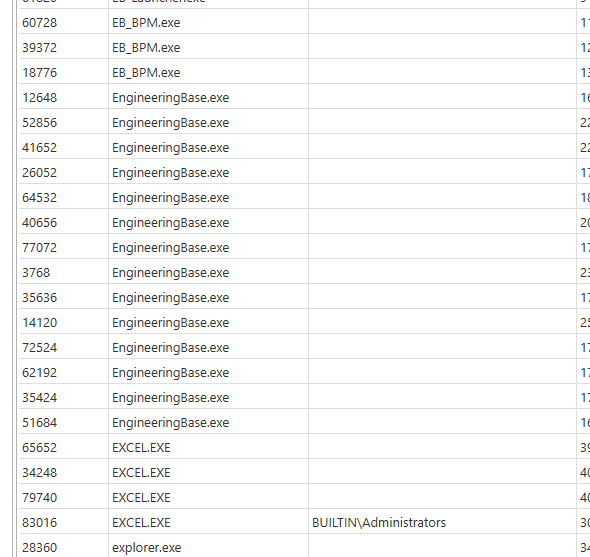
Monitor a process from specific user with Process.CountEx failsIn process view the column user is almost empty.
Only BUILTIN\Administrators shows up for some processes.
-
Monitor a process from specific user with Process.CountEx failsDo You need more information to solve this? Please let me know.
Regards
Stefan
-
Monitor a process from specific user with Process.CountEx failsI tried. It's also not working. Always returning 0.
In logfile with Loglevel 7 I find:
2025.06.23 09:08:32.521 *D* [comm.cs.1 ] Requesting metric "Process.CountEx("EB_BPM.exe",,"z004abcd")"
2025.06.23 09:08:32.555 *D* [comm.cs.1 ] GetMetricValue("Process.CountEx("EB_BPM.exe",,"z004abcd")"): 0 (SUCCESS) value = "0"But the process is running.
-
Monitor a process from specific user with Process.CountEx failsHi,
I have to monitor if a process is running under a specific user in Windows.I use Process.CountEx for doing that.
In Taskmanager the username is shown like AD001\z004abcd
Processname is EB_BPM.exeI tried: Process.CountEx("EB_BPM.exe",,"AD001\z004abcd")
and ( in case the Backslash is the problem): Process.CountEx("EB_BPM.exe",,"(?i)z004abcd")Both fail.
Using just Process.CountEx("EB_BPM.exe") works, but I need to have the username.Using NetXMS 5.2.1
Any idea?Stefan
-
Favicon for WebinterfacePerfect! Thank You.
-
Favicon for WebinterfaceHi,
we are using the Web interface (windows installer) Version 5.2.1 to connect to our NetXMS.
To avoid accidentely closing the browser, we use the edge (chrome) functionality to install the NetXMS site
as app which is working nice.
You have the NetXMS interface directly available in the taskbar or as a desktop shortcut.
The only downside is that the Web interface has no Favicon defined, which would be used as icon for the app.
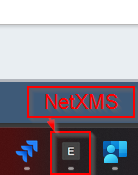
At the moment, in the taskbar we just have a generic letter representing NetXMS.
Is it possible to configure a favicon for the webinterface somehow?Regards
Stefan
-
How to use "External Resources" or "Custom Attributes"Hi,
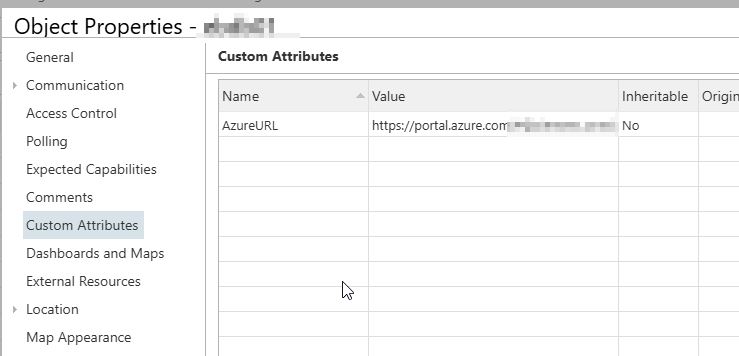
I have the HTTPS:// in the custom attribute.
See attached screenshots.
-
How to use "External Resources" or "Custom Attributes"I use the new desktop client and the WebUI.
AS is Windows 11 when using WebUI or Windows Server 2022 when using Desktop Client.
Both NetXMS Clients are version 5.2.1. -
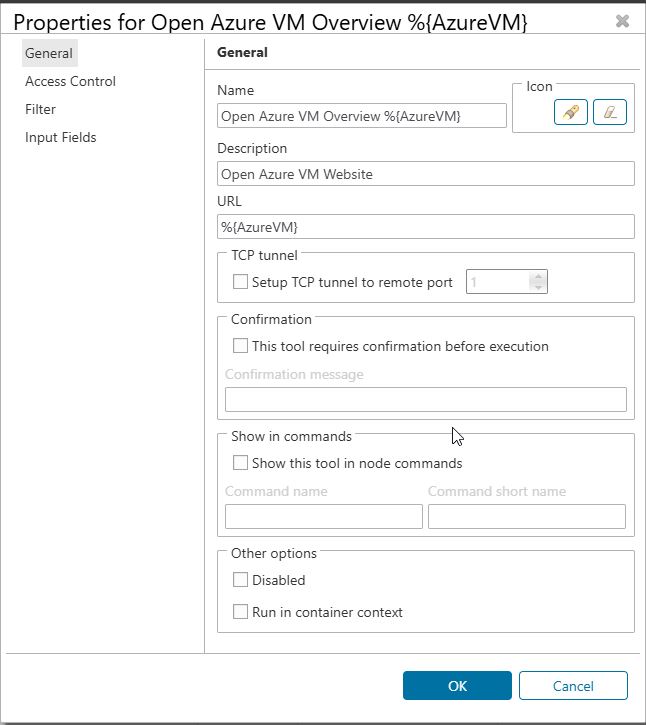
How to use "External Resources" or "Custom Attributes"I think I must doing something wrong using the custom attributes for tools.
What I did:-
Create a custom attribute
Name: AzureVM
Value: https://portal.azure.com/#home -
Create a new menu entry in Object Tools
Type: URL
Name: Open Azure
URL: %{AzureVM}
Selecting this in the tools menu on the node I set the custom attribute results in opening File Explorer.
Any thoughts?
Best regards
Stefan
-
-
How to use "External Resources" or "Custom Attributes"Perfect! That sounds exactly like what I need.
-
How to use "External Resources" or "Custom Attributes"Hi,
what is the "External resources" or "Custom Attributes", in the Node properties meant for?
My idea was that I e.g. enter the managament URL from our Azure VMs there and then have a way to
open that URL by adding it to the Tools menu to open that URL. Is that possible?It should open a webbrowser pointing to the URL configured in eather "External Resources" or "Custom Attributs". Whatever is easier.
Best regards
Stefan
-
Agent Configuration depending on node name?Works! Thank You!
-
Agent Configuration depending on node name?Hi,
I have different agent configurations for different server types. Depnding on their type also the naming of the servers is different, like db01 for DB server and vd01 for virtual desktops. Only the number changeIs it possibe to e.g. check if the node name starts with "db" in the agent configuration filter?
Maybe like:return $node.Name like 'db*';
Or is it limited to the $1 - $5 parameters?
Best regards
Stefan
-
Recommended MariaDB Version?Perfect. Thank You.